DOOR SENSOR COMPATIBILITY
Compatible with:
MyQ Smart Garage Hub models MyQ-G0301 and 821LMB.
NOT compatible with:
MyQ Garage models MyQ-G0201 and 821LM.
Visit www.LiftMaster.com/door-sensor or
www.chamberlain.com/door-sensor for more information.
INSTALL THE DOOR SENSOR
Install with Fastening Strips
1. Remove the pull tab from the door sensor to activate the
battery.
2. Position the door sensor vertically and attach to a clean,
dry location on the top panel of the garage door with
fastening strips (provided).
OR
Install with Screws
1. Remove the pull tab from the door sensor to activate the
battery.
2. Press in the bottom of the door sensor and remove the
front cover.
3. Position the door sensor vertically and attach to the top
panel of the garage door with screws (provided).
4. Replace the front cover.
PROGRAM THE DOOR SENSOR
1. Use the MyQ
®
App to add a new door sensor.
OR
1. Press and release BUTTON 1 for door 1 or BUTTON 2 for
door 2 on the Wi-Fi Hub. The yellow LED will turn solid.
2. Press the Test BUTTON on door sensor until the red LED
on the door sensor turns on. The yellow LED on the Wi-Fi
Hub will turn off when successfully programmed.
3. Press the Test BUTTON again on the door sensor and the
Wi-Fi Hub will beep once for door 1 and twice for door 2.
TEST DOOR SENSOR
Test your door sensor every 6 months or if the MyQ system
is not working as expected.
1. Press the test BUTTON on the door sensor, the LED on the
door sensor should flash and the Wi-Fi Hub should beep.
2. Perform this test 6 times. If the Wi-Fi Hub doesn’t beep
each time, replace the battery in the door sensor with a
CR2450 battery.
MyQ SMART GARAGE HUB DOOR SENSOR
MODELS MYQ-G0302, 821LMB-SENSOR
BUTTON
(Settings)
BUTTON 1
BUTTON 2
Wi-Fi Hub
LED
Test BUTTON
Door Sensor
Fastening
Strips
Door
Sensor
Front
Cover
Screws
Top Panel
of Garage Door
OR
Top
Top Panel
of Garage
Door
CR2450 Battery
To reduce the risk of SEVERE INJURY to persons:
• DO NOT enable the SMART GARAGE™ HUB or the MyQ
®
Garage if
operating either one-piece or swinging doors. To be enabled ONLY
on a sectional door.
ONE YEAR LIMITED WARRANTY
The Chamberlain Group, Inc. warrants to the first consumer purchaser of
this product that it is free from defect in materials and/or workmanship
for a period of 1 year from the date of purchase.
NEED HELP?
Go to the Help section at www.mychamberlain.com or
www.myliftmaster.com, or call Chamberlain Technical Support at
1-800-528-9131.

 Need help?
 General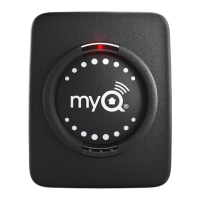

 To Next Page
