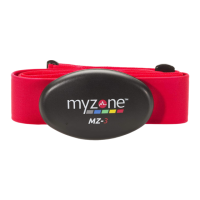
HOW TO FIT YOUR MZ-3
1
STEP
Register your belt at myzone.org by clicking on the “Register
your Belt” button. Follow our simple registration instructions
and enter the Facility ID and MYZONE® Activity Belt ID, found
on the back of your module (i.e. SN 1234567). The Facility ID
will be provided by the business from which you purchased
your belt.
2
STEP
Attach the black module with the snaps marked right and left
to the red strap. Then place the module in the center of your
chest on top of your sternum with the logo facing out. You can
adjust the strap size using the plastic adjuster. The belt should
fit snugly around your body, however always ensure that it is
comfortable. To set your resting heart rate, wear your belt for
10 minutes prior to starting your first activity. For best results
in establishing your resting heart rate, wear your MZ-3 while
lying down at a complete rest. You only need to do this once.
3
STEP
Before starting your activity, it is advised to moisten the two
black sensors on the fabric strap then connect the plastic
module to the fabric strap. You will hear 1 beep to confirm the
belt is on. You should hear no more beeps until you
disconnect the belt.
4
STEP
While wearing your belt, your data will upload into your
account when you are in range of a MYZONE® Hub or are live
streaming to the MYZONE® App. This range will differ from
location to location. If you have exercised away from the
facility where you received your belt, your data will store on
the memory chip. The memory chip will store between 14 and
16 hours of activity.
SN 1234567


 To Next Page
 Loading...