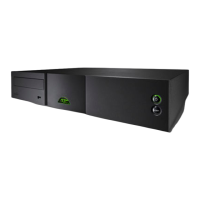
Music Server Quick Start Guide
Part No. 12-001-0061
2 Ripping Music
• Press the front panel open button and insert a CD in the drawer. Press the open button
again to close the drawer.
• The music server will begin ripping automatically. To view progress, use the handset
navigation (3456), ok, back and home keys to navigate through the user interface
and select System and Ripping Monitor from the Home menu. The CD will be ejected
automatically when ripping is complete. A typical CD will take seven to eight minutes to rip.
Note: Music servers have some music pre-ripped when manufactured.
Note: Although music servers contain a limited internal music database, to be able to identify a
CD and download its associated data during the ripping process, they must be connected to a
working internet connection.
3 Music Playback
• Use the handset to navigate through the user interface and select System and Output
Selection from the Home menu. If not already selected, select Output 1.
• Select
Browse Music from the Home menu and then either Albums, Artists or Tracks. From
the following menu chose an item and select Play Selected.
• Selecting the Quick Play menu from the Home menu provides quick access to the most
popular, recently ripped and newest items.
4 Switching Off
• Switching off the music server from its rear panel power switch is not normally necessary
and is undesirable as music servers are programmed to perform automatic music database
maintenance during periods of inactivity.
• The music server can be put into standby by pressing the handset
standby key or pressing
and holding the front panel standby button for 2 seconds. The Naim logo will extinguish
when the music server is in standby.
• Do not switch off the music server from the rear panel power switch or unplug it from the
mains supply while the Naim logo is illuminated.
handset navigation
and ok keys
handset back and
home keys
Full installation and operational information can be found in the Reference Manual
available on the CD packed with the product, or at www.naimnet.com



 To Previous Page
 Loading...