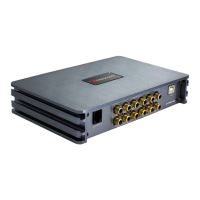
This document describes the Nakamichi NDSK4165AU Digital Sound Processor, a device designed to enhance car audio systems.
Function Description:
The Nakamichi NDSK4165AU is a digital sound processor that offers advanced audio tuning capabilities for car audio systems. It features 4 high-level input channels and supports internal Bluetooth and USB music playback. For output, it provides 6 low-level channels and 4 channels of 60W power. The device allows for comprehensive sound customization, including a 15-band equalizer for each channel, high and low pass filters, phase adjustment, and time alignment for every output channel. It can save up to 6 presets, allowing users to store and recall their preferred audio settings. The processor can be controlled via PC software or a smartphone application, offering a user-friendly interface for detailed adjustments.
Important Technical Specifications:
Product Data:
- Dynamic Range (RCA Input): ≥100dB
- S/N (RCA Input): ≥90dB
- Frequency Response: 20Hz~20KHz
- Input Impedance: High Level Input: 240Ω
- Low level Output Impedance: ≤100Ω
- Signal Input: RCA Input: 8Vpp; High Level: 26Vpp
- Output Range: RCA Output: 12Vpp; Amplifier: 4x60W
- Working Temperature: -20-70°C
- Power: DC9V-16V
- REM Input: High Level Input Signal: FL+/FL- or ACC control cable
- REM Output: +12V Startup Voltage Output
- Standby Power: ≤0.1W
- Gross Weight: Approx. 0.7kg
- Box Dimension (LxHxW): 174.5x120x40mm
Technical Sheet:
- Input Signal Type: 4 Channels high level, supports internal Bluetooth and USB music playback.
- Output Type: 6 Channels low level, 4 Channels 60W power.
- Output Gain: Gain range: Mute, -59dB~6dB.
- Output Signal EQ: 15-band EQ for every channel.
- Frequency Range: 20Hz~20KHz, 1Hz Accuracy.
- Q value (Slope): 0.404~28.85.
- Gain: -12.0dB~+12.0dB, 0.1dB Accuracy.
- Output Signal Crossover: Equipped with high and low pass filters.
- Professional filter type: Butter-w, Bessel, Link-Ril.
- Filter Crossover Point: 20Hz~20kHz, Resolution 1Hz.
- Filter Slope Setup: 6dB/Oct~24dB/Ovt.
- Output Phase and Time Alignment:
- Adjust phase and time alignment for every output channel: In Phase or Out Phase (0°-180°).
- Time Alignment: 0.000 to 20.000 milliseconds, 0 to 692 cm, 0 to 273 inches.
- Presets: Save 6 presets into the device.
Dimensions:
- Length: 174.5 mm
- Width: 120 mm
- Height: 40 mm
Usage Features:
Panel Controls and Features:
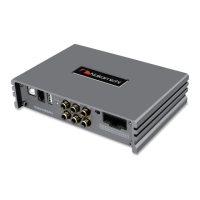
- PC Port: Connects to a computer for tuning software. No driver installation is needed as the computer sound software automatically installs it.
- Remote Level Control Port: Connects to the included remote level control for independent subwoofer volume adjustment.
- USB Port: Allows playback of songs from a U disk when selected as the audio source.
- Power Indicator Light: Indicates the power status of the device.
- AUX Low Level Output Port: Provides low-level RCA output for up to 6 channel speaker connections.
- Machine Start Mode Switch: Allows the device to be started by ACC (when set to "ACC") or by the high-level input signal (when set to "HOST").
- High Level Input and Output Port: Provides connections for high-level input and output signals. The "+" indicates positive/positive, and "-" indicates negative/inverted (ground). Special wiring for the original car or user-defined external wiring can be used.
PC Software Operation Introduction:
The PC software, downloadable from the Nakamichi website, requires a screen resolution higher than 1280x768 for full UI display. It is compatible with Windows laptops, desktops, and tablets.
- Main Menu Edit Section: Features "Memory," "Option," "Mixer," "Audio," and input source selection.
- Memory: Load/save machine preset scenarios or scene files to/from the computer.
- Options: Switch between Chinese and English, adjust noise gate, view "About" information, and restore factory settings.
- Mixer Interface: Allows mixing input sources, including high-level inputs.
- Connection Status: "Not Connected" button to connect to the host PC.
- Input Source Selection: Drop-down list to select Bluetooth, Analog, or USB as the input source.
- Channel Equalizer Editing Area:
- 15-band equalization for each output channel, adjustable for frequency, Q value (response bandwidth), and gain.
- "Reset equalization" button restores equalizer parameters to original pass-through mode.
- "Restore Equalizations" button switches between current equalizer state and pass-through mode.
- "GEQ" button selects graphic or parametric equalization.
- "Delay Unit" button selects delay unit (milliseconds, centimeters, inches).
- Channel Divider Editing Area: Sets up high and low pass filters. Adjustable parameters include filter type (Butter-w, Bessel, Link-Ril), frequency point, and Q value (gradient or slope).
- Output Channel Adjustment Area: Adjusts sound level, positive/negative phase, mute, and joint adjustment for each channel.
- Sound adjustment by scrolling or inputting values.
- Phase adjustment (0° or 180°).
- Delay setting by scrolling or inputting values.
- Reset output configuration for customizable channel types.
- Lock output type to prevent customization.
- Output left and right joint adjustment for copying data between channels.
- Main Volume Adjust Zone: Adjustment range ON/OFF, -59dB~6dB. Speaker button mutes the main volume.
Smartphone Software Operation Introduction (APP):
The smartphone APP, also downloadable from the Nakamichi website, provides similar control features.
- Main Interface: Share/save/open sound effects, view device model/version, exit software, encrypt data, store/recall 6 preset scenes.
- Connection Status: Black indicates not connected, red indicates connected.
- Scene Preset: 1-6 presets for output delay adjustment.
- Audio Source Selection: Bluetooth, analog, and USB options.
- Volume Adjustment: Press and hold to adjust main volume (0-66) and subwoofer volume (0-60). Medium, high, and low volume range is -12dB~+12dB. Speaker button mutes master volume.
- Menu: Access output channel adjustment, equalizer adjustment, mixing mode adjustment, system settings, and music playback.
- Channel Interface: Channel selection, volume mute, forward/reverse, high/low pass frequency setting, and joint tuning.
- Delay Unit Switching: Switch between milliseconds, centimeters, and inches.
- Output Channel Selection: 6 channels available.
- Channel Type Selection: Front audio, rear audio, center audio, subwoofer audio.
- Channel Volume: Adjustable from 0-60.
- Delay Setting: Adjustable delay values in milliseconds (0.000-20.000), cm (0-692), and inches (0-273).
- Mute: Click speaker button to mute.
- Channel Phase: Forward and reverse switching.
- Channel Joint Debugging Settings: Select joint debugging method.
- Mixer Interface: Bluetooth/USB-L, Bluetooth/USB-R, and 4 analog mixing options, adjustable range 0-100.
- EQ Interface: Adjusts output channel EQ curve (gain, Q value, frequency).
- EQ Display: Edit display area.
- Reset Equalization, Parametric Equalization, and Pass-through Equalization Settings: Restore 15-short equalizer parameters to factory pass-through mode. Switch between PEQ and GEQ modes.
- HPF and LPF Adjustment: Frequency range 20Hz-20.0kHz. Channel types: Link-Rill, Butter-W, Bessel. Slope selection: 6dB/Oct to 48dB/Oct, or OFF.
- System Interface: Restore factory settings, noise gate settings, mode settings, check device model/version, and enable local sound effects.
- Noise Gate Setting: 0-22.
- Mode Setting: Preset PR1-PR6 mode change and save.
- Local Sound Effects: Turn on/off.
- Restore Factory Settings: Click [Restore factory settings] and [OK] to reset all values to initial.
- Music Interface: When connected via USB, Bluetooth, or Level-H, select music to play, pause, skip tracks, loop, or shuffle.
- Playback Source Selection: USB, Bluetooth, or Level-H.
- Playlist: Sorted alphabetically.
- Song Name and Folder Name: Displayed.
- Music Adjustment: Play/pause, previous/next song, list loop/single loop, random loop.
Maintenance Features:
Troubleshooting:
- General Advice: Ensure all cables are securely connected before powering on.
- Common Faults:
- No Power: Check power and ACC connections.
- No Sound: Check if in mute mode, and if the correct input channel is selected.
- Unable to connect USB: Check USB connection and verify "HID-compliant device" driver is installed on the PC.
- Persistent Issues: If problems persist after following suggestions, reset the unit to factory settings. If issues still remain after a factory reset, contact the nearest service center.
Safety Precautions:
- Keep the device away from water, liquid, and wet areas to prevent short circuits.
- If any liquid enters the device, immediately cut off power and contact a service center.
- No user-serviceable parts inside; contact a service center for repairs.
- The device surface temperature can exceed 80°C under prolonged loads; install in a safe location.
- Before connecting power, ensure the power supply meets device requirements and connect according to instructions to prevent damage, fire, or electric shock.


 To Next Page
 General