3
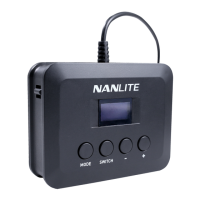
2. When the wire controller is connected to the fixture, the wire controller will first read the information of the fixture,
including the address and fixture model.
①When the wire controller is not connected to the fixture, the display will show "Disconnected" (As shown in figure 1);
②When the wire controller is connected to the fixture, the screen will display the corresponding lighting mode
interface or menu of the fixture. (As shown in figure 2)
3. MODE button: For switching lighting modes and menu.
Note: (1) When the wire controller is connected to PavoBulb 10C, the lighting mode options including CCT,
HSI and EFFECT.
(1) When the wire controller is connected to PavoTubeT8-7X, the lighting mode options including CCT, HSI,
EFFECT, PIXEL FX.
Battery levelMode
CCT
CCT: 5600K C/M: 0
DIM: 100%
CCT
CCT: 5600K C/M: 0
DIM: 100%
CCT
HUE: 000 SAT: 100
DIM: 100%
Disconnected
figure 1 figure 2
MODE SWITCH


 To Next Page
 Loading...