The Nano RX2000+PLUS is a hearing aid designed to provide an affordable solution for hearing loss challenges, aiming to help users hear more clearly. The device is accompanied by a user manual that guides individuals through its setup, usage, and maintenance.
Function Description:
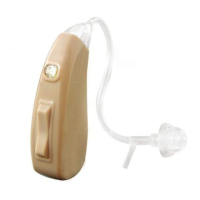
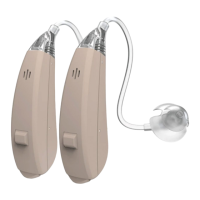
The RX2000+PLUS is a behind-the-ear (BTE) hearing aid that amplifies sound to improve hearing. It features multiple modes to adapt to different environments, allowing users to customize their listening experience. The device is rechargeable, offering convenience and reducing the need for frequent battery replacements.
Important Technical Specifications:
The technical specifications for the RX2000+PLUS include:
- Frequency Range: F1 ≤ 350 Hz, F2 ≥ 5000 Hz. This indicates the range of sound frequencies the device can process.
- Max Output: ≤ 119 dB ± 3 dB. This is the maximum sound pressure level the hearing aid can produce.
- THD (Total Harmonic Distortion):
- At 500Hz: ≤ 5%
- At 800Hz: ≤ 5%
- At 1600Hz: ≤ 5%
Lower THD values generally indicate clearer sound quality with less distortion.
- Eq. Input Noise Lvl (Equivalent Input Noise Level): ≤ 26 dBSPL. This refers to the internal noise generated by the hearing aid itself; a lower value means less background hiss.
- HFA Full-on Gain: 35 dB ± 5 dB. This is the average gain (amplification) provided by the hearing aid across specific frequencies.
Usage Features:
The RX2000+PLUS is designed for ease of use with several key features:
- Volume Control: The device has dedicated buttons for increasing (Vol. Up + ON/OFF) and decreasing (Vol. Down) the volume. A quick press on the "Vol. Up" button increases the volume, accompanied by a "Beep" sound.
- Power On/Off: To turn the device on or off, users need to press the "Vol. Up + ON/OFF" button for 3 seconds.
- Environmental Modes: The hearing aid offers four distinct modes to adapt to various listening environments:
- P1: Normal (1 beep): Suitable for quiet environments like home or office.
- P2: Noise Reduction: Ideal for noisy environments such as supermarkets or shops.
- P3: Outdoor (4 beeps): Designed for loud outdoor settings, large crowds, or traffic.
- P4: Tele-coil: To be used when talking on a telephone. Users are advised not to fully cover their ear in this mode.
Modes can be changed by pressing and holding the "Down" switch for 3 seconds, with a specific number of beeps confirming the mode change.
- Wearing the Device:
- Choose an appropriate dome size.
- Place the device behind the ear.
- Hold the bend of the thin tube close to the dome and gently insert the dome into the ear canal. The dome should fit snugly but not too tightly.
- Use an index finger to press the stabilizer bar until it's inside the ear. The stabilizer bar can be cut if it's too long without affecting the thin tubes' functionality.
- Tip: If the device feels uncomfortable, users are encouraged to adjust it until it fits nicely, as ears will adapt to the sensation over time.
- Important Note: Before initial use, it is recommended to remove any excess earwax. A professional ear cleaning may be necessary.
- Safety Warning: If a dome is not securely fastened and gets lodged in the ear canal, do not attempt to remove it with fingers, tweezers, or cotton buds. Seek immediate medical attention from a doctor or audiologist.
- Charging:
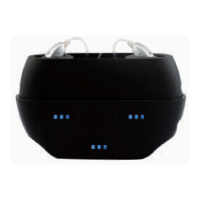
- Insert the hearing aids into the charging case.
- Connect the mini-USB end of the cable to the charging case and the USB end to a wall charger.
- The charging case has charge level indicators (bars) on the front. These will glow flashing blue or solid blue to show power capacity. Solid blue indicates a full charge.
- The charging case takes approximately 3 hours to fully charge and can charge the RX2000+ up to 3 times.
- If the power is less than 25%, the first light will flash blue.
- Do not charge for more than 4 hours.
- Battery Troubleshooting: If battery issues persist, charge the device for 10 minutes, let it drain completely, then charge it for 4 hours. The first charge before actual use can be up to 7 hours.
- Amplification Issues: If amplification is not enough, it might be due to clogged ears. Professional ear cleaning is recommended.
Maintenance Features:
Regular cleaning is essential for the longevity and performance of the hearing aids:
- Ear Dome Cleaning:
- After removing the device from the ear, take the ear dome off.
- Clean the ear dome with warm water and soft soap, gently massaging it until it's free of wax or debris. Ensure the hole is clear.
- Thin Tube Cleaning: If necessary, clean the thin tubes using soap and water after detaching them from the device.
- Device Cleaning: Wipe the device with a dry wipe and allow it to dry before re-installing the ear-dome.
- Charging Contact Cleaning: If the charging contact is dirty, clean it with 95% alcohol.
Hearing Journey:
The manual outlines a typical adaptation period for new hearing aid users:
- Week 1: Sounds may seem too loud or "on the inside of a cave or tunnel." This is normal, and the brain will adjust with consistent wear.
- Week 2: Users will start hearing new sounds, which can be exciting but overwhelming. Conversations will become easier, and volume adjustments (e.g., for TV or voices) may be needed.
- Week 3: Experiment with different volumes and ambiance modes. Continue daily wear and proper cleaning. The "tunnel" effect should subside.
- Week 4: Hearing will be much easier, and users will feel more present in conversations. The brain will have adapted to the sounds. Some individuals may take 5-6 weeks to reach this stage. Patience is key.
- Nano Hearing Aids offers extra accessories, which can be purchased by calling (480) 336-9292 or visiting www.nanohearingaids.com.
- Customer support can be reached at (480) 637-7541 or support@nanohearingaids.com.
- A "60-Day Hearing Journey Contest" offers a free $200 coupon for users who wear their hearing aids for 60 days and send a picture with their order number to challenge@nanohearingaids.com.

 Need help?
 General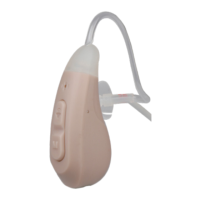

 To Next Page