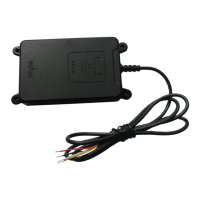
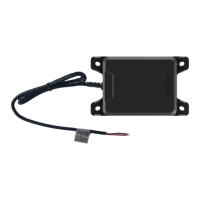
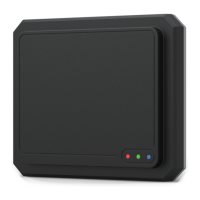
The MR76 is a 77GHz millimeter-wave (MMW) radar sensor designed for short- and medium-range obstacle detection, primarily for special vehicles collision avoidance and automotive forward collision avoidance. It utilizes Frequency Modulated Continuous Wave (FMCW) modulation to detect target distance, velocity, and position information by analyzing radar reflections.
Function Description:
The MR76 radar provides dual-beam scanning coverage for obstacles up to 170 meters. It can simultaneously detect both stationary and moving objects with relative speeds ranging from -200 km/h to 300 km/h. For each detected object, the radar outputs information on its distance, velocity, and angle. It also supports the classification of moving objects into categories such as trucks, cars, and pedestrians. The dual-scan capability offers detections in a far range (up to 170 m) and an extended field of view (FoV) in the short range, covering up to 90° (-16dB). The device can track up to 64 targets, with data output via a CAN interface. The MR76 also supports integration with other devices, such as cameras, requiring customer-developed solutions.
Beyond its primary automotive applications, the MR76 is suitable for various other uses:
- Distance Monitoring/Warning: Providing alerts if the distance to a preceding object becomes too close.
- Detection and Tracking: Identifying and tracking people, vehicles, animals, and equipment for collision avoidance in industrial, construction, agricultural, and mining environments.
- Automated Manufacturing Processes: Monitoring operations within automated manufacturing setups.
- Industrial Plant Condition Monitoring: Observing the operational status of industrial machinery and infrastructure.
- Traffic Monitoring: Managing traffic and enhancing safety by distinguishing objects across different lanes.
- Railway and Passenger Crossing Protection: Monitoring and protecting vehicles and pedestrians at railway and passenger crossings.
The sensor's high sensitivity and resolution ensure reliable detection of preceding vehicles and can even detect targets in front of the preceding vehicle through underbody reflections, even if the direct line of sight is obstructed.
Important Technical Specifications:
- Modulation: FMCW
- Distance Range:
- 0.20~170m@±4°, 0.20~120m@±9° (Mid range mode)
- 0.20~70m@±9°, 0.20~40m@45° (Short range mode)
- Distance Resolution: 0.68m (spot target, none tracking), capable of separating targets and objects 1.5-2 times the resolution.
- Distance Accuracy: ±0.30m (spot target, none tracking)
- Field of View (FoV): ±45°@-16dB
- Angle Resolution: ±0.1° (middle mode), ±0.3°@0°, ±1°@±45° (short mode)
- Velocity Range: -200km/h to +300km/h (-leaving object, +approximation)
- Velocity Resolution: ±1.23km/h (spot target, none tracking)
- Velocity Accuracy: ±0.5km/h (spot target, none tracking)
- Antenna Channels: 2TX/4RX-8 channels
- Cycle Time: 60ms
- Elevation Beam (-6dB): 14°
- Azimuth Beam (-6dB): 18°
- Transmit Frequency: ETSI&FCC 76-77GHz
- Transmit Capacity (average/peak EIRP): 29.8dBm
- Power: +8.0V~32VDC
- Consumption: 2.5W
- Working Temperature: -40°C to +85°C
- Storage Temperature: -40°C to +90°C
- Protection Class: IP67
- Interface: 1xCAN - High speed 500kbit/s
- Dimensions (WLH): 1407035mm (with shell: 136.3mm length, 66.1mm width, 31.2mm height)
- Weight: 200g
- Material: PBT+GF30 for front shell, Die-cast aluminum sump for back shell.
Usage Features:
- Installation: The MR76 is typically mounted at a height of 0.4 to 1.5 m from the ground, with the antenna facing directly forward for front/rear detection. When installed in a bumper, the bumper material significantly impacts performance. Smooth surfaces, avoidance of corners, thickness changes, chrome plating, or special decorative designs are recommended. Gluing on the radar antenna surface is forbidden.
- Bumper Requirements: A minimum distance of 20mm between the MR76 and the bumper is recommended to avoid mechanical interference, thermal geometry changes, mechanical stress, and blockage from rain, snow, or mud. An installation tilt angle of 10° < X < 30° is advised to prevent multipath reflections and noise. The bumper thickness should be an integral multiple of half the wavelength of the 77 GHz millimeter-wave radar (e.g., n*1.1mm for ABS material).
- Spraying: While bumpers can be sprayed, detailed analysis is required to ensure radar performance is not degraded. Metal materials should not be used for bumpers. The effect of metallic paint depends on metal content, sprayed surface size/shape, and primer/paint layer thickness.
- Alignment: Precise alignment is crucial. A metal plate reflector can be used for alignment, positioned perpendicularly to the vehicle's driving vector. Misalignment can lead to object detection failures.
- Electrical Connection: The MR76 uses a 3-meter cable for power (positive and negative) and CAN high/low. A 10A wire is required for the power supply, and the grounding wire should be as short as possible to protect against electromagnetic interference. The device does not support hot swapping, and internal errors may cause malfunction or restart.
- CAN Interface: The radar communicates via a CAN bus, supporting high-speed 500kbit/s data transfer. The interface pins are defined for Power In (Brown, 6-32V DC), GND (Black), CAN_H (Yellow, 0-3.3V DC), and CAN_L (Blue, 0-3.3V DC).
- Test Software: Nanoradar provides NSM_77 Tools test software for acquiring target information visually. This tool, along with a USB2CAN adapter (specifically the one shown in the manual), helps users evaluate radar performance.
- Safety: The MR76 complies with international regulatory requirements and is not considered hazardous to human health.
Maintenance Features:
- Electrostatic Protection: During transportation, storage, work, and handling, full static protection is necessary. Users should wear anti-static gloves and avoid touching the radar antenna surface or connector pins, only handling its corners.
- Cleaning: The radar surface should only be wiped with a damp, lint-free cotton cloth. Scratching the surface is prohibited.
- Inspection: The equipment needs to be inspected daily before use.
- Installation Integrity: Ensure the fixed position does not deform, and the radar sensor locking torque does not exceed 7Nm.
- Material Compatibility: The radar sensor surface should be installed in a material compatible with the chemical elements released by the vehicle.
- Power Supply: The radar input voltage range is 6-32V DC, with a ripple less than 20mV. A large ripple power supply can cause incorrect target information output.
- Electromagnetic Interference: While the product has shielding, it should be installed away from strong electromagnetic interference sources like motors and isolated metal casings.
- Firmware and Configuration: Customers can upgrade the firmware, and parameter configuration functions will be developed later.
- Troubleshooting (Common Faults):
- False alarm in adjacent lane: Indicates the radar installation angle is too large (over 25° +1° / -2°). Adjustment of the radar angle by removing the bumper is needed.
- Alarm target opposite to alarm direction: Indicates the radar is reverse installed. The radar direction needs to be adjusted.
- Following car false alarm: Indicates the radar installation angle is too small (over 25° +1° / -2°) or the installation position is wrong. Reinstallation according to instructions is required.
- Missing Alarm: Suggests the presence of wire bundles, uneven thickness, sharp corners, or other metal parts in front of the radar installation location, which should be replaced or removed.

 Need help?

 To Next Page
 General