EasyManua.ls Logo

Nanoxia DEEP SILENCE 2 - User Manual

Nanoxia DEEP SILENCE 2
21 pages
Print Icon
To Next Page IconTo Next Page
Loading...
Question and Answer IconNeed help?

Do you have a question about the Nanoxia DEEP SILENCE 2 and is the answer not in the manual?

Summary

Introduction to Nanoxia Deep Silence 2

Product Specifications

Details the physical and material attributes of the PC case, including dimensions and materials.

Included Accessories

Lists and illustrates the various accessories provided with the PC case.

Key Features Overview

Highlights the main functionalities and design aspects of the Nanoxia Deep Silence 2 case.

Noise Insulation Design

Explains the soundproofing materials and their effectiveness in reducing operational noise.

Ventilation System

Describes the case's cooling capabilities, fan support, and integrated fan controller.

Installation Instructions

Installing the Motherboard

Step-by-step guide for mounting the motherboard inside the case, including form factor considerations.

Installing the Power Supply

Instructions for securing the PSU unit to the case using provided screws.

Installing Optical Drives

Procedures for mounting optical drives in the 5.25-inch bays using tool-free mechanisms.

Utilizing the 3.5-inch Bay

Guide for installing a 3.5-inch card reader using the provided internal adapter.

Installing Hard Drives

Guide for mounting 2.5-inch and 3.5-inch HDDs into the case using specialized mounting frames.

Front Panel Removal and Dust Filters

Instructions on how to detach the front panel and clean the easily accessible dust filters.

Optional Fan Installation

Guide for adding extra fans to the top, side, and bottom of the case for enhanced cooling.

Connecting Fans to Fan Controller

Explains how to connect fans to the 2-channel fan controller for speed management.

Fan Controller Operation

Details how to use the sliders behind the front door to adjust fan speeds on two channels.

I;O Panel and Front Connectors

Describes the front panel I/O ports and how to connect front panel connectors to the motherboard.

Water Cooling Installation

Guide for installing radiators and fans for water cooling systems using the case's mounting bracket.

Front Panel Connector Wiring

Instructions for connecting front panel USB 2.0, USB 3.0, HD Audio, and AC 97 to the motherboard.

Support and Contact Information

Customer Support Channels

Provides e-mail addresses for support questions, spare parts, and warranty issues for different regions.

General Inquiries

Contact information for general comments, suggestions, and other inquiries.

Overview

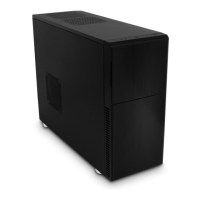
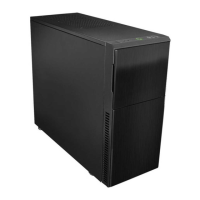
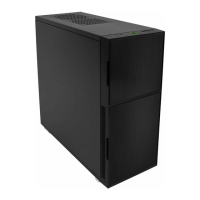
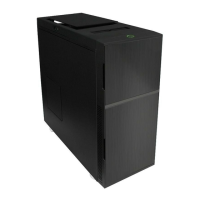
The Nanoxia Deep Silence 2 is a PC tower designed to offer a low-noise computing experience while maintaining optimal system temperatures. Developed by an experienced team in Germany, this PC case emphasizes high quality, functionality, and flexibility, making it suitable for a wide range of hardware and water cooling solutions.

Function Description

The primary function of the Nanoxia Deep Silence 2 is to house and protect computer components, providing an optimized environment for performance and longevity. Its design prioritizes noise reduction, making it an ideal choice for users who value a quiet workspace. The case integrates a comprehensive ventilation system and a built-in fan controller, allowing users to manage airflow and noise levels according to their specific needs. It also supports various storage configurations and water cooling setups, offering versatility for different build requirements.

Usage Features

The Nanoxia Deep Silence 2 offers a variety of features designed to enhance user experience and system performance:

  • Soundproofing: The case is extensively lined with high-quality, sound-absorbing insulation materials, specifically chosen to meet industrial standards and the requirements of the Deep Silence series. This ensures effective noise suppression while maintaining acceptable internal temperatures. The front door is also sound-insulated with foam, and the lower part of the front is insulated with bitumen to absorb noise from hard disks and front-mounted fans.
  • Tool-Free Mounting: Optical drives can be installed without the need for tools, simplifying the assembly process. This is achieved through a locking mechanism with a black slider that secures the drive in place.
  • Water Cooling Support: The Deep Silence 2 is "watercooling-ready" and features a special mounting bracket between the motherboard and hard drive cage. This bracket is designed to accommodate 120mm or 240mm radiators, even allowing for fans to be mounted on both sides of the radiator for maximum cooling capacity. The generous internal depth ensures that spacing problems are not a concern. Additionally, the case provides four rubber hose guides for external water cooling components.
  • Ventilation System: An integrated ventilation system includes three standard Nanoxia Deep Silence fans (two 120mm in the front, one 120mm in the rear, all max. 1,300 RPM) and a 2-channel fan controller capable of managing up to six fans. The case supports a total of up to nine fans, with optional mounting points in the front (on the HDD cage bracket), side, bottom, and top. The Nanoxia axial flow fans are optimized for quiet operation, featuring a rifle bearing for a long service life of up to 80,000 hours.
  • Fan Control: The 2-channel fan controller allows users to adjust fan speeds to their preferences. Sliders located behind the upper front door control the fans connected to each channel (A1, A2, A3 for the left slider; B1, B2, B3 for the right slider). Each channel can control up to three 3-pin fans, with a maximum power of 18 watts per channel.
  • Cable Management: The motherboard tray includes nine rubberized holes for efficient cable management, helping to keep the interior tidy and improve airflow.
  • Hardware Compatibility: The case accommodates long graphics cards (up to 345mm, or 370mm without the mounting bracket) and tall CPU coolers (up to 165mm). A mounting hole in the motherboard tray facilitates the installation of CPU coolers.
  • Drive Bays: It features two external 5.25-inch drive bays (tool-free), one of which includes a 3.5-inch adapter. Internally, there are seven 3.5/2.5-inch bays, which are decoupled to reduce vibrations. Hard drives are installed on trays with rubber grommets to absorb vibrations. The hard drive slides offer a second pair of mounting holes, allowing for shifting the position of the drives.
  • I/O Panel: The front I/O panel includes two USB 3.0 ports (blue), one USB 2.0 port (black), and audio jacks for headphones (left) and a microphone (right).
  • Nanoxia VentCovers: Removable, sound-proofed VentCovers are provided for the two top fan holes and the left side panel fan hole. These allow users to choose between minimal noise and improved case ventilation. The top covers are equipped with sound-absorbing foam, and a self-adhesive bitumen mat is included for the side panel VentCover to ensure compatibility with high CPU coolers.
  • Motherboard Installation: The manual provides clear charts and instructions for installing E-ATX, ATX, Micro-ATX, and Mini-ITX motherboards, including guidance on attaching spacers and routing the EPS extension cable.

Maintenance Features

The Nanoxia Deep Silence 2 incorporates features that simplify maintenance and ensure the longevity of the system:

  • Dust Filters: The air intake openings in the front and at the bottom of the case are equipped with easy-to-clean dust filters. These filters can be removed for cleaning, typically by vacuuming them gently.
  • Front Panel Removal: The front panel can be easily removed by pulling it from the bottom cutout, allowing access to the front fans and dust filters. Users are advised to be cautious of the I/O panel cables at the top of the front when removing it.
  • Fan Cleaning: To clean the front dust filters or switch the front fans, the front panel must first be removed, followed by unscrewing and removing the dust filter, to which the fans are attached.
  • Removable Mounting Bracket: The mounting bracket for additional fans or radiators behind the HDD cage can be removed by unscrewing it, facilitating fan assembly and cleaning of dust filters in that area.

The Nanoxia Deep Silence 2 is designed for users who prioritize a quiet computing experience without compromising on performance or cooling capabilities. Its thoughtful design and robust features make it a versatile and user-friendly PC case.

Nanoxia DEEP SILENCE 2 Specifications

General IconGeneral
TypeMid Tower
MaterialSteel, Plastic
Weight11.5 kg
Expansion Slots7
Cooling System2 x 120mm front fans (included), 1 x 120mm rear fan (included)
Front Ports2 x USB 3.0, 2 x USB 2.0, Audio In/Out
Motherboard SupportATX, Micro-ATX, Mini-ITX
Case TypeMid Tower
Maximum CPU Cooler Height160 mm
Maximum PSU Length200 mm
ColorBlack
Power SupplyNot included
Included Fans1 x 120mm
Noise Reduction FeaturesSound-dampening material

Related product manuals