Need help?
Do you have a question about the Native Instruments SOLID MIX Series and is the answer not in the manual?
The Native Instruments SOLID BUS COMP is a stereo bus compressor, designed to bring the sound of renowned studio mixing consoles into your digital audio workstation. It functions as an audio processing unit that reduces the dynamic range of an incoming signal, effectively decreasing the level difference between quiet and loud sections. This process helps to increase the perceived loudness of a signal and can make individual instruments "glue" together within a mix, making them sit more naturally, especially useful for drum recordings. The compressor can also extend the decay phase of instruments, particularly drums, and add sustain to electric guitar tones.
The SOLID BUS COMP is versatile and can be applied to various instruments and mixes. For electric guitars and basses, it smooths out the varying intensity of individual strokes, boosting the overall perceived level and, at extreme settings, creating a "wall-of-sound" effect. When applied to bass drum or snare tracks, it adds punch and helps define their sound in a mix. For vocals, it balances soft and loud sounds, making them more consistent. In mixing and pre-mastering, a subtle compression on the overall mix or specific subgroups can add cohesion between instruments, a crucial step given that most mixes are stereo.
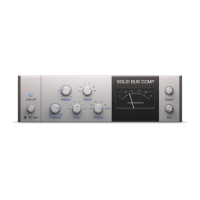
The core of the SOLID BUS COMP's functionality revolves around several key parameters. The Threshold knob defines the audio level above which compression begins. Signals below this level remain unaffected, while those above it have their gain attenuated. Turning this knob counter-clockwise increases the amount of compression. The Ratio knob determines the degree of attenuation applied to the signal. For instance, a 2:1 ratio means an input level 2 dB above the threshold results in an output level only 1 dB above it. Available ratios range from 1.5:1 for soft to moderate compression, to 5:1 for more severe compression, and 10:1, which makes the compressor behave more like a limiter.
Since compression reduces higher signal levels, the Makeup knob allows users to add a fixed gain to the output, compensating for any perceived loss in overall level. The Attack knob controls how long it takes for the compressor to reach its full effect once the threshold is crossed. Longer attack times can preserve the initial transients of percussive or plucked string instruments, compressing only the sustained sound that follows. Available attack times range from 0.1 ms to 30 ms. Conversely, the Release knob dictates the time it takes for the compressor to return to its standby state after the signal level drops below the threshold. Release times vary from 0.1 s to 1.6 s, with an additional "AUTO" position that automatically adjusts the release time based on the audio content.
The SOLID BUS COMP also features a Side-Chain Input, which allows an external control signal to trigger the compressor instead of the input signal itself. This widens the compressor's versatility, enabling effects like "ducking," where one instrument's level is attenuated by another (e.g., bass guitar compressed by the kick drum). The SC Gain button enables or disables this side-chain input, and the SC Gain knob controls the input gain of the side-chain signal.
The Link L/R button determines how stereo channels are processed. When off, left and right input channels are processed independently. When on (the default setting), their mono sum is used as the control signal, applying the same compression to both channels.
For visual feedback, the COMPRESSION meter displays the real-time amount of applied compression.
Beyond standard compression, the SOLID BUS COMP incorporates Parallel Compression, a technique where the original signal is blended with the compressed signal. This is controlled by the Output knob (for the compressed signal) and the Dry knob (for the original signal). Turning the Dry knob fully counter-clockwise outputs only the compressed signal, while turning it clockwise progressively blends in the original signal. This feature helps retain the sonic characteristics, especially transients, of heavily compressed signals and can add "top-end sparkle." After adjusting the Dry level, the Output knob may need to be adjusted to maintain an optimal overall output level.
The device also includes several usage and maintenance features accessible via its menu bar. Users can save and load presets for their favorite settings, with the option to organize them into factory and user submenus. Presets can be saved by entering a name and clicking "SAVE." Unwanted user presets can be deleted, though factory content cannot. The menu bar also offers A/B comparisons, allowing users to store two different parameter settings (A and B) and quickly switch between them to compare their effects. Settings from one slot can be copied to the other.
Additional functions in the File menu include Show User preset folder, which opens the system folder where user presets are stored, allowing for renaming by changing file names. An Open Manual option provides quick access to the PDF manual for reference. Finally, Visit Solid Bus Comp on the web opens the user's default web browser to the Native Instruments website page for the product.
 General
| Bit Depth | 24-bit |
|---|---|
| USB Audio Interface | Yes |
| Phantom Power | Yes |
| Channels | 4 |
| Software Integration | Traktor |
| Inputs | RCA, Microphone |
| Outputs | RCA, XLR, Headphone |
| Effects | Filter |

 To Next Page