

EasyManua.ls Logo

NavePoint Open Frame 2 Post Rack - User Manual

NavePoint Open Frame 2 Post Rack
2 pages
Print Icon
To Next Page IconTo Next Page
Loading...
Desktop Open Frame 2 Post Rack
www.NavePoint.com
customerservice@navepoint.com
© 2017 NavePoint, LLC
Part Quantity
A Front Base x 1
B Left Vertical Rail x 1
C Right Vertical Rail x 1
D Left Base x 1
E Right Base x 1
Assembly Hardware
F M6 16mm Screw x 10
G M6 Flange Nut x 10
H Plastic Foot x 4
I M5 12mm Screw X4
Shelving Hardware
20 sets of Cage Nut, Screw and Plastic
Washer
Rev. 201708
Important information-
Keep this information for further reference.
WARNING
Limitations of Liability: In no event will NavePoint, LLC. (or its ofcers, direc-
tors, employees or agents) be liable for any damages, whether direct or
indirect, special, punitive, incidental or consequential damages (including,
but not limited to, lost prots or revenue, loss of use, lost business opportu-
nities or loss of goodwill) or for the costs of procuring substitute products,
arising out of or in connection with the use of the product, whether such
liability arises from any claim based upon contract, warranty, tort (including
negligence), product liability or otherwise, whether or not seller has been
advised of the possibility of such loss or damage. In no event will seller’s
total cumulative liability, from all causes of action and all theories of liabil-
ity, exceed the total amounts actually paid to seller by customer under the
order that gives rise to any liability hereunder.
The information contained in this document is subject to change
without notice.
NavePoint makes no warranty of any kind with regard to this
material, including, but not limited to the implied warranties of
merchantability and tness for a particular purpose.
NavePoint shall not be liable for errors contained herein or for
incidental or consequential damages in connection with the
furnishing, performance, or use of this material.
NavePoint assumes no responsibility for the use, application, or
reliability of the software or hardware that you install into the
product. Always install the heaviest equipment in the bottom.
It is highly recommended that installation of this product be
performed by a qualied and experienced installer. Improper
installation of this product could result in damage to the
product, other equipment, or personal injury. NavePoint cannot
be held responsible for damage to equipment or personal
injury resulting from improper use, installation or the misuse of
information presented in this document.
Examine the package for any damaged or loose parts. If
anything is damaged or missing, contact NavePoint for
assistance. Do not attempt to install or use product if it
has been damaged.
Thank you for purchasing a NavePoint product. NavePoint intends this manual to guide you through
a smooth installation of the product. NavePoint assumes that you are qualied in the servicing of
computer equipment and trained in recognizing any hazards that may occur in the installation of this
product. If you have any questions regarding the installation or use of your product, please call us at
888.505.1363.
Instructions for Products:
00301070
Question and Answer IconNeed help?

Do you have a question about the NavePoint Open Frame 2 Post Rack and is the answer not in the manual?

Summary

Safety and Liability Information

Important Warning

Provides critical warnings about product liability, potential damages, and limitations of responsibility for usage and installation.

Product Assembly Instructions

Attach Front Base to Left Base

Connect the Front Base (A) to the Left Base (D) using specified hardware.

Attach Front Base to Right Base

Connect the Front Base (A) to the Right Base (E) using specified hardware.

Attach Left Vertical Rail

Secure the Left Vertical Rail (B) to the base assembly using M6 screws and flange nuts.

Attach Right Vertical Rail

Secure the Right Vertical Rail (C) to the base assembly using M6 screws and flange nuts.

Attach Plastic Feet

Install the four Plastic Feet (H) to the bottom of the rack using M5 screws.

Overview

The NavePoint Desktop Open Frame 2 Post Rack is a robust and versatile solution designed for organizing and supporting various types of computer equipment in a desktop environment. This manual provides comprehensive instructions for its smooth installation and outlines important safety and usage guidelines. The rack is intended for users who are qualified in servicing computer equipment and are familiar with potential hazards during installation.

Function Description:

The primary function of this 2-post rack is to provide a structured and stable platform for mounting IT equipment, such as servers, network switches, patch panels, and other rack-mountable devices. Its open-frame design allows for easy access to equipment for installation, maintenance, and cable management. The "2 Post" designation indicates that it features two vertical rails for mounting equipment, typically suitable for lighter-weight devices or where a full enclosure is not required. The desktop form factor suggests it is designed to be placed on a desk or other flat surface, making it ideal for small offices, home labs, or temporary setups where space is a premium. The rack helps in organizing equipment, reducing cable clutter, and improving airflow compared to stacking devices directly.

Important Technical Specifications:

While specific dimensions are not explicitly listed in the provided text, the components and hardware listed give an indication of its construction and capacity.

  • Construction: The rack is constructed from several key components:
    • Front Base (A), Left Base (D), Right Base (E): These form the foundational support for the rack, providing stability.
    • Left Vertical Rail (B), Right Vertical Rail (C): These are the primary mounting surfaces for equipment, featuring holes for cage nuts and screws.
  • Hardware: The assembly relies on specific types and quantities of fasteners:
    • M6 16mm Screw (F): Used for assembling the main structural components. 10 pieces are included.
    • M6 Flange Nut (G): Paired with the M6 screws for secure fastening. 10 pieces are included.
    • Plastic Foot (H): Provides stability and protects surfaces. 4 pieces are included.
    • M5 12mm Screw (I): Used to attach the plastic feet. 4 pieces are included.
  • Shelving Hardware: The rack comes with dedicated hardware for mounting equipment:
    • 20 sets of Cage Nut, Screw, and Plastic Washer: This indicates the rack can accommodate at least 20 units of rack-mountable equipment, assuming one set per mounting point. Cage nuts are a standard method for mounting equipment in rack rails, allowing for flexible and secure attachment.
  • Material: While not explicitly stated, the use of M6 screws and flange nuts suggests a robust metal construction for the main frame components, likely steel, to support the weight of IT equipment. The plastic feet provide surface protection and minor vibration dampening.

Usage Features:

  • Open Frame Design: Facilitates excellent airflow for cooling equipment, reducing the risk of overheating. It also provides unrestricted access to the front and rear of mounted devices for cabling, configuration, and maintenance.
  • 2-Post Configuration: Suitable for lighter equipment such as network switches, patch panels, and smaller servers. It offers a more compact footprint compared to 4-post racks, making it ideal for desktop or limited-space environments.
  • Rack-Mountable Compatibility: Designed to accept standard rack-mountable equipment using the included cage nuts and screws. This ensures broad compatibility with a wide range of IT devices.
  • Easy Assembly: The manual provides clear, step-by-step instructions with diagrams for assembly, making the setup process straightforward for qualified individuals. The assembly involves attaching the bases, then the vertical rails, and finally the plastic feet.
  • Stability: The design with front, left, and right bases, combined with plastic feet, aims to provide a stable platform for the mounted equipment on a flat surface.
  • Cable Management Potential: While not explicitly detailed, the open frame naturally allows for easier cable routing and management compared to enclosed spaces, though external cable management accessories might be beneficial for very dense setups.
  • Scalability (Implied): The inclusion of 20 sets of shelving hardware suggests a reasonable capacity for a desktop rack, allowing users to mount multiple devices.

Maintenance Features:

  • Durability: The use of metal components and robust fasteners (M6 screws) implies a durable construction designed for long-term use in an IT environment.
  • Easy Access for Maintenance: The open frame design is inherently beneficial for maintenance. Technicians can easily access the front and rear of equipment to perform diagnostics, replace components, or reconfigure cabling without disassembling the rack or struggling in confined spaces.
  • Replaceable Hardware: Standardized hardware like M6 screws, flange nuts, and cage nuts means that replacement parts are generally easy to source if needed, extending the lifespan of the rack.
  • Surface Protection: The plastic feet (H) prevent scratching or damage to the underlying desk or floor surface, which is a practical maintenance feature for the environment where the rack is placed.
  • Cleaning: The open design makes it easy to clean dust and debris from the rack and the mounted equipment, contributing to better equipment performance and longevity.

Important Considerations and Warnings:

  • Qualified Installer Recommended: NavePoint strongly recommends that installation be performed by a qualified and experienced installer to prevent damage to the product, other equipment, or personal injury. This highlights the importance of proper assembly and understanding of potential hazards.
  • Heaviest Equipment at the Bottom: A critical safety and stability guideline is to "Always install the heaviest equipment in the bottom." This lowers the center of gravity, significantly reducing the risk of the rack tipping over, especially in an open-frame design.
  • No Warranty for Software/Hardware: NavePoint assumes no responsibility for the use, application, or reliability of software or hardware installed into the product. This clarifies the scope of their product warranty.
  • Limitations of Liability: NavePoint explicitly limits its liability for damages (direct, indirect, special, punitive, incidental, or consequential) arising from the product's use. This is a standard legal disclaimer found in many product manuals.
  • Inspection Before Use: Users are instructed to "Examine the package for any damaged or loose parts" and to "not attempt to install or use product if it has been damaged." This ensures product integrity and user safety.
  • Contact for Assistance: NavePoint provides contact information (phone and email) for customer service, emphasizing support for installation or product use questions.

In summary, the NavePoint Desktop Open Frame 2 Post Rack is a practical, easy-to-assemble, and robust solution for organizing IT equipment in compact settings. Its open design prioritizes accessibility and airflow, while the included hardware ensures compatibility with standard rack-mountable devices. Adherence to installation guidelines, particularly regarding equipment placement, is crucial for safe and effective operation.
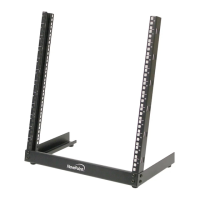
NavePoint Open Frame 2 Post Rack Specifications

General IconGeneral
BrandNavePoint
ModelOpen Frame 2 Post Rack
CategoryDesktop
LanguageEnglish