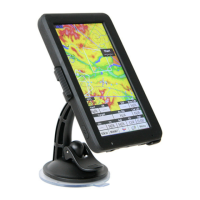
DEAR PILOT
Thank you for choosing Omni! This manual will help you get
started with your new device right out of the box. Follow the
instructions to get the most out of your Omni and to keep
it in top shape for years to come. We wish you many happy
adventures and safe landings with this Omni as your co-pilot.
For more information, news, rmware updates and support
please visit: https://www.naviter.com
IN THE BOX
Omni, Protective case, Getting started manual, velcro, wall
charger, USB-C data and charging cable, SIM tray opener tool.
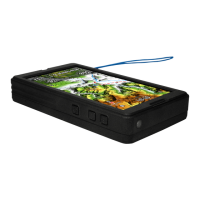
ABOUT YOUR OMNI
1. Fanet+ antenna
2. Speaker
3. QR Code scanner
4. + / - buttons
5. Power button
6. SIM Card tray
7. USB-C connector
8. Reset button
9. Charging light
10. Light sensor
CONNECTIVITY
Omni has full Wi , Bluetooth and 2G/3G/4G/LTE connectivity.
The cellular connectivity is unlocked, you can use a SIM card
from any provider. Simply insert the SIM card in the slot and
start the device. Communication is enabled by default.
To use Wi , you must slide down from the top of the screen
two times to open the Android Wi settings. Connect to a Wi
network or share a Hotspot connection from your phone.
FIRST RUN & REGISTRATION
Omni requires you sign into your SeeYou account during the
rst run. This will guarantee a seamless experience.
1. Press and hold the Power button to turn on Omni.
2. Login to SeeYou or create a new account.
3. Complete the on-boarding process.
4. SeeYou Navigator will start and it is ready to y.
5. To turn the device off, press and hold the power button for
one second.
SEEYOU NAVIGATOR SOFTWARE
SEEYOU
You will enjoy all the bene ts and seamless experience when
Omni is used in connection with SeeYou Cloud. One year free
use of SeeYou Cloud is included with the purchase of a new
Omni. The evaluation starts automatically when you login to
SeeYou on your new Omni.
Plan your ights, manage
waypoints, keep your
logbook, share and learn
from your ights - with
SeeYou Cloud.
https://seeyou.cloud
HARDWARE
SeeYou Navigator will
prompt you to update itself
whenever a new version
is available and Omni is
connected to the internet.
It is highly recommended
to keep Omni up-to-date at
all times.
Detailed instructions about
SeeYou Navigator are
available at:
https://kb.naviter.com
SCREEN
• 3.5 inch screen size, 800×400 pixels
• 1000 nits brightness
• Portrait and Landscape orientation
• Multi-touch (pinch&zoom)
SIZE AND WEIGHT
• 97×87×25 mm / 3.8×3.4×1 inch
• 222 grams
SENSORS
• Fanet & Flarm
• High-precision pressure
sensor (<10 cm)
• High-accuracy GPS sensors,
Galileo & GLONASS GPS receiver
• Gyro-assisted instant Vario
BATTERY
• 6000 mAh, 2.5 hours charge
time from empty to full
• 11 hours autonomy with default
settings / 12–15 hours with
battery saver settings
• 40+ hours of continuous ight
recording with screen powered off
CONNECTIVITY
• USB Type-C and USB OTG
• Wi , Bluetooth LE, 2G/3G/4G/LTE
• Wi and Bluetooth
Internet tethering
MEMORY
• 4 GB RAM and 64 GB Flash
MENU LAYERS
1
2
3
5
4
10
6, 7, 8, 9


 To Next Page
 Need help?

 General