
 Need help?
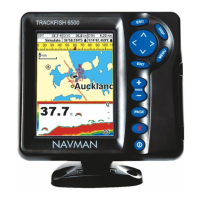
Do you have a question about the Navman TRACKFISH 6600 and is the answer not in the manual?
Explains how to turn the TRACKFISH unit on and off, including auto power functionality.
Describes the Man Overboard (MOB) feature to save the boat's position and navigate back.
Explains the two ways of navigating: going straight to a point or following a route.
Instructions for starting and cancelling navigation to a specific point or waypoint.
Covers creating, editing, moving, displaying, and deleting waypoints.
How to initiate navigation to a selected waypoint from various displays.
Covers creating, editing, displaying, and deleting routes.
How to start and manage navigation along a selected route.
Details on Gain, Threshold, and Range settings that affect the sonar display.
Configures sonar settings including frequency, scroll speed, fish symbols, filter, and display options.
Configures various alarms including arrival radius, XTE, danger, and depth alarms.
Guides for calibrating speed transducer, temperature, fuel, and keel offset for accurate readings.
Instructions for flush mounting and bracket mounting the display unit for optimal viewing and access.
Step-by-step guide for installing the GPS antenna and sonar transducer for proper function.
Diagram and explanation of how to connect the GPS antenna, transducers, and power/data cable.
Detailed instructions for wiring the power cable and external beepers/lights.
Troubleshooting steps for common issues like the unit not turning on or off, or incorrect language display.
Diagnosing and resolving issues related to GPS fix, position accuracy, and chart synchronization.
Troubleshooting steps for erratic sonar operation, no bottom display, or poor echo quality.
Diagnosing issues with fuel used/remaining readings, flow rates, and fuel economy calculations.
 General
| Display Type | Color LCD |
|---|---|
| GPS | Yes |
| Sonar Frequency | 50/200 kHz |
| Depth Capability | 1000 meters |
| Waterproof Rating | IPX7 |
| Chartplotter | Yes |
| Waypoints | 1000 |


 To Next Page