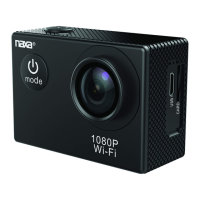
The Naxa NDC-409 Action Camera is a high-definition digital motion video recording device designed for a variety of uses, including vehicle data recording, photo-sharing, outdoor sports, home security, and deep-water probing. It boasts a compact and durable design, available in diversified colors, and is built to withstand various environments.
Function Description:
The NDC-409 Action Camera offers digital video recording, photo shooting, audio recording, and video display functionalities. It features a detachable battery for extended camera life and can record videos while charging. The camera supports Wi-Fi connectivity, allowing remote control via a smartphone or tablet using the "GoPlus Cam" app. This app enables full camera control, live preview, photo playback, and sharing of selected content. Video encryption capabilities are also integrated for enhanced security.
Important Technical Specifications:
- Display: 2-inch TFT LCD screen.
- Lens: 120° wide-angle lens.
- Video Resolution:
- 1080P (interpolated): 1920*1080
- 1080P (interpolated): 1440*1080
- 720P (real): 1280*720
- WVGA: 848*480
- VGA: 640*480
- Video Format: AVI.
- Photo Resolution: 16M, 12M, 10M, 8M, 5M, 3M.
- Storage: Supports Micro SD cards up to 32 GB (max.). Branded Micro SD cards are recommended for normal operation.
- Frequency of Optical Source: 50Hz / 60Hz.
- USB Interface: USB2.0.
- Power Source Interface: 5V1A.
- Battery Capacity: 900MAH.
- Power Dissipation: 300mA@4.2V.
- Recording Time: Approximately 90 minutes.
- Charging Time: Approximately 3 hours.
- Waterproof: Up to 30 meters with the included waterproof housing.
Usage Features:
- Mode Switching: Easily switch between video recording, photo shooting, playback, and menu settings by pressing the "Power On-Off" button.
- Video Recording: In recording mode, press "OK" to start and stop recording. A flashing icon on the screen indicates active recording.
- Photo Shooting: In photo shooting mode, press "OK" to take photos.
- File Storage & Playing: Videos and photos can be exported to a computer via a USB cable or accessed directly from the Micro SD card using a card reader.
- Wi-Fi Connection:
- Download the "GoPlus Cam" app from the Apple App Store or Google Play Store.
- Connect to the camera's Wi-Fi network (e.g., "NDC-409" followed by numbers) in your smartphone or tablet's Wi-Fi settings.
- Enter the password "12345678" (displayed on the camera's LCD screen).
- Open the app to control the camera remotely.
- Time Synchronization: The device time can be synchronized with the app. This involves clicking the version number in the app, selecting "Set Wifi Sport Cam Time," choosing "Enable," and then clicking the connect device symbol.
- Multi-Language Support: The camera offers multiple language options.
Maintenance Features:
- Battery Management: The camera features a detachable battery that is easy to replace. It can record videos while charging, and charging can be done via a computer, power adapter, or car charger.
- SD Card Handling: Always use branded Micro SD cards and format them on a computer before use to ensure normal operation. Avoid placing the Micro SD card near strong magnetic fields to prevent data loss.
- Care and Handling:
- This is a high-precision product; avoid dropping or impacting it to prevent damage.
- Do not expose the product to strong magnetic objects or radio waves, as this can cause malfunction or damage to image/audio performance.
- Never expose the product to high temperatures or direct sunlight.
- In case of overheating, smoke, or an unpleasant smell during charging, immediately unplug the device to prevent fire hazards.
- Keep the product out of reach of children during charging to prevent accidental suffocation or electric shock from the charging cable.
- Store the device in a cool, dry, and dust-proof space.
The Naxa NDC-409 Action Camera comes with a comprehensive set of accessories, including a waterproof housing, various mounts (handle bar/pole mount, clip, multiple general mounts), bandages, a USB cable, and a battery, along with a user manual. Support information is available on the Naxa website and through Naxa Technical Support.

 Need help?
 General

 To Next Page