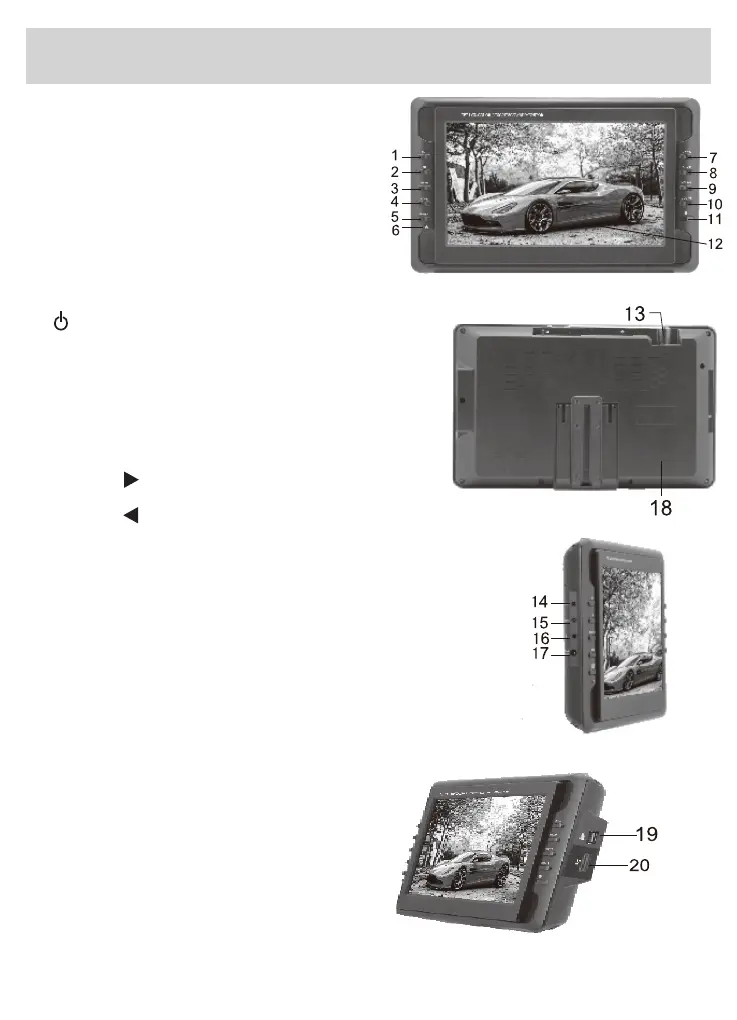
1. EXIT: EXIT button
2. OK: Confirm button
3. MENU: Menu button
4. MODE: Switch between
inputs TV/AV/ Radio/MEDIA
5.
6.
7. CH+/▲: Channel Select/Upward button
8. CH-/▼ : Channel Select/Downward button
9
. VOL+/ : Volume up/Rightward button
10.VOL-/ : Volume down/Leftward button
11.Remote control IR Sensor
. USB slot
20. CARD Input slot
19
12.TFT-LCD screen
13.Antenna Input Jack
14.Headphone Jack/
AVOUT: Audio and Video
output
ATV an
d AV source only.
function in
15.AV-IN Jack
16.Power on/off switch
17.DC Power Input
18.Speakers
-6-
4. Main Unit
Power indicator: Light red when
Power: Power/Standby; press to turn
the TV is connected to the power; Light
green when TV is charging; the indicator
will darken when TV is fully charged.
the TV on or to place it in standby mode.
FM


 To Next Page
 Loading...