10
NBB Controls +
Components
GmbH
Transmitter HyPro-6 /
HyPro-8
Surface Mounted Joystick
> Changing the Surface Mounted Joystick
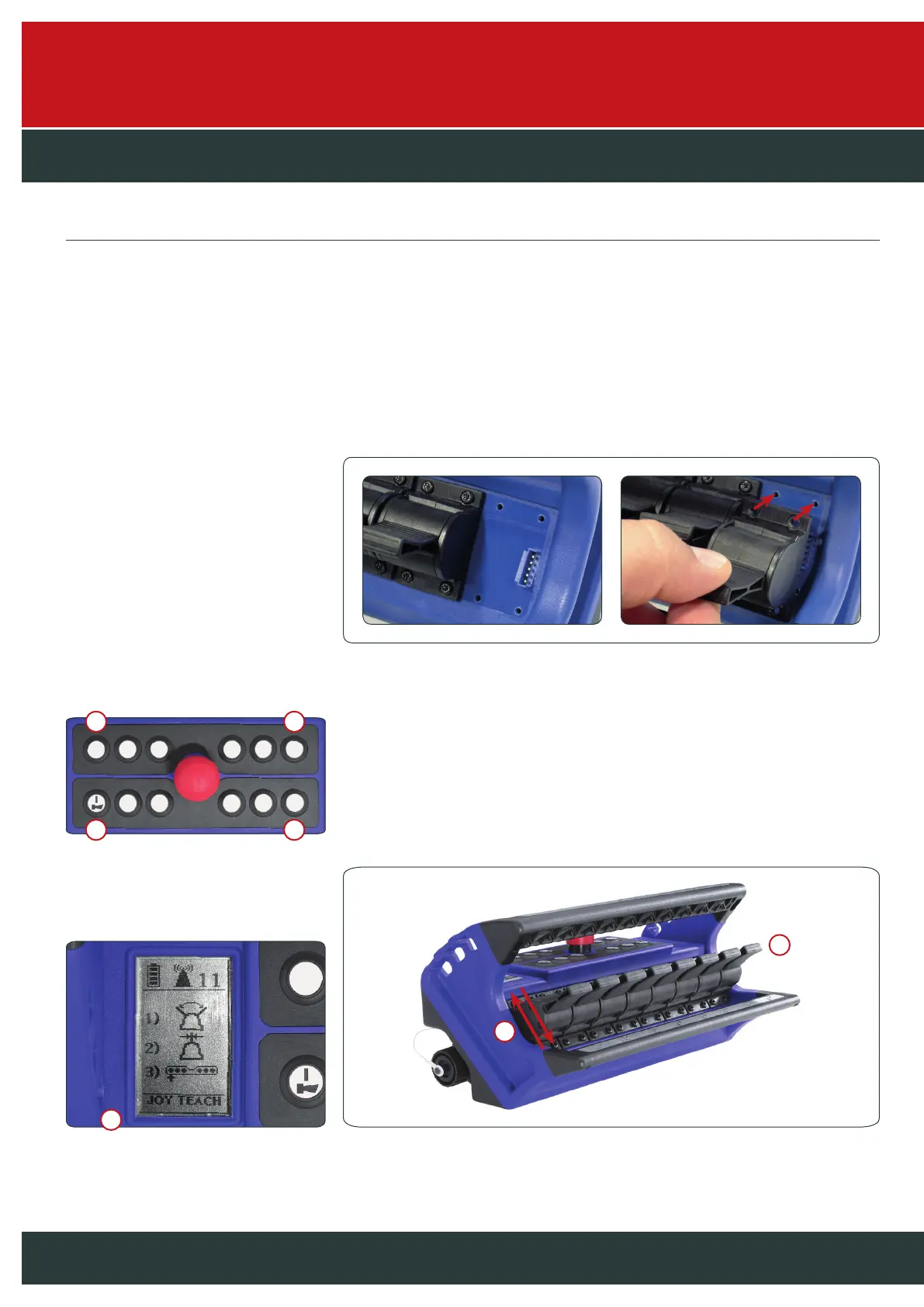
– Switch off the transmitter and remove the battery.
– Loosen all 4 screws of the Surface Mounted Joystick with a Torx 10 screwdriver and remove the
screws.
– Remove the Surface Mounted Joystick from the top. Insert the new Surface Mounted Joystick
and make sure that the plugs and sockets are above each other when mounting. Screw down
the Surface Mounted Joystick with the 4 screws previously removed and re-inset the battery.
Start teach mode after changing the Surface Mounted Joystick (see below).
> Surface Mounted Joystick teach mode activation
To activate teach mode, the transmitter must be switched on.
1. Press the two outer right buttons as well as the upper left button for 7 seconds.
2. Display will indicate “JOY TEACH” when teach mode is entered successfully.
3. Move all joysticks in both directions.
4. Bring joystick to zero position by releasing it.
5. Press the “On/Horn” button once. Teach mode will be closed and the new
Surface Mounted Joystick will perform to its full extent.
4
2
3
1 1
15



 To Next Page