·
NBVOICE
2
INTRODUCTION
Thank you for purchasing the NBVOICE PARTY SPEAKER ARIES CP2.
Please read this manual carefully, and keep it safe if in feature reference.
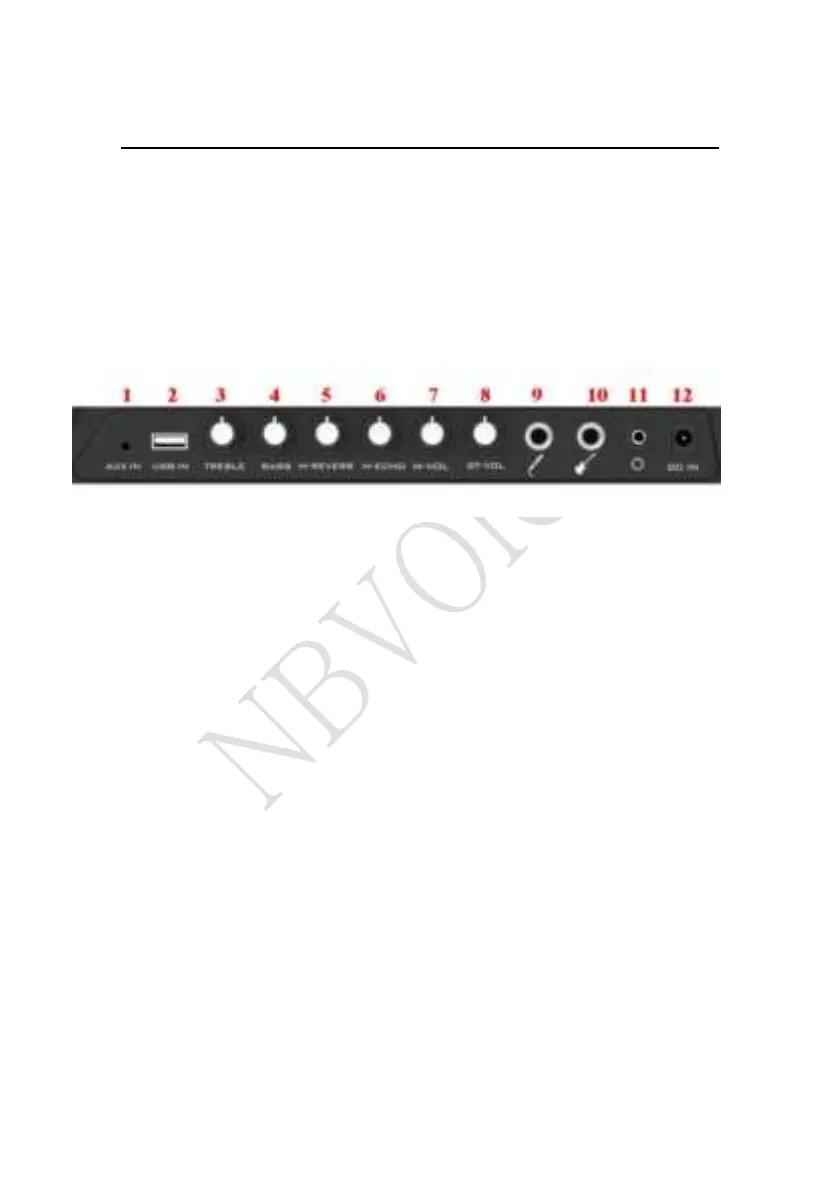
CONTROL PANEL
1. AUX IN
Accepts 3.5mm Minijack input connections.
2. USB SLOT
Play media files from a USB device by connecting the device to the
solt.
3. TRELBE
Increase and decrease the low frequency for MIC/LINE/AUX/MP3
sources at a range between -10dB to +10dB.
4. BASS
Increase and decrease the high frequency for MIC/LINE/AUX/MP3
sources at a range between -10dB to +10dB.
5. M-REVERB
Increase the echo effect of the microphone sound, and make people
live more full.
6. M-ECHO
Adjust the knob to make the microphone sound more pleasant.


 To Next Page