VAP Interface is Enable, then CPE will open the Wi-Fi
SSID means Service Set Identifier (Your Wi-Fi name).
Broadcast SSID: Enable, SSID is visible; Disable: SSID is hidden, the
user can’t scan the SSID if hide, have to input it by manual.
Encryption: Support None, WPA, WPA2, WPAPSK/WPA2, recommend
TKIP/AES mode
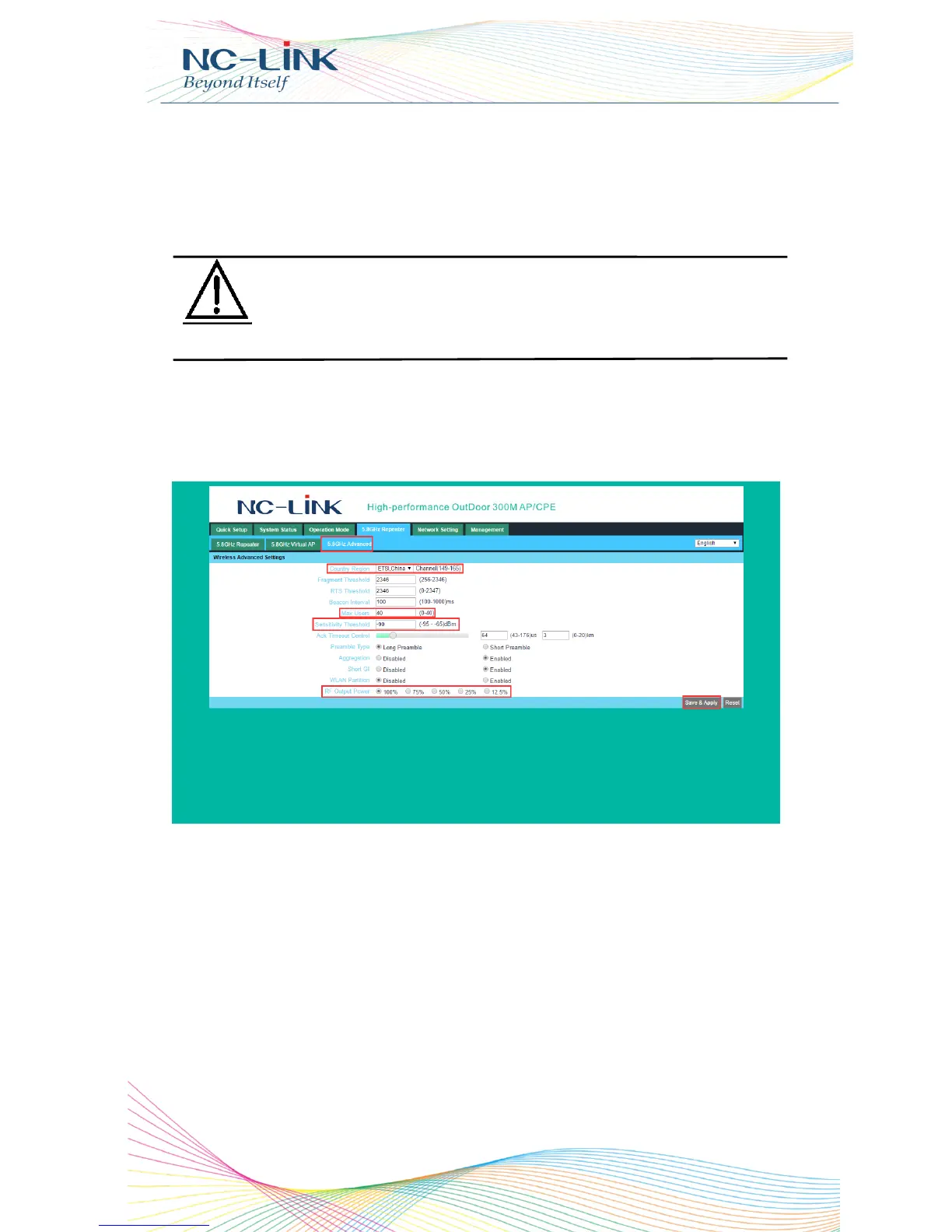
f) Advanced Settings
Click “Advanced Settings” → ”5.8GHz Repeater” → “5.8GHz
Advanced”
P16 Advanced Settings
Country Region: set it of your country or region
RF Output Power: 100%, 75%, 50%, 25%, 12.5%
MAX user: limit the number of connect client
Sensitivity threshold: limit the weak signal client to connect
Other advanced Setting: Professional installation or maintenance
person can set it accordingly. General, keep it default. Click Apply after
setting
There is no need to set Channel in Bridge Mode here, because
the CPE’s channel will keep it same with WLAN and AP’s
Channel in Bridge Mode


 To Next Page
 Loading...