NAVIGATION
Additional Maps and Upgrades – Please visit www.ndrive.com
Technical Help – Please contact the helpline on 0844 557 9677
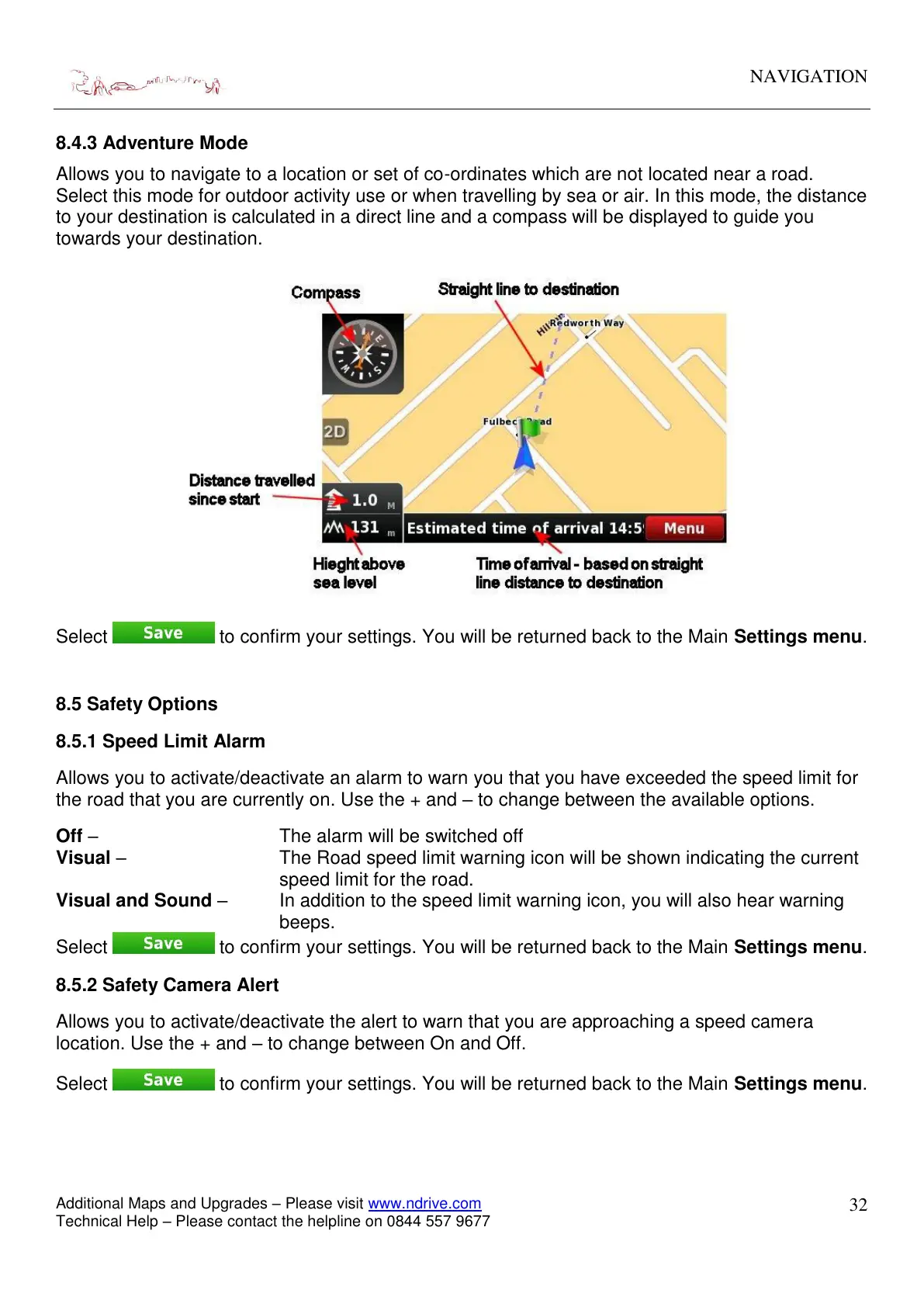
8.4.3 Adventure Mode
Allows you to navigate to a location or set of co-ordinates which are not located near a road.
Select this mode for outdoor activity use or when travelling by sea or air. In this mode, the distance
to your destination is calculated in a direct line and a compass will be displayed to guide you
towards your destination.
Select to confirm your settings. You will be returned back to the Main Settings menu.
8.5 Safety Options
8.5.1 Speed Limit Alarm
Allows you to activate/deactivate an alarm to warn you that you have exceeded the speed limit for
the road that you are currently on. Use the + and – to change between the available options.
Off – The alarm will be switched off
Visual – The Road speed limit warning icon will be shown indicating the current
speed limit for the road.
Visual and Sound – In addition to the speed limit warning icon, you will also hear warning
beeps.
Select
to confirm your settings. You will be returned back to the Main Settings menu.
8.5.2 Safety Camera Alert
Allows you to activate/deactivate the alert to warn that you are approaching a speed camera
location. Use the + and – to change between On and Off.
Select to confirm your settings. You will be returned back to the Main Settings menu.



 To Next Page