
 Need help?
Do you have a question about the Neat NOVO and is the answer not in the manual?
The NOVO unit provides security and comfort, primarily for elderly users in apartments or nursing homes.
This handbook is for advanced users and covers all NOVO versions, detailing common functions and specific characteristics.
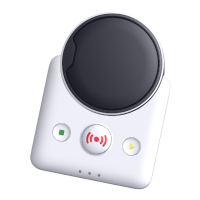
Description of the NOVO unit's design, size, and components, with top and bottom view illustrations.
Details the three distinct buttons on the NOVO unit: Alarm, Reset, and Extra button, and their functions.
Describes the six LEDs on the main unit, their colors, positions, and functions.
Identifies and describes the IP, AC, and External GSM antenna connectors for specific NOVO versions.
Lists and describes the TELE, LINE, AC, and External GSM antenna connectors for PSTN versions.
Details how to connect an external GSM antenna for better signal quality on IP/GSM versions.
Explains the On/Off button's function and how the CPU controls power, noting AC plug disconnection is insufficient.
Describes the accumulator lid, compartment, and connector, and the need for correct replacement accumulators.
Step-by-step instructions for safely replacing the backup accumulator.
Instructions for mounting the SIM card in IP/GSM versions, noting differences in SIM-hatch types.
Details how to mount the NOVO unit on a wall using key holes.
Explains the meaning of the front LEDs (L1-L3) in various operational states and failure conditions.
Details LED indications for the Alarm (L4), Reset (L5), and Extra (L6) buttons.
Describes LED behavior during Control/Service modes and unit boot/startup.
Covers acoustic feedback like pre-call melodies, disconnection signals, and warning sounds.
Alarms triggered by the user, e.g., pressing the Alarm button, or by accessories.
Alarms configured for automatic sending to the NEAT Carephone Management Portal for supervision.
Alerts for low backup accumulator voltage, including causes and user warnings.
Alerts for mains power loss and restoration, including user warnings and delays.
Describes alarms triggered by additional accessories like sensors or detectors.
Explains how alarm events are routed through alarm types, groups, and sequences to initiate calls.
Lists various events that can initiate an alarm, such as radio signals or button presses.
Describes the reason for an alarm and how its properties are configured.
Explains the system of 16 alarm type groups to which each alarm type must belong.
Details the configurable parameters for up to eight alarm sequences, including call type, carrier, and attempts.
Requires receiving personnel to acknowledge alarm calls and allows configuring sequence repetitions.
Unique ID for each NOVO unit used for caller identification at the alarm central.
Lists default indications for user-initiated alarm calls, including pre-call signals and LED blinking.
NOVO supports various market protocols for communication, defining parameters for data and voice transmission.
Details conversation control commands for the Home Phone protocol and a maximum conversation time.
Provides examples of alarm sequences, including simple sequences and SCAIP over IP/GSM.
Outlines configuration methods (buttons, CMP, software, HAND, LPP) across different NOVO versions.
Describes entering Control Mode to toggle illumination, change volume, or enter Service Mode.
Details entering Service Mode for functions like adding/removing transmitters and managing GSM antenna/Home/Away status.
Explains programming PSTN units using the Local Programming Protocol (LPP) via DTMF tones.
Guide to installing and running the NOVO Programmer software on Windows.
Overview of menus within NOVO Programmer: File, Communication, Option, and Help.
Details the Basic tab within NOVO Programmer for setting alarm codes, PIN, and own number.
Explains the unit's real-time clock, its continuous operation, and NTP server synchronization.
Describes how alarms are logged, synchronized to CMP, and the information stored for each alarm.
Provides essential guidelines for the safe use, handling, and maintenance of the NOVO unit.
Instructions on how to clean the NOVO unit using mild soap and a damp cloth, with safety precautions.
Critical safety warnings, suitability for users, and limitations regarding life support or integration.
Guidance on proper disposal and recycling of the product at the end of its life.
 General
| Category | Medical Equipment |
|---|---|
| Power | AC power adapter |
| Manufacturer | Neat |
| Camera | 4K resolution, wide-angle |
| Microphone | Multi-microphone array |
| Connectivity | Bluetooth, Wi-Fi, USB |
| Compatibility | Zoom, Microsoft Teams |

 To Next Page