EasyManua.ls Logo

Nebula DMS 300-4L - User Manual

Nebula DMS 300-4L
14 pages
Print Icon
To Next Page IconTo Next Page
Loading...
1
DMS 300-4L
Holter ECG Recorder
Operator’s Manual
Question and Answer IconNeed help?

Do you have a question about the Nebula DMS 300-4L and is the answer not in the manual?

Summary

Recorder Component Overview

Recorder Front View

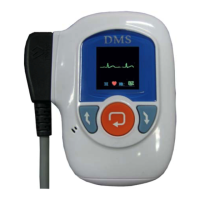
Identifies front panel components like the LCD screen and navigation buttons.

Recorder Rear View

Identifies rear panel components including the battery and SD card compartments.

Recorder Side View

Identifies side panel components, specifically the HDMI port for the ECG cable.

Recorder Bottom View

Identifies bottom panel components, specifically the SD card slot.

Initial Recorder Setup Procedures

SD Card and Battery Installation

Steps for inserting a compatible SD card and a new AAA battery into the recorder.

Power-On Display and Initialization

Describes the DMS logo display and 'Initializing SD Card' message after setup.

Initial Setup: Initialization and Battery Status

SD Card Detection and Error Handling

Explains the 'Initializing SD Card' message and the error display if no card is detected.

Low Battery Warning System

Details the two types of low battery warnings and user options for continuing or powering off.

Connecting Patient Cable and Data Status

Patient Cable Connection Prompt

Instructs to connect the patient cable and describes the expected 'Start/Setting' screen.

File Analysis Status Alert

Explains the 'Warning! File isn't Analyzed' message and its implication for data transfer.

Starting and Configuring the ECG Recording

Start;Setting Menu Navigation

Describes navigating between 'Start' and 'Setting' menus using arrow buttons and confirming with Enter.

Recorder Settings Configuration

Explains how to adjust settings like 'ID_Input', 'RESP', and 'Pace Maker' via the 'Setting' menu.

Recording Process and Monitoring

Start Recording Confirmation

Details the 'Start Recording' confirmation message and countdown before data erasure.

ECG Data Recording Display

Describes the LCD display during recording, showing date, time, leads, elapsed time, and battery status.

Advanced Settings and Options

Accessing Real-Time ECG Data

Explains how to view real-time ECG and heart rate by pressing the orange 'Enter' key.

Password Entry for Settings

Describes the password prompt that appears when selecting the 'Setting' menu.

System Settings Menu

System Setting Options

Details settings for 'Patient ID', 'PaceMaker', and 'Respiration Test' (On/Off).

Time Setting and Updates

Explains how to set the date and time, noting the internal time-keeping function.

Additional Settings and Exiting

Load Default Settings

Allows restoring the recorder to its default factory settings.

Version Help Information

Displays the recorder model number, serial number, and firmware version.

Exiting the Settings Menu

Instructs to press 'Exit' to return to the main 'Start/Setting' screen.

Removing Recorder and Data Download

Battery Removal and Disposal

Instructions on removing the battery cover, discarding the battery, and its single-use design.

ECG Cable Disconnection

Guidance on unsnapping lead wires and disconnecting the ECG cable from the recorder.

ECG Data Download Methods

Details two methods for downloading ECG data: SD card reader or HDMI-to-USB cable.

Patient Data Entry and Warnings

Instructions for entering patient data and crucial warnings about data overwriting.

Data Analysis and Completion

Loading Holter ECG Data

Instructions to click 'OK' to load and analyze the patient's data onto the CardioScan program.

Completing Data Transfer

Describes the prompt to remove the SD card or disconnect the recorder after analysis.

Overview

The DMS 300-4L Holter ECG Recorder is a portable device designed for continuous electrocardiogram (ECG) monitoring over an extended period, typically 24 to 48 hours. This allows for the detection of intermittent cardiac arrhythmias and other heart conditions that might not be captured during a standard, short-duration ECG. The device is compact and features an LCD screen for displaying real-time information and navigating settings.

Function Description

The primary function of the DMS 300-4L is to record and store ECG data from a patient over a prolonged duration. It connects to the patient via an ECG cable, which can be a 4-, 5-, 7-, or 10-electrode type, all compatible with the device's HDMI connector. The recorded data is saved onto an SD card inserted into the device. This data can then be downloaded to a computer running CardioScan software for analysis by a healthcare professional.

The recorder automatically detects the number of leads based on the connected ECG cable, displaying "3-Lead" for 4-, 5-, and 7-electrode cables, and "12-Lead" for 10-electrode cables. It also features settings for "ID_Input," "Respiration (RESP)," and "Pace Maker," which can be toggled On or Off through the device's menu. When "Patient ID" is set to "On," the user can assign an identification code to the patient, which is then transferred with the ECG data during download.

During recording, the LCD screen provides essential information such as the current date and time, the number of leads being recorded, the elapsed recording time, and a battery life indicator. The device also displays real-time ECG waveforms and the patient's heart rate when the "Enter" button is pressed, allowing the operator to navigate between different channels using the Up and Down arrow buttons.

Usage Features

The DMS 300-4L is designed for user-friendly operation, with clear on-screen prompts and navigation buttons.

  • Initial Setup:

    • SD Card Insertion: A compatible SD card must be inserted into the designated slot. The device will display "Initializing SD Card" upon successful recognition. If no SD card is detected, an error message "Please Insert SD Card!" will appear.
    • Battery Insertion: A new AAA battery is required for each recording. Upon insertion, the DMS logo will appear, followed by the "Initializing SD Card" message.
    • Low Battery Warnings: The device provides two types of low battery warnings. For batteries with sufficient life for a short recording, it will ask "Low Battery! Continue? Yes No." For nearly depleted batteries, it will display "Warning! Low Battery! Power Off?" and prevent further operation until a new battery is installed.
    • ECG Cable Connection: The device prompts "Please Insert Patient Cable!" before recording. Once the ECG cable is connected, the "Start/Setting" screen appears.
    • Unanalyzed File Warning: If the SD card contains an ECG recording that has not yet been downloaded and analyzed by the CardioScan software, the device will display "Warning! File isn't Analyzed!!!" and prevent further recording until the data is downloaded. This ensures that previous patient data is not overwritten before analysis.
  • Start/Setting Menu:

    • Navigation: The "Start/Setting" screen displays current recorder settings and a 30-second countdown. Users can navigate between "Start" (to confirm settings and begin recording) and "Setting" (to adjust parameters) using the blue Up and Down arrow buttons. The orange "Enter" button confirms the selection.
    • Settings Adjustment: Selecting "Setting" requires a 4-digit password to access the settings menu. Here, users can adjust "System Setting," "Time Setting," "Load Default," "Version Help," and "Exit."
    • System Setting: Allows toggling "Patient ID," "PaceMaker," and "Resp Test" On or Off. If "Patient ID" is On, an identification code can be assigned.
    • Time Setting: Enables manual adjustment of the date and time. The device has an internal time-keeping function, so this may not be necessary for every patient, especially if pre-enrolled via CardioScan software.
    • Load Default: Restores the recorder to its factory settings.
    • Version Help: Displays the recorder's model number, serial number, and firmware version.
    • Start Recording: After confirming settings, a 10-second countdown "Start Recording" appears. Selecting "OK" initiates the recording. If no selection is made, the recording starts automatically after the 30-second countdown on the "Start/Setting" screen expires.
    • Erasing ECG File: Before starting a new recording, the device displays "Erasing ECG File!" for 5-10 seconds, automatically deleting any existing ECG data on the SD card that has been marked as downloaded.
  • During Recording:

    • LCD Display: The screen shows date, time, number of leads, elapsed time, and battery status.
    • Real-time ECG: Pressing the orange "Enter" key displays real-time ECG waveforms and heart rate, with navigation between channels using the Up and Down arrows.
    • Power Saving: The LCD screen dims after approximately 30 seconds to conserve battery life.

Maintenance Features

The DMS 300-4L incorporates features and guidelines to ensure proper data integrity and device longevity.

  • Battery Management: It is crucial to use a NEW AAA battery for each individual test to minimize the risk of incomplete or missing ECG data. The device's low battery warnings are a key maintenance feature, prompting the user to replace batteries before they fail during a recording.
  • SD Card Handling: The SD card is the primary storage medium. Users are advised to remove the SD card and insert it into an SD card reader connected to a PC running CardioScan software for data download. Alternatively, the recorder can be connected directly to the PC via an HDMI-to-USB download cable.
  • Data Download Protocol: The manual emphasizes a specific download protocol to prevent data loss. When a patient returns, the battery and ECG cable should be removed. Before starting a new recording, the existing data on the SD card must be downloaded to the CardioScan software. The act of downloading places an electronic "marker" on the SD card, indicating that the ECG file can now be overwritten. This prevents accidental erasure of unanalyzed data. The "Warning! File isn't Analyzed!!!" message serves as a critical safeguard against overwriting.
  • CardioScan Software Integration: The CardioScan software plays a vital role in the maintenance workflow. It not only analyzes the ECG data but also facilitates patient enrollment, automatically updates the date and time on the recorder if pre-enrolled, and manages the "analyzed" status of recordings on the SD card.
  • Recorder Reset: The "Load Default" option in the settings menu allows users to quickly restore the recorder to its default factory settings, which can be useful for troubleshooting or preparing the device for a new patient with standard configurations.

By adhering to these usage and maintenance guidelines, the DMS 300-4L Holter ECG Recorder can reliably capture and store critical cardiac data for diagnostic purposes.

Nebula DMS 300-4L Specifications

General IconGeneral
TypeDigital Mammography System
CategoryMammography
Detector TypeAmorphous Selenium (a-Se)
Workstation CompatibilityDICOM 3.0
Power Requirements220 VAC, 50/60 Hz