SETTING THE CLOCK
To enter the oven clock time, ex. 11 : 30 (A.M
or P.M).
1. Touch CLOCK button.
2. Touch CANCEL button.
3. Touch 1-MIN. button 6 times.
4. Touch CLOCK button again to confirm.
Default setting is 1:01 when the oven is
plugged in.
You can check the clock time when cooking
is in progress by touching the CLOCK
button.
MICROWAVE COOKING
Suppose you want to cook for 5 minutes at
60% of microwave power.
1 Touch MICRO button.
2 Touch 1-MIN. button five times.
3 Touch POWER button 3 times.
4 Touch START button.
Step 3 is not necessary if you are to cook at
100% power level.
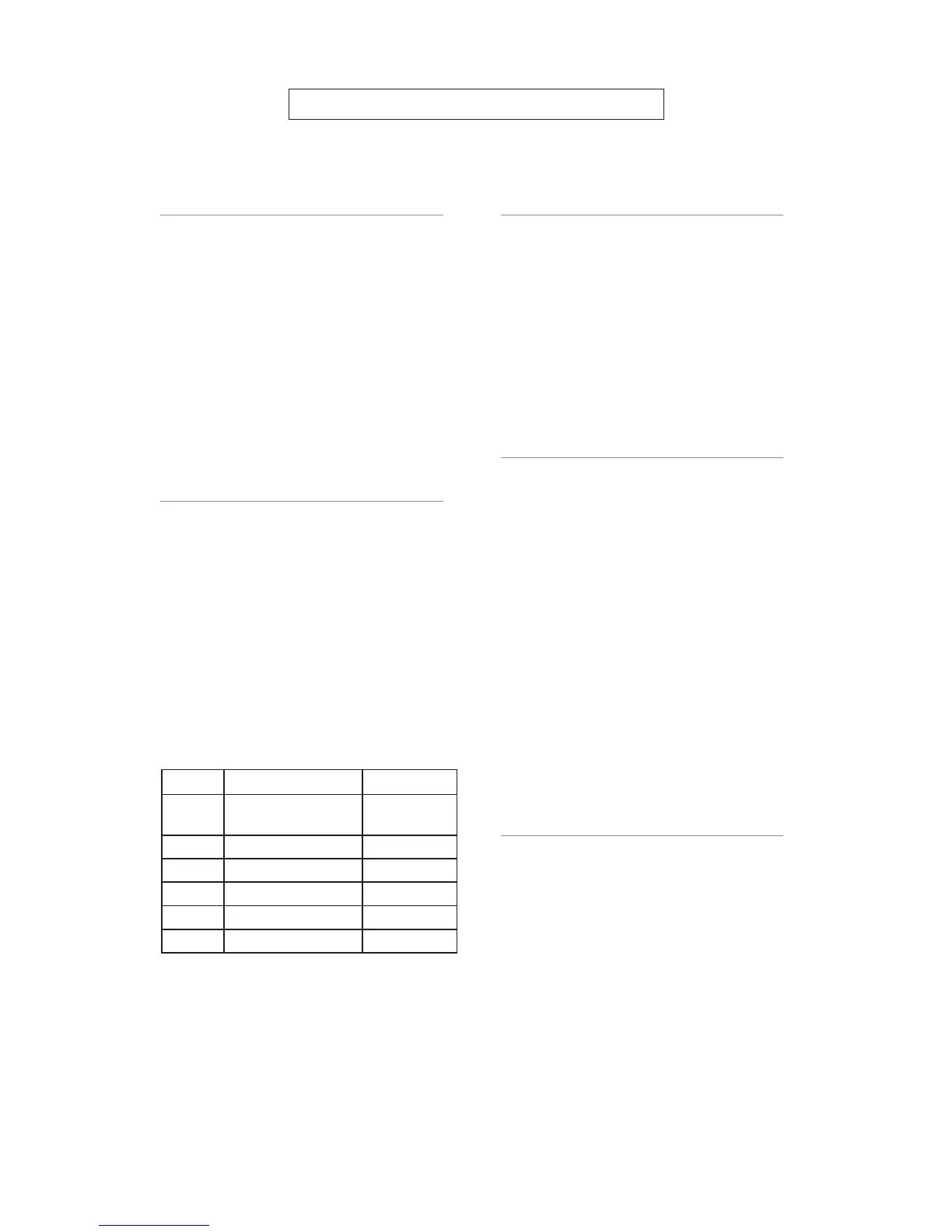
----------POWER BUTTON----------
By pressing the power button a number of
times, you are selecting different microwave
power levels as the following table shows
Press Screen display Power Level
Once 100
100% of
total
Twice 80 80%
Thrice 60 60%
4 times 40 40%
5 times 20 20%
6 times 0 (setting the timer) 0%
GRILL COOKING
Grill cooking is particularly useful for thin
slices of meat, steaks, chops, kebabs,
sausages or pieces of chicken. It is also
suitable for hot sandwiches and au grain
dishes
Suppose you want to grill for 40 minutes.
1 Touch GRILL button.
2 Touch 10-MIN. button 4 times.
3 Touch START button.
COMBINATION COOKING
COMBINATION 1
30% time for microwave cooking.
70% time for grill cooking.
Use for fish, potatoes, or au gratin.
COMBINATION 2
55% time for microwave cooking.
45% time for grill cooking.
Useful for cooking pudding omelets, baked
potatoes, and poultry.
Suppose you want to set the oven to
COMBINATION 1 for 25 minutes.
1 Touch COMBINATION 2 button.
2 Touch 10-MIN. button 2 times and 1-MIN.
button 5 times.
3 Touch START button.
H
H
O
O
W
T
T
O
O
S
S
E
E
T
T
T
T
H
H
E
E
O
O
V
V
E
E
N
N
C
C
O
O
N
N
T
T
R
R
O
O
L
L
S
S
MULTI-STAGE COOKING
The oven can be programmed to do several
consecutive functions.
The following steps are needed if we are
going to set a cooking program which
involves jet defrost, microwave, and grill.
1 Touch CANCEL button to reset the
system.
2 Input Quick-defrost program.
3 Input microwave-cooking program.
4 Touch MEMORY button.
7


 To Next Page
 Loading...