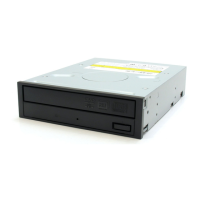
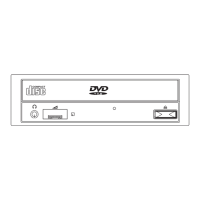
This document describes the ND-3520A Internal DVD R/RW Drive, a versatile optical drive designed for use within a host PC. It functions as both a reader and writer for various CD and DVD formats, offering a wide range of compatibility and performance features.
Function Description
The ND-3520A is an internal drive, meaning it is designed to be installed inside a computer chassis. Its primary function is to read and write data to and from both DVD and CD media. This includes:
- Reading: DVD-ROM, DVD-Video (with CSS protection), DVD-R, DVD+R, DVD-RW, DVD+RW, CD-Audio, CD-ROM, CD-ROM XA, Photo CD, CD-I, Video CD, and CD-TEXT.
- Writing: DVD+R, DVD+R DL, DVD+RW, DVD-R, DVD-R DL, DVD-RW, CD-R, and CD-RW.
The drive supports various modes and formats for both DVD and CD media, including single and dual-layer DVDs, multi-border, multi-session, and different CD-ROM modes. It also supports different write methods such as Disc at Once, Track at Once, Session at Once, and Packet Writing for CDs, and Disc at Once, Random Write, Sequential Write, Incremental, Multi-Border, and Restricted Overwrite for DVDs.
Important Technical Specifications
DVD Section:
- User Data Capacity:
- Single layer, 12cm: 4.7 GBytes
- Dual layer, 12cm: 8.54 GBytes
- Single layer, 8cm: 1.46 GBytes
- Dual layer, 8cm: 2.66 GBytes
- User Data Blocks: 2048 Bytes/block
- Data Transfer Rate (Maximum):
- DVD-ROM (Single Layer): 22 MBytes/sec
- DVD-ROM (Dual Layer): 10 MBytes/sec
- DVD-R, +R: 22 MBytes/sec
- DVD-RW, +RW: 11 MBytes/sec
- DVD-Video with CSS Protection: 6.9 MBytes/sec
- Access Time: 140 msec (1/3 Stroke read, average)
- Hard Error Rate: Below 10^-12 Block/bit (After error correction)
- Write Speed and Transfer Rate (Examples):
- DVD+R Write (16X CAV): 9-22 MBytes/sec
- DVD+R DL Write (4X CLV): 5.5 MBytes/sec
- DVD+RW Write (8X ZCLV): 5.5-11 MBytes/sec
- DVD-R Write (16X CAV): 9-22 MBytes/sec
- DVD-R DL Write (4X CLV): 5.5 MBytes/sec
- DVD-RW Write (6X ZCLV): 5.5-8.2 MBytes/sec
- Block Length Supported: 2048 Bytes/sector
CD Section:
- User Data Capacity:
- Mode 1: 656 Mbytes/disc
- Mode 2: 748 Mbytes/disc
- User Data Blocks:
- Mode 1 and Mode 2 Form 1: 2048 Bytes
- Mode 2: 2336 Bytes
- Mode 2 Form 2: 2328 Bytes
- Access Time: 120 msec (1/3 Stroke Read, typical)
- Hard Error Rate: Below 10^-12 Block/bit (After error correction)
- Data Transfer Rate (Maximum):
- CD-ROM/CD-R: 7200 Kbytes/sec (Mode 1 and Mode 2 Form 1)
- CD-RW: 4800 KBytes/sec (Mode 1 and Mode 2 Form 1)
- Write Speed and Transfer Rate (Examples):
- CD-R Write (48X CAV): 3000-7200 KBytes/sec
- CD-RW Write (24X ZCLV): 3000-3600 KBytes/sec
- Block Length Supported:
- CD-Audio: 2352 Bytes
- CD-ROM (mode 1): 2048 Bytes
- CD-ROM XA/CD-I form 1: 2048 and 2332 Bytes
- CD-ROM XA/CD-I form 2: 2332 Bytes
IDE Interface Section:
- Burst Transfer Rate: PIO mode 4, DMA Single Word mode 2, DMA Multi Word mode 2, Ultra DMA 33 mode 2
- Memory Buffer: 2 MBytes
Audio Section:
- Frequency Response: 20 Hz - 20 kHz +3.0 dB, -3.0 dB
- S/N Ratio: > 80dB (1kHz) (T.B.D.)
- Total Harmonic Distortion: < 0.10% (1KHz)
- Output: 0.75 V (rms) ±3.0 dB / 10 KΩ load at 1 kHz: 0 dB
General Specifications:
- Power Supply: 5V 1.6A / 12V 1.8A
- Dimensions (W x H x D): 14.82 x 4.2 x 19.0cm (5 13/16 × 1 5/8 x 7 4/5 inch)
- Weight: 1.0 Kg (2.20 lbs)
Environment:
- Ambient conditions for use:
- Temperature: +5 deg C to +50 deg C
- Humidity: 20% to 80% (Maximum Wet Bulb Temperature 29 deg C, No condensation)
- Ambient conditions for storage:
- Temperature: -40 deg C to +65 deg C
- Humidity: 20% to 90% (Maximum Wet Bulb Temperature 38 deg C, No condensation)
Usage Features
Installation:
- The drive is installed in a host PC, typically requiring mounting rails.
- It connects to the computer via a power cable and an IDE I/O BUS connector. The colored stripe on the ribbon cable should align with the arrow on the connector.
- Jumper blocks on the rear of the drive allow configuration of the DVD R/RW drive mode (CSEL, SLAVE, MASTER) on the IDE interface.
Disc Handling:
- Inserting a Disc: Press the Load/Eject button to open the disc tray, place the disc label-side up in the center of the tray, and press Load/Eject again to retract.
- Removing a Disc: Press the Load/Eject button to open the tray, remove the disc, and press Load/Eject again to retract.
- Vertical Installation: When installed vertically, discs must be inserted with the label side facing the correct direction (either left or right depending on the installation orientation) to ensure proper seating. Only 12cm discs are supported in vertical installations; 8cm discs should not be used.
- Emergency Eject: In case of power failure or software disablement of the eject button, a steel rod (approx. 1.3mm diameter) can be inserted into the emergency eject hole to partially eject the tray, which can then be pulled open manually.
Front Panel Features:
- BUSY Indicator: Lights green when data is being read or written.
- Tray Panel: Prevents dust from entering the drive.
- Emergency Eject Hole: Used for manual disc ejection.
- Load/Eject Button: Ejects or retracts the disc tray.
Rear Panel Connectors:
- Jumper Blocks: For drive mode configuration.
- DIGITAL OUT Connector: For connecting CD Digital Audio to an audio board.
- Line Out Connector: For connecting CD-Audio to an audio board.
- I/O BUS Connector: For control and data transfer with the computer.
- Power Connector: Provides operating power from the host computer.
Maintenance Features
Cleaning:
- The DVD R/RW drive should be cleaned with a soft, damp cloth and mild detergent if necessary.
- Avoid using solvents like benzine or paint thinner, as these can cause color changes or deformation.
Disc Care:
- Do not touch the data side of the disc.
- Do not apply paper labels or write on any part of the disc (data or label side).
- If dust or fingerprints are on the disc, wipe with a soft cloth from the center to the edge.
- Do not use benzine, paint thinner, record cleaner, or static repellent on discs.
- Do not store discs in direct sunlight or high temperatures.
- Avoid using cracked, misshapen, or adhesively repaired discs, as they can break at high speeds and cause injury.
Safety Precautions:
- Laser Safety: The drive employs a laser. Do not remove the cover or attempt to service the device when connected, due to the possibility of eye damage from visible and invisible laser radiation. A Class 1 Laser Product label is present.
- General Safety:
- Do not disassemble or modify the unit.
- Prevent foreign objects or fluids from entering the unit.
- Use only the indicated power voltage.
- Avoid storing or using the unit in places subject to shocks, strong vibrations, extreme temperatures, high humidity, direct sunlight, near heat-generating equipment, or in dusty places.
- Do not place heavy objects on the unit.
- Do not stick hands into the disc insertion slot.
- Set volume to minimum before turning on power to prevent hearing impairment.
- Keep the disc tray closed when not inserting or removing discs to prevent injury.
- When disconnecting from computer equipment, wait a few minutes for the enclosure to cool down, as it may reach temperatures over 60°C.
- Consult the dealer or an experienced radio/TV technician for help with interference issues.
- Changes or modifications to the unit without manufacturer approval will void user authority to operate the equipment.

 Need help?

 To Next Page
 General