2
Connect the Cables
3
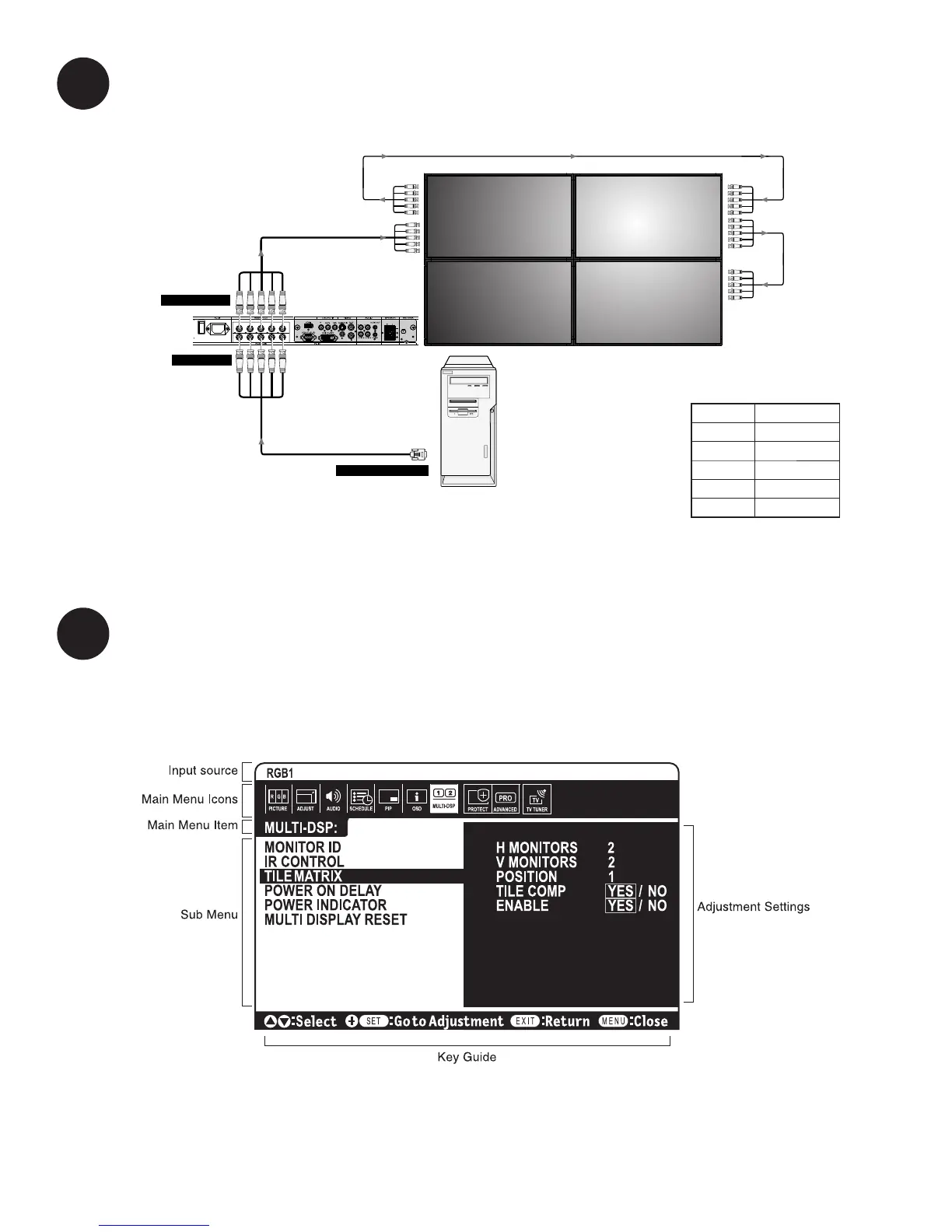
Use the TileMatrix feature to setup the 2x2 Video Wall
4
The TileMatrix feature of the NEC Display allows one image to be expanded and displayed over a 2x2 Video Wall
setup.** This is accessed through the OSD (On-Screen Display) Controls under the “MULTI-DISP” main menu icon.
Under the “TileMatrix” sub-menu, enable the feature and set the necessary parameters that match the 2x2
Video Wall setup.
Use BNC cables to connect the NEC Displays.
*PerfectAlign™ is a registered trademark of Digital Factory. Patent Pending. All rights reserved.
**Up to twenty fi ve (25) NEC Displays may be used for a multiple display set up using the TileMatrix feature.
Display 1
Display 1
Display 2
Display 4
Display 3
RGB/HV IN
RGB/HV OUT
RGB/HV OUT
RGB/HV IN
RGB/HV IN
BNC x 5
BNC x 5
PC
Mini D-sub 15 pin
To analog RGB output
To RGB/HV IN
To RGB/HV OUT
WIRE CONNECTION
Red Red
Green Green
Blue Blue
Black H-Sync
Yellow V-Sync
NOTE: Make sure all BNC cables
are connected correctly.
5-BNC CABLE GUIDE



 To Next Page