7
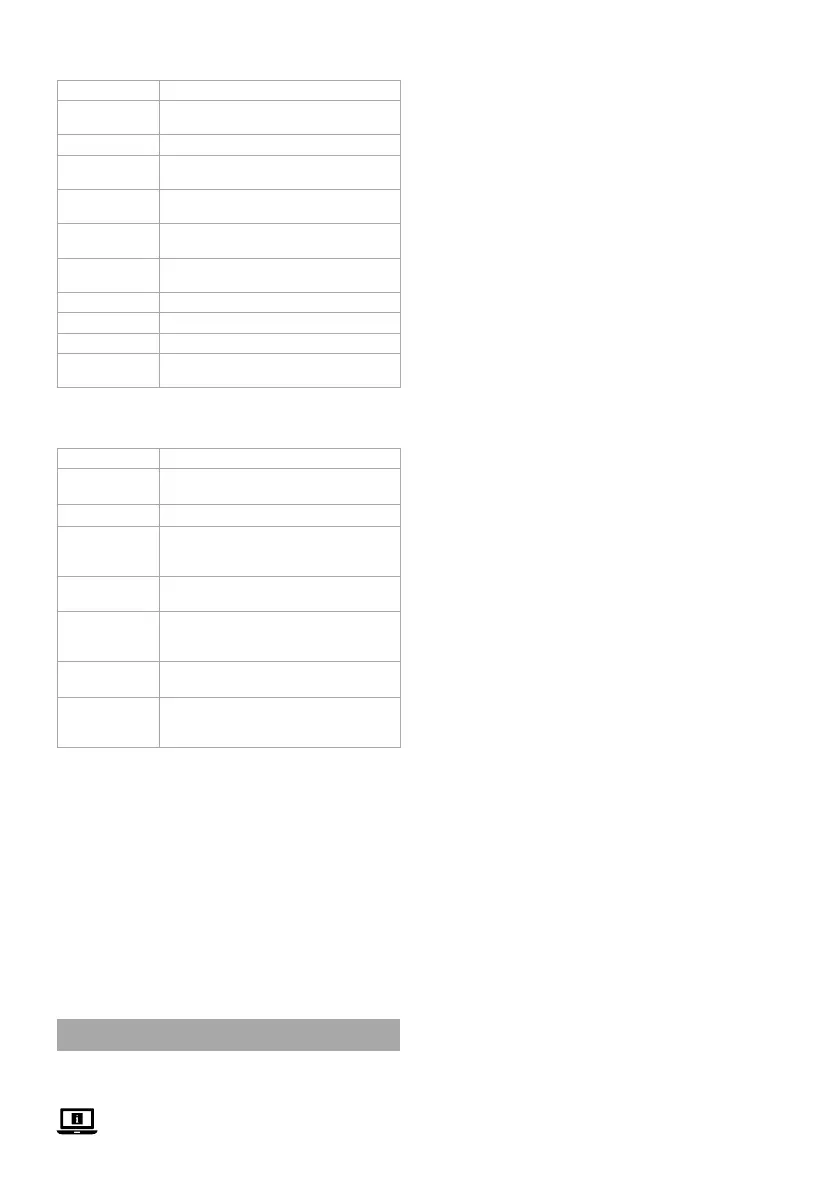
Function descriptions of the software (image B)
Function Description
Pair IPC Check the status of the IPC channel and
whether it is connected.
System Open a new window with the system settings.
Playback Playback video recordings stored on the
hard disk.
Record mode Schedule video recordings throughout the
week.
Backup Backup the videos of the hard disk to an
external hard disk/USB.
PTZ Control Control the camera from a distance (not
available for this product).
IPC Cong Adjust the settings of the cameras.
Info Shows information about the system
Shutdown Switch o the system.
View 4 Switch between an overview of 1 or 4 camera
views.
Function descriptions of the Nedis SmartLife
app (image C)
Function Description
Playback C
2
Tap C
2
to play back the video footage
stored on the hard disk.
Message C
3
Tap C
3
to view human detection alarms.
Albums C
4
Tap C
4
to view recorded video footage
and screenshots saved to an album on your
smartphone.
Settings C
5
Tap C
5
to open a new window with the
system settings
Screenshot C
7
Tap C
7
to make a screenshot of the current
camera view. The screenshot will be saved to
an album on your smartphone.
Security camera
speaker C
8
Tap and hold C
8
to speak through the
speaker of the camera.
Record video C
9
Tap C
9
to record the current camera view.
The video footage will be saved to an album
on your smartphone.
Declaration of Conformity
We, NEDIS, as manufacturer, declare that product SLNVR201CWT
from the brand Nedis, produced in China was tested according to all
relevant CE standards / regulations and passed all tests.
The complete Declaration of Conformity ( + safety datasheet if
applicable ) can be found and downloaded via http://webshop.
nedis.com
For other compliant-related information, please contact customer
service desk for support:
via website: http://www.nedis.com
via e-mail: service@nedis.com
NEDIS B.V., De Tweeling 28,
5215 MC ’s-Hertogenbosch, THE NETHERLANDS
c
Kurzanleitung
Smart Wireless
NVR-Sicherheits-Set
SLNVR201CWT
Weitere Informationen nden Sie in der erweiterten
Anleitung online: ned.is/slnvr201cwt
Bestimmungsgemäße Verwendung
Dieses Produkt ist nur zur Verwendung als Smartes Wireless-
Sicherheits-Set gedacht.
Das Produkt ist nur zur Verwendung innerhalb von Gebäuden
gedacht.
Jegliche Modikation des Produkts kann Folgen für die Sicherheit,
Garantie und ordnungsgemäße Funktionalität haben.
Hauptbestandteile (Abbildung A)
1 Antenne
2 Basisstation
3 Festplattenabdeckung
4 Ethernet-Anschluss
5 VGA-Ausgang
6 HDMI-Ausgang
7 USB-Anschluss (2x)
8 DC-Stromanschluss
9 Bohrschablone (2x)
q Dübel (6x)
w Schraube (6x)
e Festplattenschraube (4x)
r HDD-LED
t Betriebs-LED
y Power-LED
u Schelle
i Kamera (2x)
o Lautsprecher
p Mikrofon
a Objektiv
s Lichtempndlicher Sensor
d Adapterstecker
f Kopplungs-Taste
g Maus
h Ethernet-Kabel
j Netzkabel (3x)
Benutzeroberäche der Software (Abbildung B)
1 Neu laden/Anmelden
Symbol
2 QR-Code
3 Rechtsklick-Menü
4 Signalstärke der
verbundenen Kamera
5 Stummschalten/
Stummschaltung aufheben
Benutzeroberäche der App (Abbildung C)
1 Menü
2 Wiedergabe
3 Nachricht
4 Alben
5 Einstellungen
6 Stummschalten/
Stummschaltung aufheben
7 Screenshot
8 Sicherheitskamera-
Lautsprecher
9 Video aufzeichnen
q Vollbild
Sicherheitshinweise
-
WARNUNG
• Vergewissern Sie sich, dass Sie die Anweisungen in diesem
Dokument vollständig gelesen und verstanden haben, bevor Sie
das Produkt installieren oder verwenden. Heben Sie die
Verpackung und dieses Dokument zum späteren Nachschlagen
auf.
• Verwenden Sie das Produkt nur wie in diesem Dokument
beschrieben.
• Verwenden Sie das Produkt nicht, wenn ein Teil beschädigt ist
oder es einen Mangel aufweist. Ersetzen Sie ein beschädigtes
oder defektes Produkt unverzüglich.
• Lassen Sie das Produkt nicht herunterfallen und vermeiden Sie
Kollisionen.
• Setzen Sie das Produkt keinem Wasser oder Feuchtigkeit aus.
• Dieses Produkt darf nur von einem ausgebildeten Techniker
gewartet werden, um die Gefahr eines Stromschlags zu
reduzieren.
• Verwenden Sie nur das mitgelieferte Stromkabel.
• Trennen Sie das Produkt von der Stromquelle und anderer
Ausrüstung, falls Probleme auftreten.
• Ziehen Sie das Produkt niemals am Kabel aus der Steckdose.
Halten Sie immer den Stecker fest und ziehen Sie daran.
Optional: Installieren der Festplatte (nicht im
Lieferumfang enthalten) (Abbildung D)
1. Drehen Sie die Basisstation A
2
auf einer weichen Oberäche
vorsichtig auf den Kopf.
2. Lösen Sie die Schrauben, um die Festplattenabdeckung A
3
von
A
2
zu lösen.


 To Next Page
 Loading...