EasyManua.ls Logo

nedis TVCM5830BK - User Manual

nedis TVCM5830BK
8 pages
Print Icon
To Next Page IconTo Next Page
Loading...
15
3. The Insensitivity Of Remote Control (The Funional Disnce Is Less Than 3m.)
 

1
2
Abnormal Operation: The TV Mount Can't Be Adjusted To 0
°
Or 75
°
 

1
Can't Operate
2
  
 
 

2
Abnormal Noise

1
2
INSTALLATION MANUAL
Remote Control Motorized TV Ceiling Mount
TVCM5830BK
200x200
300x300
400x200
400x400
&  



Question and Answer IconNeed help?

Do you have a question about the nedis TVCM5830BK and is the answer not in the manual?

Summary

Remote Control Insensitivity

Abnormal Operation: TV Mount Adjustment Issues

TV mount cannot be adjusted to 0° or 75°.

TV Mount Not Operating

Troubleshooting steps when the TV mount fails to operate.

Abnormal Noise from TV Mount

Guidance for addressing unusual sounds emitted by the TV mount.

Wooden Ceiling Mounting

Solid Brick and Concrete Ceiling Mounting

Installing the VESA Plate

For Flat Back Screens

Attaching the VESA plate to TVs with flat back panels.

For Recessed Back Screens or A;V Access

Attaching VESA plate to TVs with recessed backs or A/V input access.

Hooking the TV onto the Ceiling Mount

Installing Decorative Covers and Running Cables

Placing the IR Receiver

Remote Control Operation

Standard Operation Instructions

Using the remote control for standard TV mount functions.

Manual Mode Operation

How to manually adjust the TV mount's position.

LEARN MODE Operation

Troubleshooting and Repair

Buzzer Alarm Sound Error

Resolving constant alarm sounds from the TV mount.

Remote Control Power Loss

Addressing abnormal power drain in the remote control.

Remote Control Buttons Not Working

Fixing issues with unresponsive remote control buttons.

Maintenance Checks

Overview

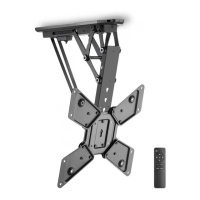
The Remote Control Motorized TV Ceiling Mount is a sophisticated device designed to provide a flexible and space-saving solution for mounting televisions. Its primary function is to allow a TV to be discreetly stored flat against the ceiling and then lowered or tilted to an optimal viewing angle using a remote control. This motorized functionality enhances convenience and offers a clean, minimalist aesthetic in any room.

Function Description

The core function of this device is to motorize the movement of a television, allowing it to be stowed flush with the ceiling and then deployed for viewing. The mount supports both wooden and solid brick/concrete ceiling installations, ensuring versatility across different construction types. Once installed, the VESA plate attaches to the back of the TV, and the entire assembly hooks onto the ceiling mount. Decorative covers are then installed to conceal the mechanism and cables, contributing to a tidy appearance.

The motorized movement is controlled via a dedicated remote control (RMT-01). This remote allows for upward and downward movement of the TV, as well as stopping at any desired position. A key feature is the ability to save two preferred viewing positions (Memory 1 and Memory 2). Users can program these positions by holding down the respective memory button for three seconds until a double beep confirms the save. Recalling a saved position is as simple as pressing the memory button followed by the OK button, prompting the mount to automatically swivel to the stored location.

Beyond the dedicated remote, the mount also boasts a "LEARN MODE" feature, which allows users to program certain functions (upward movement, downward movement, and OK/stop) onto their existing TV remote control. This eliminates the need for multiple remotes, streamlining the user experience. The learning process involves a series of button presses on both the dedicated and TV remotes, guided by LED light and buzzer feedback from the IR receiver. This mode is particularly useful for popular TV remote brands, though it's noted that not all functions of the matched remote can be replaced.

The system incorporates a reset mode for troubleshooting. If the mount exhibits abnormal operation, such as not adjusting to 0° or 75°, a system reset can be performed by restarting the power and then pressing and holding the "SET" button for three seconds, repeated three times. This allows the system to automatically find its maximum position without human intervention.

Usage Features

The motorized TV ceiling mount offers several usage features designed for convenience and safety:

  • Motorized Movement: Smooth and controlled upward and downward movement of the TV, with a continuous adjustable tilt range of 0° to 75° (default flat against the ceiling to maximum tilt).
  • Remote Control Operation: Intuitive control via the RMT-01 remote, including dedicated buttons for up, down, stop, and two memory positions.
  • Memory Function: Ability to save and recall two preferred viewing angles, providing quick access to frequently used positions.
  • LEARN MODE: Programmable functionality to integrate basic mount controls (up, down, stop) into an existing TV remote, reducing remote clutter.
  • Manual Mode: In addition to remote control, the mount can be manually adjusted. If the TV is in any position (except the minimum against the ceiling) and pushed up, it will automatically return to the minimum position. If pushed up slightly from the minimum position, it will automatically unfold to the maximum position.
  • Safety Mechanisms: The system is designed with safety in mind. It includes warnings against exceeding the rated weight, improper installation, and using the product outdoors. The installation process emphasizes securely tightening screws and ensuring the supporting surface can bear the combined weight of the equipment.
  • Cable Management: Cable ties are provided to secure cables, and users are advised to leave slack for arm movement, preventing strain on connections. Decorative covers further enhance cable concealment.
  • IR Receiver Placement: The IR receiver, crucial for remote control functionality, should be placed in a position where its transmission is unobstructed, ensuring reliable operation.
  • No-load Running Prohibition: The manual explicitly states that no-load running is prohibited, indicating that the mount should always have a TV attached during operation to prevent potential damage or malfunction.

Maintenance Features

Maintaining the motorized TV ceiling mount ensures its longevity and safe operation. The manual outlines several key maintenance aspects:

  • Regular Security Checks: Users are advised to check that the bracket is secure and safe to use at regular intervals, specifically every three months. This helps identify and address any loosening or wear before it becomes a problem.
  • Troubleshooting Guide: The manual includes a "Repair" section that acts as a troubleshooting guide for common issues. This covers problems like the buzzer constantly giving an alarm sound (indicating a positioning signal error), abnormal loss of power (due to dead batteries in the remote), and remote control buttons not working.
  • Battery Replacement: For remote control issues, the first step is to check and replace the batteries (NO.7 AAA battery for the RMT-01).
  • Infrared Ray Receiver Check: If remote control problems persist, checking the proper connection and functionality of the infrared ray receiver is recommended.
  • Power Adaptor Check: For "Can't Operate" issues, verifying the power adaptor's connection and functionality is crucial. The manual guides users to check for buzzer sounds or red light power indications and suggests replacing the adaptor if it's faulty.
  • Product Replacement Guidance: For persistent issues that cannot be resolved through basic troubleshooting (e.g., abnormal noise, remote control insensitivity after battery replacement, or mount not adjusting after a reset), the manual directs users to contact their local distributor for product replacement.
  • Authorization for Electronic Components: A critical warning states not to disassemble or change the electronic components of the product without authorization, implying that internal repairs should only be handled by qualified personnel or through official channels.
  • System Reset for Abnormal Operation: The reset procedure, as described in the "Function Description," also serves as a maintenance step to recalibrate the system if it experiences abnormal movement or positioning.

Overall, the Remote Control Motorized TV Ceiling Mount is designed for ease of use, aesthetic integration, and reliable performance, with clear instructions for both operation and basic maintenance to ensure a satisfactory user experience.

nedis TVCM5830BK Specifications

General IconGeneral
Mounting typeCeiling
Maximum VESA mount400 x 400 mm
Minimum VESA mount200 x 200 mm
Maximum screen size55 \
Minimum screen size23 \
Maximum weight capacity30 kg
Panel mounting interface200 x 200, 300 x 300, 400 x 200, 400 x 400 mm
Number of displays supported1
Maximum distance to ceiling663 mm
Cables includedIR sensor
Product colorBlack
Housing materialSteel
AC input voltage220 - 240 V
AC input frequency50 - 60 Hz
Power cable length1.5 m
Harmonized System (HS) code85299097
Weight and Dimensions IconWeight and Dimensions
Width108 mm
Height435 mm
Weight7780 g
Depth (max)557 mm

Related product manuals