4
a
Quick start guide
HDMI Converter VCON3450AT
For more information see the extended manual online:
ned.is/vcon3450at
Intended use
The VCON3450AT is an HDMI to VGA converter that converts digital HDMI signal
into analog VGA video and analog audio.
The product is not intended for professional use.
Any modication of the product may have consequences for safety, warranty
and proper functioning.
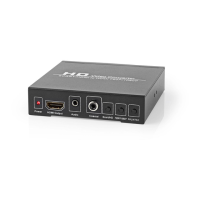
Main parts (image A)
Power supply port
Input signal indicator LED
HDMI input
VGA output
Output signal indicator LED
R/L output
Power cable
Installation
4
Make sure all the devices you want to connect have been turned o.
1. Plug an HDMI cable (not included) from your video source into A
2
.
A3 lights up.
2. Plug a VGA cable (not included) from your display into A
4
.
A5 lights up.
3. Plug an RCA cable (not included) from your speakers into A
6
.
4. Plug A
8
into A
7
.
5. Plug the other end of A
8
into a power outlet.
4
The converter does not give an output when the HDMI source has copyright
protection.
Specications
Product HDMI Converter
Article number VCON3450AT



 To Next Page