4
a
Quick start guide
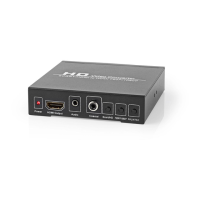
HDMI Converter VCON3452AT
For more information see the extended manual
online: ned.is/vcon3452at
Intended use
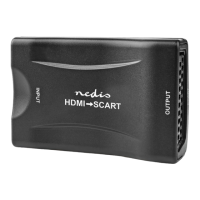
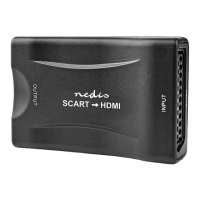
The VCON3452AT is an HDMI and SCART to HDMI and coaxial audio
converter.
Any modication of the product may have consequences for safety,
warranty and proper functioning.
Main parts (image A)
Power indicator LED
HDMI output
Audio output
Coaxial output
SCART / HD button
720p / 1080p button
PAL / NTSC button
HDMI input
SCART input
Power supply port
Power cable
Safety instructions
-
WARNING
• Only use the product as described in this manual.
• Do not use a damaged product.
• Do not expose the product to direct sunlight, naked ames or
heat.
• Do not expose the product to water or moisture.
• Place the product on a stable and at surface.
• Do not drop the product and avoid bumping.
• Do not open the product.
• Keep the product out of reach from children.
Connecting the product
1. Plug an HDMI cable (not included) from your source device
into A
8
.
4
Or: plug a SCART cable (not included) from your video source
into A
9
.
2. Plug another HDMI cable (not included) from A
2
into a
display.
3. Plug a 3.5 mm audio cable from your speakers into A
3
.
4
Or: plug a coax cable from your stereo installation into A
4
.
4. Plug A
w
into A
q
.
5. Plug the other end of A
w
into a power outlet.
4
A
1
lights up.
Using the converter
1. Press A
5
to switch between HDMI or SCART input.
2. Press A
6
to switch the resolution between 720p or 1080p.
3. Press A
7
to switch the frequency between 50 Hz or 60 Hz.
Specications
Product HDMI Converter
Article number VCON3452AT
Dimensions (l x w x h) 108 x 100 x 25 mm
HDMI input 1080p @ 60 Hz
1080i @ 60 Hz
480i / 576i / 480p / 576p / 720p
@ 60 Hz
SCART input PAL
NTSC-M
NTSC4.43
SECAM
PAL-M
PAL-N
HDMI output 1080 @ 60 Hz
720 @ 60 Hz
Audio output Digital coaxial
Analog stereo
Power supply 5 VDC
c
Kurzanleitung
HDMI-Wandler VCON3452AT
Weitere Informationen nden Sie in
der erweiterten Anleitung online:
ned.is/vcon3452at
Bestimmungsgemäße Verwendung
Der VCON3452AT ist ein Wandler von HDMI und SCART zu HDMI
und Koaxial-Audio.
Jegliche Modikation des Produkts kann Folgen für die Sicherheit,
Garantie und ordnungsgemäße Funktionalität haben.
Hauptbestandteile (Abbildung A)
Betriebsanzeige-LED
HDMI-Ausgang
Audioausgang
Koaxialausgang
SCART / HD Taste
720p / 1080p Taste
PAL / NTSC Taste
HDMI-Eingang
SCART Eingang
Stromversorgungsanschluss
Stromkabel
Sicherheitshinweise
-
WARNUNG
• Verwenden Sie das Produkt nur wie in dieser Anleitung
beschrieben.
• Verwenden Sie keinesfalls ein beschädigtes Produkt.
• Setzen Sie das Produkte keiner direkten Sonneneinstrahlung,
oenen Flammen oder Hitze aus.
• Setzen Sie das Produkt keinem Wasser oder Feuchtigkeit aus.
• Stellen Sie das Produkt auf eine stabile, ebene Oberäche.
• Lassen Sie das Produkt nicht herunterfallen und vermeiden Sie
Kollisionen.
• Önen Sie das Produkt nicht.
• Halten Sie das Produkt stets von Kindern fern.


 To Next Page