4
a
Quick start guide
HDMI Converter VCON3454AT
For more information see the extended manual online:
ned.is/vcon3454at
Intended use
The VCON3454AT is a VGA video and stereo audio to HDMI converter.
Any modication of the product may have consequences for safety, warranty
and proper functioning.
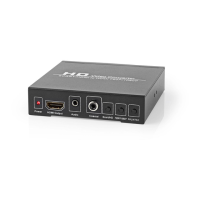
Main parts (image A)
VGA input
Input signal indicator LED
R/L input
Power supply port
Output signal indicator LED
HDMI output
Power cable
Safety instructions
-
WARNING
• Only use the product as described in this manual.
• Do not use a damaged product.
• Do not expose the product to direct sunlight, naked ames or heat.
• Do not expose the product to water or moisture.
• Place the product on a stable and at surface.
• Do not drop the product and avoid bumping.
• Do not open the product.
• Keep the product out of reach from children.
Using the HDMI Converter (image A)
1. Plug A
7
into A
4
.
2. Plug the other end of A
7
into a power outlet.
3. Plug a VGA cable (not included) from your source device to A
1
.
4. Plug a R/L cable into A
3
.
5. Plug an HDMI cable (not included) from a display to A
6
.
6. A
25
lights up.



 To Next Page