7
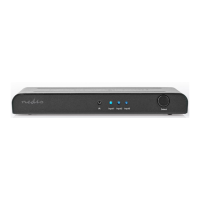
Main parts (image A)
USB-C input
Infrared receiver
Power indicator LED
Input indicator LED
Select button
Power supply port
HDMI output
HDMI input
Power supply
Power button
Input source button (numbers)
Input source button (left/right)
Safety instructions
-
WARNING
• Only use the product as described in this manual.
• Only use the provided power supply.
• Do not use the product if a part is damaged or defective. Replace a damaged
or defective product immediately.
• Do not plug or unplug the power supply with wet hands.
• Do not immerse the product in water.
• Do not expose the product to direct sunlight, naked ames or heat.
• Place the product on a stable and at surface.
• Do not drop the product and avoid bumping.
• Do not open the product.
• Keep the product out of reach from children.
Connecting the product (image B)
• See image B for a connection overview.
Using the product
Press A5e to select an input source.
Press A
w to cycle between the input sources.
Declaration of Conformity
We, Nedis B.V. declare as manufacturer that the product VSWI34721AT from our
brand Nedis
®
, produced in China, has been tested according to all relevant CE
standards and regulations and that all tests have been passed successfully. This
includes, but is not limited to the RED 2014/53/EU regulation.



 To Next Page
 Loading...