Familiarising yourself with your appliance en
17
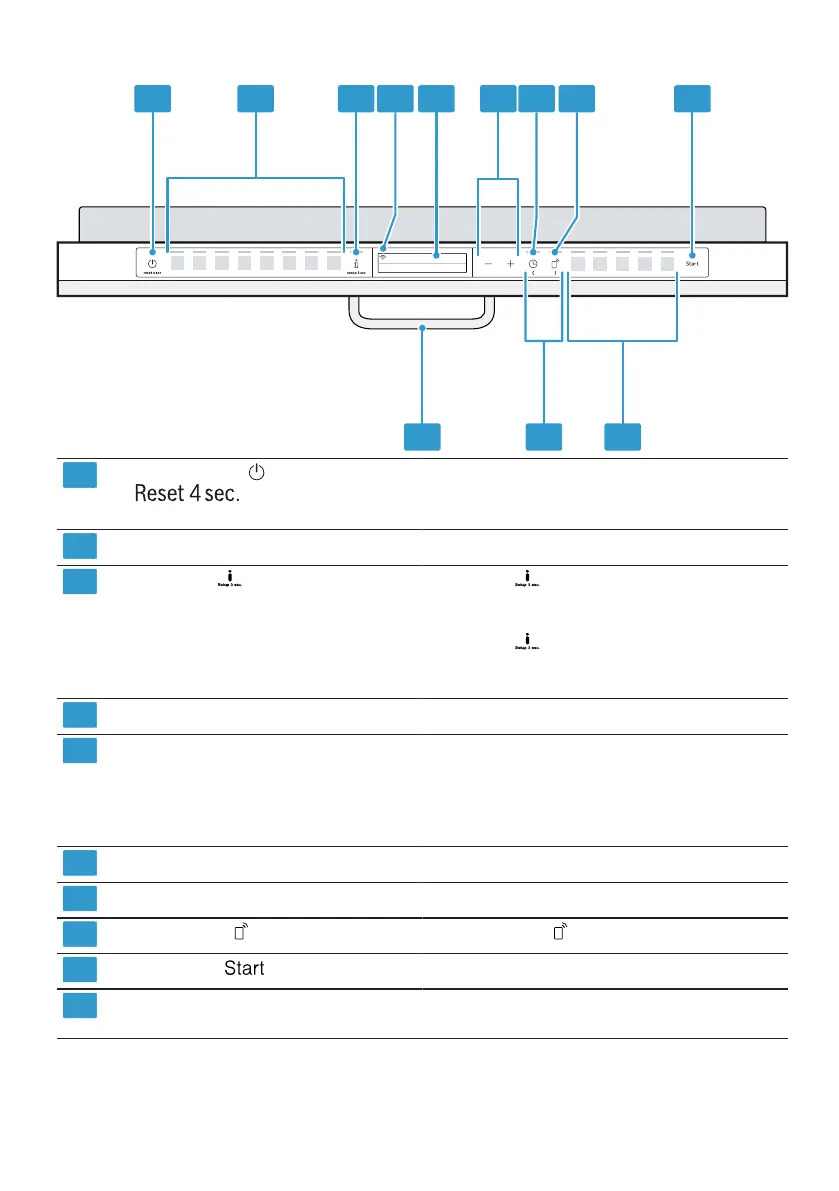
ON/OFF button and reset button "Switching on the appliance" →Page34
"Switching off the appliance" →Page35
"Terminating the programme" →Page35
Programme buttons "Programmes" →Page19
Info button If you press , the display shows information
about selected programmes, basic settings and
additional functions.
If you press for approx. 3 seconds, you can
open the menu.
→"Changing basic settings", Page38
WLAN display "Home Connect" →Page38
Display
1
The display shows information about pro-
grammes, basic settings or additional functions.
You can change the basic settings via the display
and the setting buttons.
→"Changing basic settings", Page38
Setting buttons "Changing the basic settings" →Page38
Timer programming "Setting timer programming" →Page34
Remote Start →"Remote Start ", Page39
Start button "Starting the programme" →Page35
Programme buttons and additional
functions
"Programmes" →Page19
"Additional functions" →Page21
1
Depending on the appliance specifications


 To Next Page