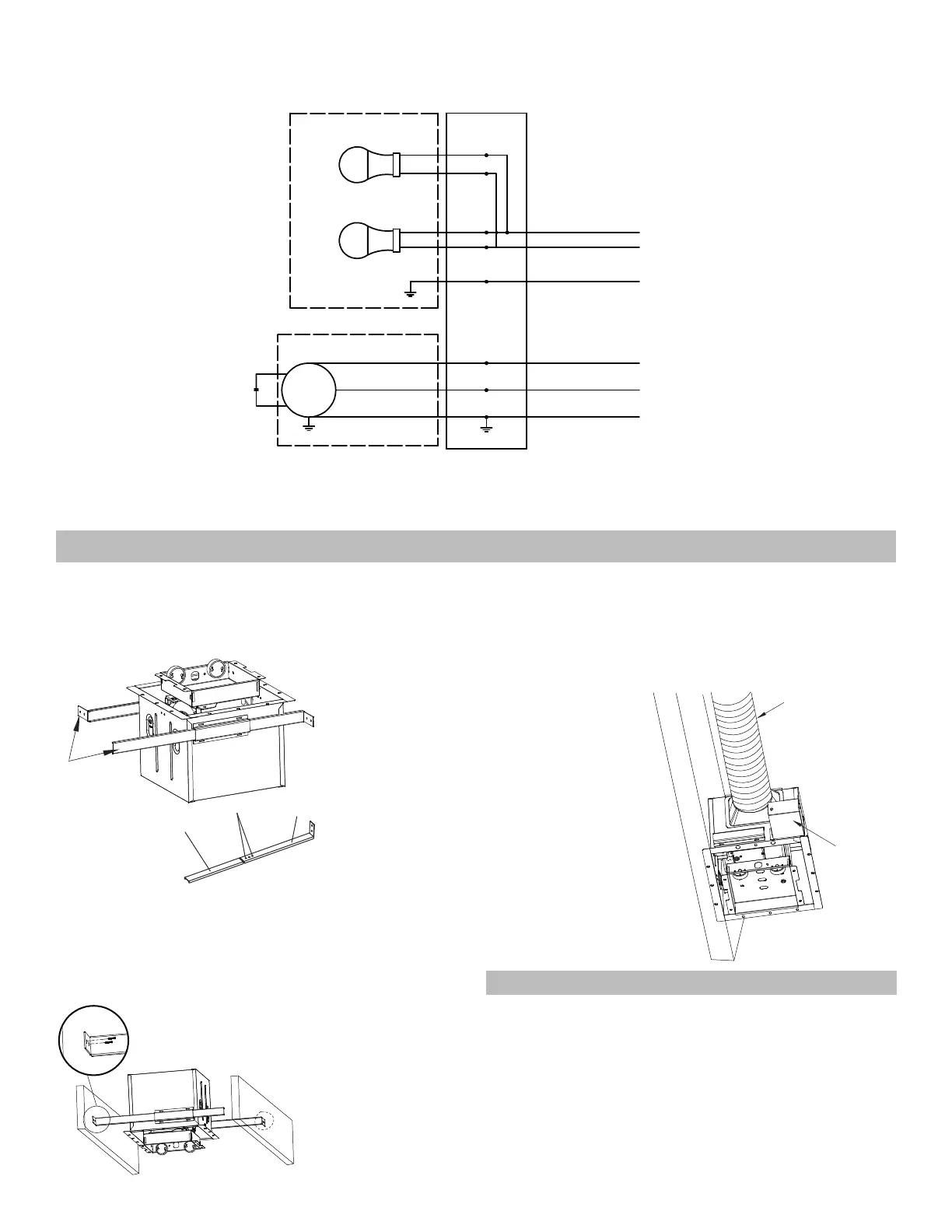
Light housing 120 V AC 60 Hz
Up to 9 W
Up to 9 W
Capacitor for long life
of motor
Motor
Black wire
White wire
Green wire
Junction box
Fan housing
to switch
to switch
to neutral
to ground
to neutral
▪
Wiring diagram
4
to ground
Warning: Turn power off at the electrical panel before beginning installation.
▪
Installation I (joist mounting)
Insert the support brackets into the slots on the fan housing (Fig. A).
Insert support
brackets
Support bracket I
2 screws
Support
bracket II
Duct
Wiring box
Figure A
Figure C
Figure B
2. Install the support brackets to joists by using the long screws
(Fig. B).
3. Refer to wiring diagram, and using wire connectors, connect house
power wires to ventilating fan wires: black to black; white to white; green
to green. Replace the junction box cover (Fig. C).
Caution: Mount junction box cover carefully so that wires are not pinched.


 To Next Page