Notes: Power off the printer when clearing a paper jam.
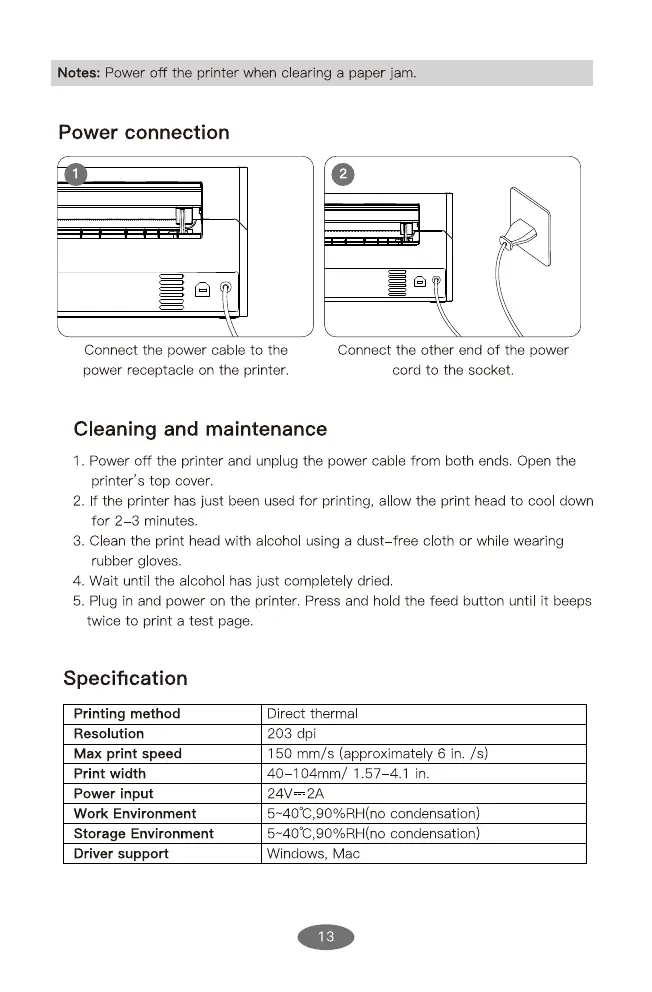
Power connection
Connect the power cable to the
power receptacle on the printer.
Connect the other end of the power
cord to the socket.
Cleaning and maintenance
1. Power off the printer and unplug the power cable from both ends. Open the
printer's top cover.
2. f the printer has just been used for printing, al ow the print head to cool down
for 2 3 minutes.
3. Clean the print head with alcohol using a dust—free cloth or while wearing
rubber g oves.
4. Wait until the alcohol has just complete y dried.
5. Plug in and power on the printer. Press and hold the feed button until it beeps
twice to print a test page.
Specification
Printing method
Resolution
Max print speed
Print width
Power input
Work Environment
Storage Environment
Driver support
Direct thermal
203 dpi
150 mm/s (approximately 6 in. /s)
40 104mm/ 1.57—4.1 in.
24V 2A
condensation)
condensation)
Windows, Mac
13


 To Next Page