Indicator status
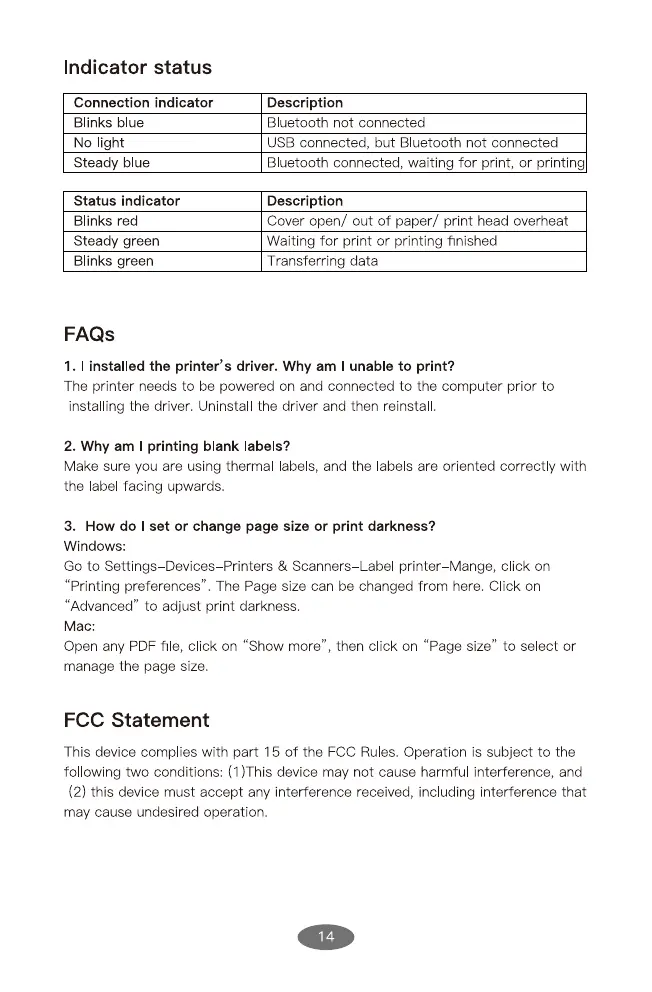
Connection indicator
Blinks blue
No light
Steady blue
Status indicator
Blinks red
Steady green
Blinks green
FAQS
Description
Bluetooth not connected
USB connected, but Bluetooth not connected
Bluetooth connected, wafting for print, or printing
Description
Cover open/ out of paper/ print head overheat
Waiting for print or printing finished
Transferring data
1. I installed the printer's driver. Why am I unable to print?
The printer needs to be powered on and connected to the computer prior to
Installing the driver. Uninstall the driver and then reinstal
2. Why am I printing blank labels?
Make sure you are using thermal labels, and the labels are oriented correct y with
the label facing upwards.
3. How do I set or change page size or print darkness?
Windows:
Go to Settings Devices Printers & Scanners Label printer-Mange, click on
"Printing preferences". The Page size can be changed from here. Click on
"Advanced" to adjust print darkness.
Mac:
Open any PDF fl e, click on "Show more", then click on "Page size" to se ect or
manage the page size.
FCC Statement
This device complies with part 15 of the FCC Ru es. Operation is subject to the
following two conditions: (1)This device may not cause harmfu interference, and
(2) this device must accept any interference received, including interference that
may cause undesired operation.
14


 To Next Page
 Loading...