Print using Bluetooth function via phone
1. Search for "Shipping Printer Pro" on the App Store or Goog e Play and instal
the app.
2. Power on the printer.
3. Open "Shipping Printer Pro" , allow app access to "Bluetooth," "Location," and
"Storage" permissions. Click on "Not connected" to add the printer.
4. After it is connected, click on "Fi e," select the fl e you want to print, click edit,
then print.
Notes:
1. Bluetooth function only available for mobile phone and Windows, Not Mac. For
Mac, you need to connect the printer via USB cable and install driver file.
2. For Mac with MI, M2 CPU, you can also search for "Shipping Printer Pro" on
App Store and install, connect and print via Bluetooth through Shipping Printer Pro.
Do not connect via Bluetooth directly.
Print using Bluetooth function on Windows
1. Before installation, power on the printer.
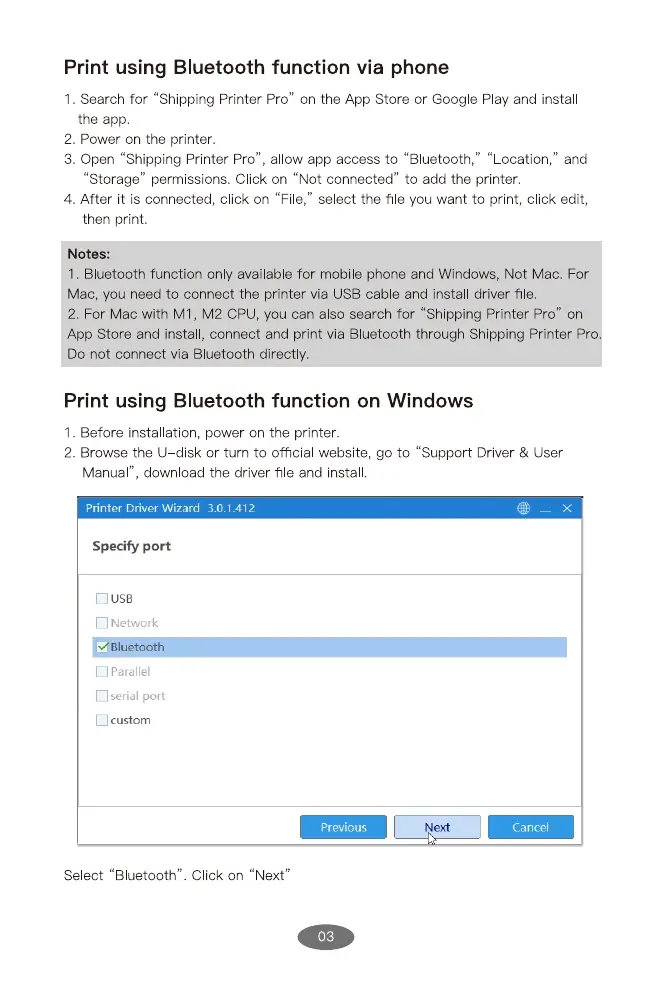
2. Browse the IJ disk or turn to official website, go to "Support Driver & User
Manual", down oad the driver file and instal
Printer Driver Wizard 3.0.1.412
Specify port
CDUSB
CJ Network
V luetooth
Parallel
Ü serial port
custom
Select "Bluetooth' . Click on
Previous
"Next"
03
Next
Cancel


 To Next Page
 Loading...