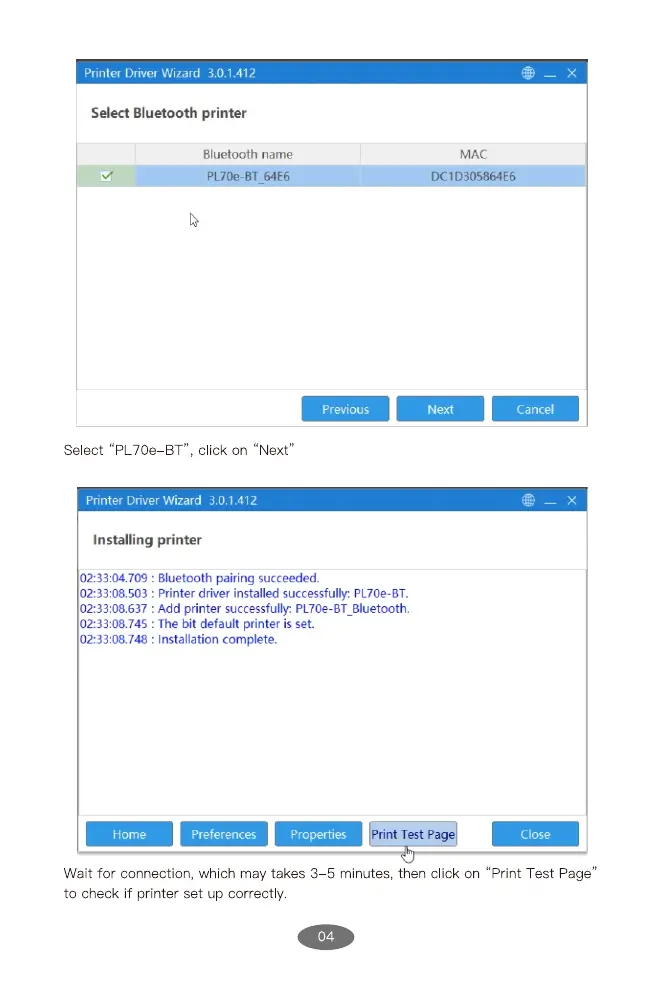
Printer Driver Wizard 3.0.1.412
Select Bluetooth printer
Bluetooth name
PL70e-BT 64E6
Previous
Select "PL70e BT", click on "Next"
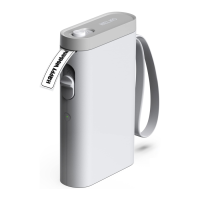
Printer Driver Wizard 3.0.1.412
Installing printer
: Bluetooth pairing succeeded.
• Printer driver installed successfully: PL70e-BT.
• Add printer successfully. PL70e-BT_Bluetooth.
MAC
DCID305864E6
Next
Cancel
Home
• The bit default printer is set.
• Installation complete.
Preferences
Print Test Pag
Close
"Print Test Page"
Wait for connection, which may takes 3 5 minutes, then click on
to check if printer set up correctly.
04


 To Next Page