Notes:
1. Do not connect the printer to Windows via Bluetooth on settings by yourself.
Install the driver and select "Bluetooth" , the driver will connect the printer to
computer automatically.
2. Normally, Bluetooth is available in 5 meters distance, make sure phone/
computer and printer as close as possible and less than 5 meters.
3. Print using Bluetooth function on Windows may takes minutes for printer to
respond and print, for faster printing, set up printer on Windows via USB cable
by installing the driver and select "USB"
Windows Setup (USB)
Driver installation
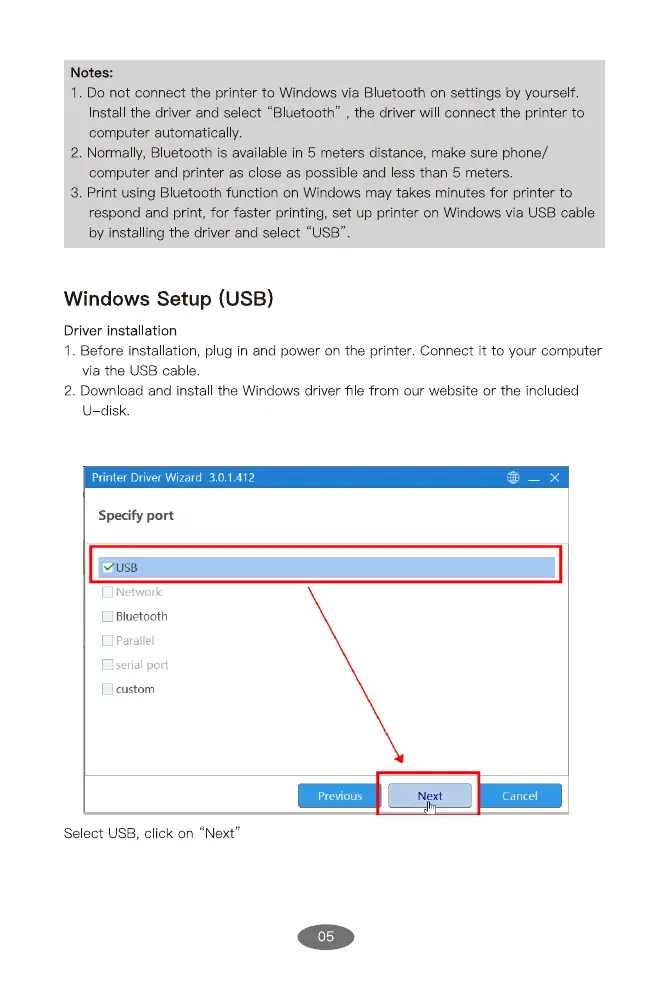
1. Before installation, plug in and power on the printer. Connect it to your computer
via the USB cable.
2. Download and instal the Windows driver file from our website or the included
U disk.
Printer Driver Wizard 3.0.1.412
Specify port
OUSB
L Network
Bluetooth
C serialport
Custom
Select IJSB, click on
Previous
"Next"
05
Cancel


 To Next Page