EasyManua.ls Logo

Neo Chair NEC - User Manual

Neo Chair NEC
3 pages
Print Icon
To Next Page IconTo Next Page
Loading...
ASSEMBLY
INSTRUCTION
BACK X1 SEAT X1 ARMREST X2
CONTROL
MECHANISM X1
WHEEL X5
BASE X1
BASE LEG X1
GAS LIFT
CYLINDER X1
X10
A
X4
B
X10
C
X1
D
(SEAT + BACK
ARMREST)
(LOCKING)
(WASHER)
(ALLEN KEY)
※Please make sure all the parts are included.
Missing parts? support@neochair.com
Instructions
User Manual
Cautions
Contents
Read the instructions carefully.
Please follow the assembly steps.
Cautions
To deodorize your new chair
leave the chair in a well
ventilated area for 1-2 days
For longer use
Re-tighten bolts every 6 months by using
the enclosed allen-key.
*Using an electric drill can damage the chair.
Please re-tighten bolts manually.
Use this product only for
seating
one person at a time
Regularly check all bolts,
screws, and
knobs are tight
Be careful,
some of the part
are
heavy and has sharped edge
Failure to follow these warnings
may cause
serious injury
DO NOT
use the chair
unless all bolts, screws
and knobs are tight
DO NOT use the chair if
only components are
missing or damaged
DO NOT stand on the chair
use as a step stool or ladder
support@neochair.com
www.neochair.com
Our goal is to create a perfect customer experience.
Let us know if you have any feedback.
Your comment motivates us to become a better team.
Enjoy your new favorite chair
support@neochair.com
www.neochair.com
@NEOCHAIR
neochair_office
If there are any problems, do not hesitate to e-mail us. support@neochair.com
NEC
Question and Answer IconNeed help?

Do you have a question about the Neo Chair NEC and is the answer not in the manual?

Summary

Assembly and Usage Guidelines

Chair Deodorization

Ventilate the chair in a well-aired space for 1-2 days.

Regular Chair Maintenance

Periodically retighten all bolts, screws, and knobs to ensure stability.

Critical Safety Cautions

Adhere to all warnings regarding single-person use, fastener tightness, component integrity, and avoiding standing on the chair.

Assembly Instructions

Bottom Assembly Steps

Assemble the base legs, wheels, and gas lift cylinder onto the chair base.

Top Assembly Steps

Attach armrests and backrest to the seat, ensuring proper alignment.

User Manual Functions

Seat and Mechanism Attachment

Secure armrests to the seat and attach the control mechanism.

Chair Height Adjustment

Operate the lever to adjust the chair's height up or down.

Tilt and Tilt Lock Functionality

Understand how to engage, disengage, and adjust the chair's tilt mechanism.

Tilt Tension Adjustment

Modify the resistance of the chair's tilt function.

Overview

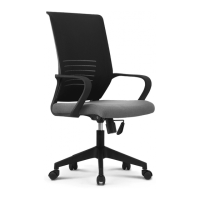
This document serves as an assembly and user manual for a Neo Chair, a device designed for seating one person at a time, offering various adjustable features for comfort and proper posture.

Function Description

The Neo Chair is primarily a seating device, providing a comfortable and ergonomic solution for users. Its core function is to support the user's body while seated, with multiple adjustable components to customize the seating experience. The chair is designed to be assembled by the user, with clear instructions provided to guide through the process. Once assembled, it offers features such as tilt, tilt lock, tilt tension adjustment, and height adjustment, allowing users to find their preferred seating position and support. The chair's design emphasizes user comfort and the ability to maintain a healthy posture during extended periods of sitting.

Usage Features

The Neo Chair comes with several usage features that enhance the user experience and allow for personalized adjustments:

  • Assembly: The chair requires user assembly, guided by a step-by-step instruction manual. The manual highlights the importance of using the included Allen key for assembly, advising against electric drills to prevent damage. It also suggests using the packaging box for an easier assembly process.
  • Seating Capacity: The chair is designed for seating one person at a time, emphasizing safe and intended use.
  • Tilt Function: The chair offers a tilt function, allowing the user to recline the backrest and seat simultaneously. This feature can be engaged or disengaged based on user preference.
  • Tilt Lock: To maintain a desired reclined position, the chair includes a tilt lock mechanism. This allows the user to lock the chair in a specific tilted angle, preventing it from rocking back and forth.
  • Tilt Tension Adjustment: For personalized comfort, the chair features a tilt tension adjustment. This allows the user to control the amount of force required to recline the chair. Turning the adjustment knob towards '+' increases the tension, making it harder to recline, while turning it towards '-' decreases the tension, making it easier to recline. This ensures that users of different weights and preferences can find a comfortable recline resistance.
  • Height Adjustment: The chair's height can be adjusted to suit the user's desk height and personal preference. A lever mechanism allows the user to raise or lower the seat, ensuring proper ergonomic alignment with their workspace. Pushing the lever up raises the chair, and pushing it down lowers it.
  • Armrests: The chair includes armrests that are integrated into the assembly process. These provide support for the user's arms, contributing to overall comfort and reducing strain on the shoulders and neck.
  • Wheels: Equipped with five wheels, the chair allows for easy mobility across various floor surfaces, enabling the user to move around their workspace without standing up.
  • Control Mechanism: A central control mechanism, located beneath the seat, houses the levers and knobs for adjusting the chair's functions, such as height and tilt.

Maintenance Features

To ensure the longevity and safe operation of the Neo Chair, several maintenance features and recommendations are provided:

  • Deodorization: Upon receiving a new chair, it is recommended to leave it in a well-ventilated area for 1-2 days to allow any new product odors to dissipate.
  • Bolt Tightening: For longer use and to maintain structural integrity, users are advised to re-tighten all bolts every 6 months using the enclosed Allen key. A specific caution is given against using an electric drill for this task, as it can damage the chair; manual re-tightening is recommended.
  • Regular Checks: Users should regularly check all bolts, screws, and knobs to ensure they are tight. This prevents loosening over time, which could compromise the chair's stability and safety.
  • Pre-use Inspection: Before using the chair, it is crucial to ensure that all bolts, screws, and knobs are tight. The chair should not be used if any components are missing or damaged.
  • Safe Usage Guidelines:
    • The chair is designed for seating one person at a time.
    • Do not stand on the chair or use it as a step stool or ladder, as this can lead to instability and potential injury.
    • Be careful during assembly and maintenance, as some parts may be heavy or have sharp edges, posing a risk of serious injury if warnings are not followed.
  • Customer Support: In case of any problems or missing parts, users are encouraged to contact customer support via email at support@neochair.com or visit the website www.neochair.com. This ensures that users can receive assistance for any issues that arise, contributing to the chair's proper maintenance and continued use.

By adhering to these usage and maintenance guidelines, users can ensure a safe, comfortable, and long-lasting experience with their Neo Chair.

Neo Chair NEC Specifications

General IconGeneral
TypeOffice Chair
StyleModern
ColorBlack
Weight Capacity250 lbs
MaterialMesh, Metal
AdjustabilityHeight, Tilt, Armrests

Related product manuals