neo-tools.comneo-tools.com
19
AUTOMATIC HEIGHT MEASUREMENT
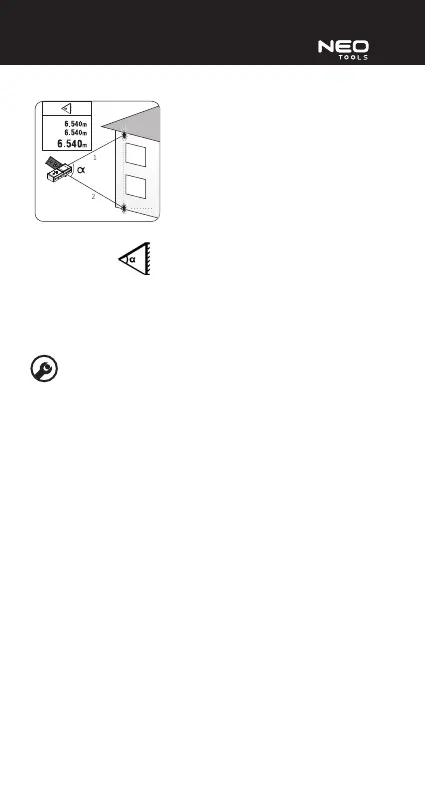
Switch on the device and swipe left/right to choose the automatic height
measurement mode
.. Scroll up/down and choose measurement unit and
the measurement reference point.
Press the measurement button (2) and measure length of the upper side of the
triangle, indicated in red on the range nder screen. Next measure the bottom side
of the triangle in the same way. Based on the side lengths and the angle measured
by the range nder, it will automatically determine height (vertical distance
between measurement points).
PROBLEMS AND TROUBLESHOOTING
The device displays errors using error codes. The table below shows code
descriptions and solutions.
Error code Cause Solution
204 Calculation error Repeat the measurement
accordingly to the manual
208 Too high current Contact the manufacturer
220 Depleted battery Replace batteries
252 Too high temperature Let the device cool down to
temperature below 40°C
253 Too low temperature Warm up the device to temperature
above 0°C
255 Too weak
measurement
signal/too long
measurement time
Use aim board or make
measurements using surface that
reects light
256 Too strong
measurement signal
Use aim board or make
measurement on less illuminated
surface
261 Beyond
measurement range
Choose measurement point in the
measurement range
500 Software error Switch the device o and on. If the
display still shows the code, contact
the manufacturer


 To Next Page