Need help?
Do you have a question about the Neogen Corporation AccuPoint Advanced Next Generation and is the answer not in the manual?
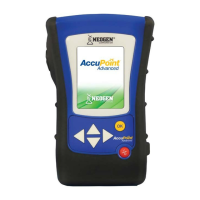
Overview of the AccuPoint Advanced NG sanitation monitoring system.
Lists and describes the parts of the AccuPoint Advanced NG system.
Important safety information regarding electrical usage and power sources.
Guidance on correct handling and storage of AccuPoint sampler cartridges.
Instructions for maintaining the instrument's condition and longevity.
Procedures for cleaning the outer surfaces and optical tube of the instrument.
Step-by-step guide on how to turn the instrument on and off.
Description of the main screen elements and navigation options.
How to perform tests not associated with a site plan.
Details displayed on the screen after a test is completed.
How to add supplementary notes to test results.
Procedure to re-run a test on the same site.
Detailed instructions on how to collect a sample and run a test.
Steps for users to access the instrument by logging in.
Procedure for securely logging out of the instrument.
How to choose a site plan for running tests.
How to select an area within a site plan.
How to choose a group within an area for testing.
How to select a specific test site within a group.
Displays the progress of a sample test.
Shows the final result and details of a completed test.
Functionality to add comments to the test results.
Process for performing a retest on a site.
How to proceed to the next test site in the plan.
List of all programmed test sites for selection.
Accessing and viewing stored test results.
Options for configuring instrument behavior like timeouts and language.
Process for programming RFID tags for site identification.
Information on wireless data transfer setup and usage.
Displays technical and regulatory information about the device.
Procedure to associate RFID tags with site groups.
How to use programmed RFID tags to identify test locations.
Details on configuring wireless communication.
How to wirelessly transfer test data to the manager software.
Steps to disable the Wi-Fi connection.
Steps to re-establish a Wi-Fi connection.
Overview of the software for data management and analysis.
Explains the different sampling modes and test types.
How to configure test result thresholds.
Solutions for common errors and operational issues encountered with the instrument.
Compliance information regarding radio frequency interference.
Physical dimensions, weight, and operating environmental limits.
Recommended temperature, humidity, and altitude for operation.
Recommended temperature, humidity, and altitude for storage.
Power supply specifications and voltage compatibility.
Information on the instrument's quality control and certification.
List of available part numbers for replacement and accessories.
Details of the product's limited warranty terms.
Contact details for customer support and technical assistance.
 General
| Category | Medical Equipment |
|---|---|
| Product Type | Sanitation Monitoring System |
| Technology | ATP Bioluminescence |
| Measurement | Relative Light Units (RLU) |
| Detection Range | 0 to 9999 RLU |
| Sample Collection | Swab-based |
| Data Transfer | USB |
| Display | LCD |
| Weight | 0.5 lbs |
| Intended Use | Monitoring cleanliness by detecting ATP on surfaces |
| Power Source | Rechargeable battery |
| Battery Life | Approximately 8 hours |
| Test Duration | 15 seconds |

 To Next Page