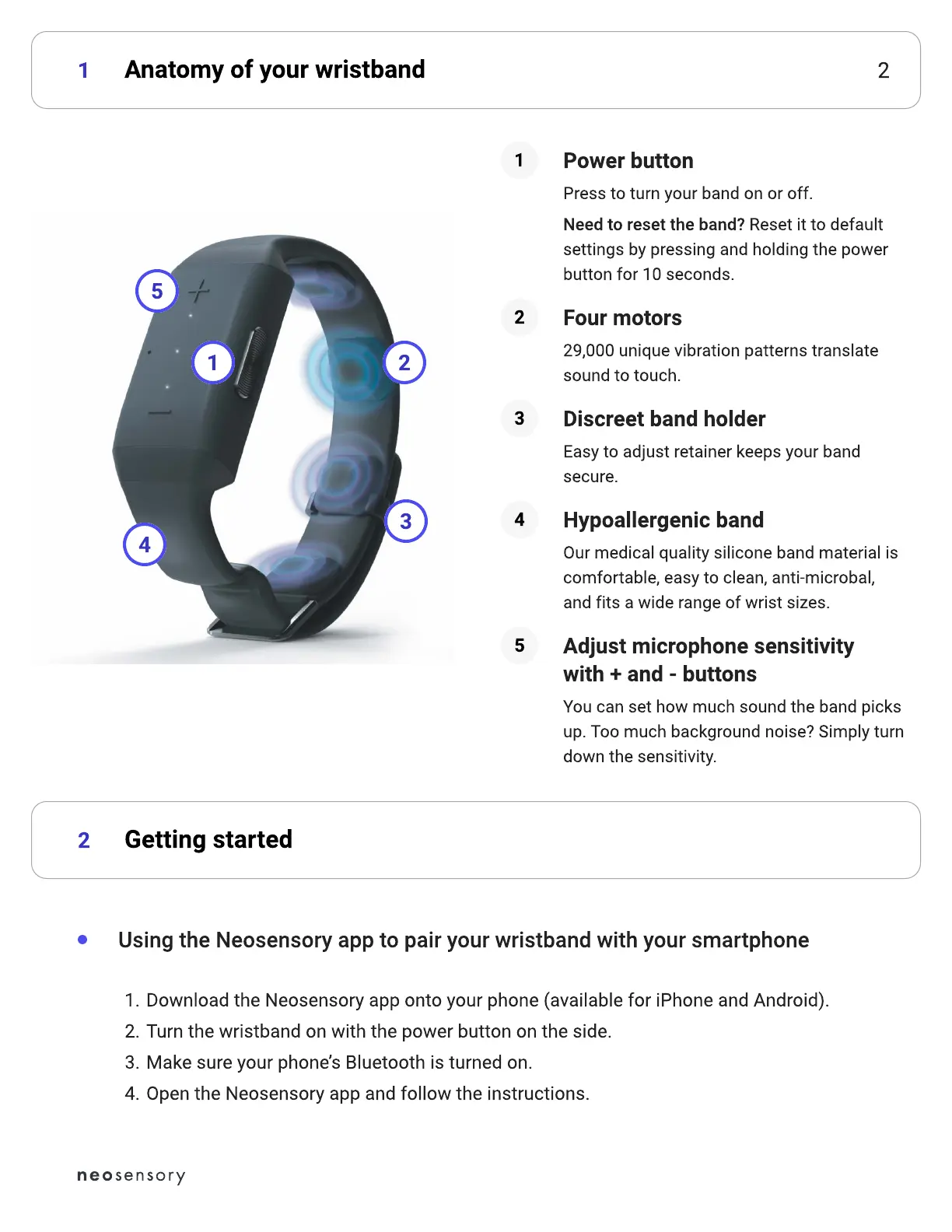
1 2Anatomy of your wristband1
2 Getting started2
Download the Neosensory app onto your phone (available for iPhone and Android)
Turn the wristband on with the power button on the side
Make sure your phone’s Bluetooth is turned on
Open the Neosensory app and follow the instructions.
Using the Neosensory app to pair your wristband with your smartphone
4
2
3
5
1
Press to turn your band on or off.
Need to reset the band? Reset it to default
settings by pressing and holding the power
button for 10 seconds.
Power button
1
29,000 unique vibration patterns translate
sound to touch.
Four motors
2
Easy to adjust retainer keeps your band
secure.
Discreet band holder
3
Our medical quality silicone band material is
comfortable, easy to clean, anti-microbal,
and fits a wide range of wrist sizes.
Hypoallergenic band
4
Y
ou can set how much sound the band picks
up. Too much background noise
?
S
imply turn
down the sensitivity.
Ad
j
ust microphone sensiti
v
it
with
+
and
-
buttons
5



 To Next Page