This document describes the Neostar CD Radio Cassette, product code 3244363, an electronics device designed for audio playback and recording.
Function Description:
The Neostar CD Radio Cassette is a versatile audio system capable of playing CDs, MP3 files from USB storage media, and cassette tapes. It also features an FM radio tuner. A key feature is its ability to encode audio from various sources (CD, Tuner, Aux, Cassette) into MP3 format and record it onto a connected USB memory stick or flash drive. The system creates a music folder named "RIP" for CD-DA encode, and "REC" for Tuner, Aux, and Cassette encode.
Important Technical Specifications:
- MP3 Track Format Requirement:
- Bit rate: 32 kbps~320kbps
- Sampling rate: 32kHz, 44.1kHz, and 48 kHz decodable
- Recording Speed: 1:1
- Recording Format (MP3): 128 kbps, 44.1kHz sampling rate
- Power Source: AC (via detachable power cord) or DC (8 pcs size C (UM-2) batteries)
- Preset Stations: Up to 20 FM radio stations can be stored in memory.
- CD Programming: Up to 20 tracks can be programmed for disc play in any order.
- USB Compatibility: Supports MP3 files from USB storage media. Does not support USB extension cables or direct computer communication.
- Ventilation: Requires a minimum distance of 150-180mm around the apparatus for sufficient ventilation.
Usage Features:
- Controls:
- USB socket (1)
- Aux in socket (2)
- 3.5mm headphone jack (3)
- Cassette button (4)
- Handle (5)
- FM antenna (6)
- CD door open/close (7)
- Volume knob (8)
- LCD display (9)
- Function button (10)
- Stop button (11)
- Skip / Tuning down button (12)
- Memory / Clock-adj button (13)
- Stereo/Mono/Play button (14)
- Cassette door (15)
- Standby LED (16)
- On/Off button (17)
- Play/pause / Band button (18)
- Skip / tuning up button (19)
- Record button (20)
- TS (Track Separation) button (21)
- AC socket (22)
- Battery compartment (23)
- Folder/ Pre up/ down button (24)
- Clock Setting: Set in standby mode, allows selection of 12 or 24-hour format. The pre-set time will reset if the main power supply is disconnected.
- Radio Listening:
- Manual Tuning: Select Tuner mode, choose FM band, then use Skip down/up buttons to tune.
- Auto Tuning: In Tuner mode, press and hold Skip down/up buttons to auto scan.
- FM & FM-stereo Reception: Defaults to auto stereo. Can be switched to Mono-ST for weak signals. The rod antenna (6) should be fully extended for best reception.
- Preset Stations: Store up to 20 FM stations. Tune to desired station, press "Mem" (13), select memory slot with Pre-up (24), confirm with "Mem" (13). Recall with Pre-up/down (24).
- CD Playback:
- Select CD mode, open CD door (7), insert disc, close door. Playback starts automatically.
- Play/Pause: Press Play/Pause (18) to pause/resume.
- Stop: Press Stop (11) to stop playback.
- Skip Mode: During play, press Skip up (19) for next track, Skip down (12) for beginning of current track, or again for previous track.
- Repeat/Random Mode: Press "Play mode" (21) during playback to select repeat (single track, all tracks) or random play for CD. For MP3 files, options include repeat single track, repeat single folder, repeat all tracks, and random mode.
- Folder Select (MP3): Use "Folder/ Pre-up" (24) to select folder number, then "Skip up/down" (19/12) to select track number.
- CD Disc Programming: Program up to 20 tracks. In CD mode, press Memory (23), select track with Skip up/down (19/12), press Memory (23) to enter. Play with Play/Pause (18). Terminate with Stop (11).
- MP3 Encoding (from CD, Tuner, Aux, Cassette to USB):
- CD Encoding (1 track/1 disc at 1x speed): Play desired CD track, press REC (20). System displays "REC" and flashing "USB" icon. Stops automatically after recording. Press Stop (11) to interrupt. For whole CD, stay in stop mode, press REC (20).
- CD Encoding (by program): Follow CD programming steps, start program playback, press REC (20).
- Copying MP3 file (from MP3 CD to USB): Insert MP3 disc, press REC (20). System switches to copying mode.
- Tuner Encoding: Tune to desired station, press REC (20). System displays "REC" and flashing "USB" icon. Press Stop (11) to finish.
- Cassette/Aux Encoding: Plug in USB drive, set function to "tape" or "Aux", press REC (20). Start playback from cassette or external Aux device. Press Stop (11) to finish.
- Track Separation (during encoding from tape or Aux to USB): Press "TS" (21) to generate a new track.
- Removing USB: Turn off power or switch function mode to CD, AUX, or Tuner before carefully unplugging.
- Automatic Standby: Unit switches to standby if no music is played for over 15 minutes to reduce power consumption. Press power button to switch back on.
Maintenance Features:
- Cleaning: Follow recommendations in the notice.
- Repair: Device should be repaired by qualified personnel if the power cord is damaged, objects or liquid have entered the apparatus, exposed to rain, not working correctly, or broken. Users should not attempt to maintain the device beyond what is described in the manual.
- Battery Disposal: Attention should be drawn to environmental aspects of battery disposal. Replace only with the same or equivalent type.
- General Safety: Read all instructions, keep for future use, respect security guidelines. Avoid water/moisture contact, shocks. Do not block outputs. Avoid heat sources or direct sun exposure. Plug as indicated. Overload protection replacement by experienced technician. Unplug power cord when not in use for long periods. Apparatus should not be exposed to dripping/splashing. Mains plug is the disconnect device and should be easily accessible. Batteries should not be exposed to excessive heat. Excessive sound pressure from earphones can cause hearing loss.
Important Cautions:
- Usage of controls or adjustments or performance of procedures other than specified may result in hazardous radiation exposure.
- This unit should not be adjusted or repaired by anyone except qualified service personnel.
- Since movement of the CD mechanism and sensitive circuitry may cause interference to the radio tuner, switch off while operating other radio devices.
- In the unlikely event the unit 'hangs', unplug from the main power supply to restart.
- Connecting the USB upside down or backwards could damage the audio system or storage media.
- The system can only detect and read MP3 files in USB mode; other music file formats are not supported.
- Due to variances in MP3 encoding format, some MP3 players may not be able to play via the USB socket. This is not a malfunction.
- USB port does not support connection with USB extension cable and is not designed for communication with a computer directly.
- The system has no delete function for MP3 files; manage erasing files via computer or other device.
The device is a Class I Laser Product. The crossed-out Wheelie Bin logo indicates that electrical products should not be disposed of with normal household waste. Scotts Ltd contributes to UK recycling facilities.

 Need help?
 General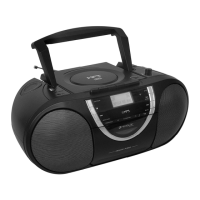

 To Next Page