3
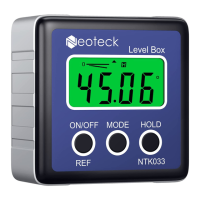
4. Unit of measurement selection (°degrees / % / mm/m
IN/FT)
After switching on, the screen always shows the last mode
before shutdown. By pressing the MODE button you can
change the angles unit display units from degrees (°) to
percent (%), to (mm/m) to pitch (in/ft). Pitch readings are
in 1/8-inch/fee increments.
The icon indicates the current angle’s position,
either up or down away from the horizontal or vertical
position.
5. Angle measure
If the equipment isn’t in level, it will display values on the
screen. Press REF button to set current angle to be zero,



 To Next Page