
 Need help?
Do you have a question about the Neousys Technology PCIe-PoE550X and is the answer not in the manual?
Manual is informative guide, subject to change without prior notice.
Lists Neousys, Intel, NVIDIA, Texas Instruments trademarks and patents.
Details the manual's version history, including the initial release date.
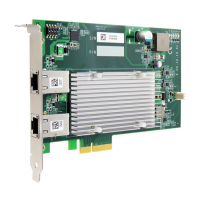
Overview of the PCIe-PoE550X, highlighting 10GbE NIC and PoE+ capabilities.
Technical specifications for the PCIe-PoE550X card, including interface, ports, and power.
Technical specifications for the PCIe-10G550X card, useful for comparison.
Dimensional drawings and measurements for the PCIe-PoE550X card.
Lists items included in the PCIe-PoE550X package for verification.
Explains the meaning of status LEDs for link and speed on the PCIe-PoE550X.
Configures PoE mode (af/at) using DIP switch 4 for optimal operation.
Sets unique board IDs for multiple PCIe-PoE550X cards using DIP switches.
Step-by-step guide for physically installing the PCIe-PoE550X card into a system.
Instructions for installing the necessary drivers and software for the PCIe-PoE550X.
How to configure Jumbo Frames for improved data throughput and reduced CPU utilization.
Adjusting Receive Buffers to enhance data reception performance.
Adjusting Transmit Buffers to optimize data transmission performance.
Steps to install the driver package for per-port PoE on/off control functionality.
Reference for the API function to get the status of a PoE port.
Reference for the API function to enable PoE power for a specific port.
Reference for the API function to disable PoE power for a specific port.
 General
| Brand | Neousys Technology |
|---|---|
| Model | PCIe-PoE550X |
| Category | Adapter |
| Language | English |

 To Next Page