UM_VERTUO NEXT_Z1.indb 18
Coffee preparation
❶
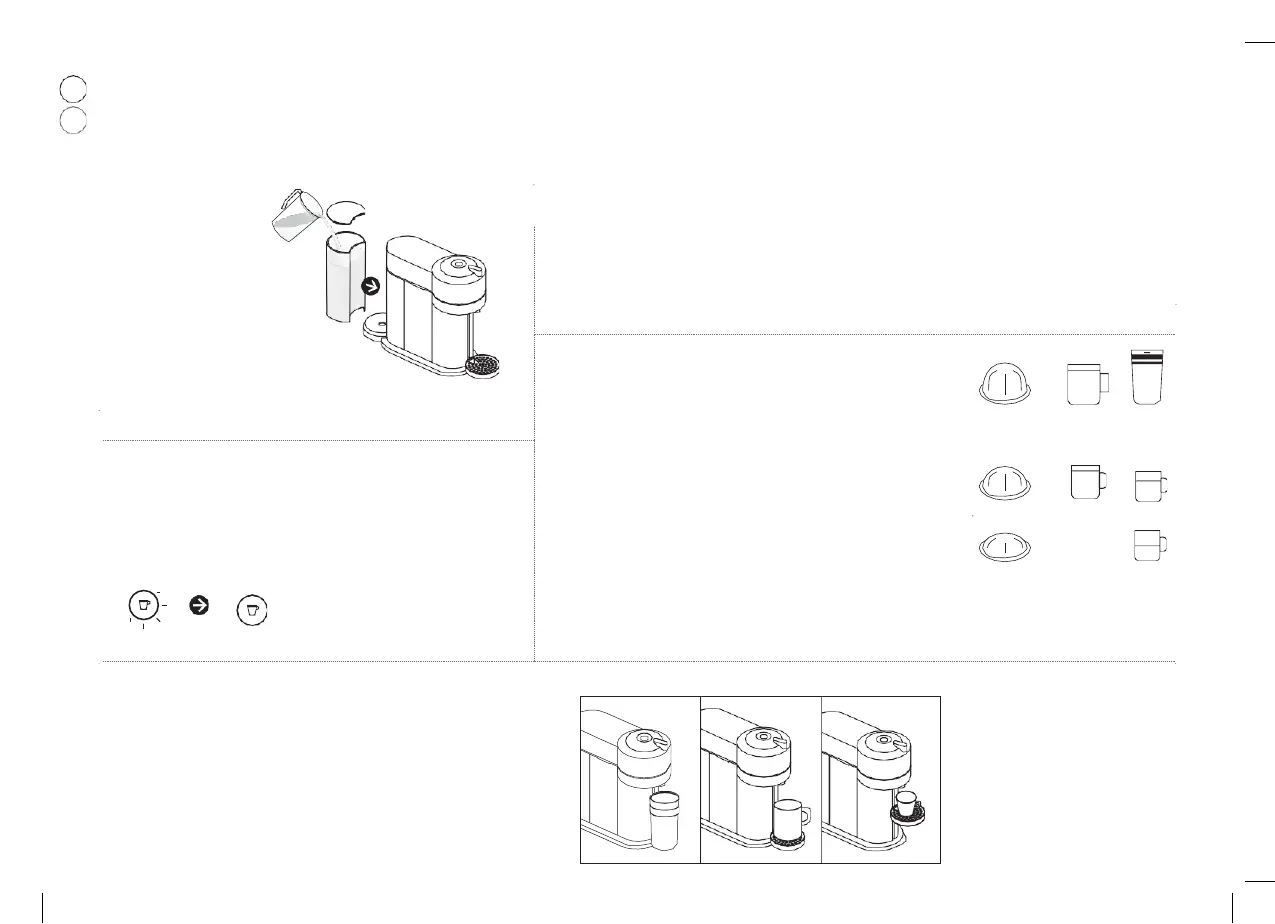
Fill the water tank with
fresh
drinking
water
and place it into its
position.
❷
-
For
an
optimized
heating
time, close
and
lock
the
machine
to
turn
the
machine
ON.
-
If
the
machine
is
already
closed
and
locked,
turn
the
machine
ON
by
pressing
the
button.
-
-
❹
The factory settings for the coffee sizes are the following. Please make
sure your recipient is big enough to prevent overflow.
Alto: 14 fl oz. / 414 ml
Mug: 7.77 fl oz. / 230 ml
Gran Lungo: 5.07 fl oz. / 150 ml
Double Espresso: 2.7 fl oz. / 80 ml
Espresso:
1.35
fl
oz.
/
40
ml
: 414 ml / 14 fl oz.
: 230 ml / 7.77 fl oz.
: 150 ml / 5.07 fl oz.
: 80 ml / 2.7 fl oz.
: 40 ml /
1.35 fl oz.
❸
Light will blink while the machine is heating up. Steady light indicates
the machine is ready.
= √
❺
Adjust position in height of the cup support. The cup support has 3 positions
and can be temporarily removed to accommodate various cup sizes. Make
sure the cup support is properly secured.
3
18



 To Next Page
 Loading...