2 X
3 sec.
3 sec.
2
1
EN
KR
21
EMPTYING THE SYSTEM
BEFORE A PERIOD OF NONUSE, FOR FROST PROTECTION OR BEFORE A REPAIR
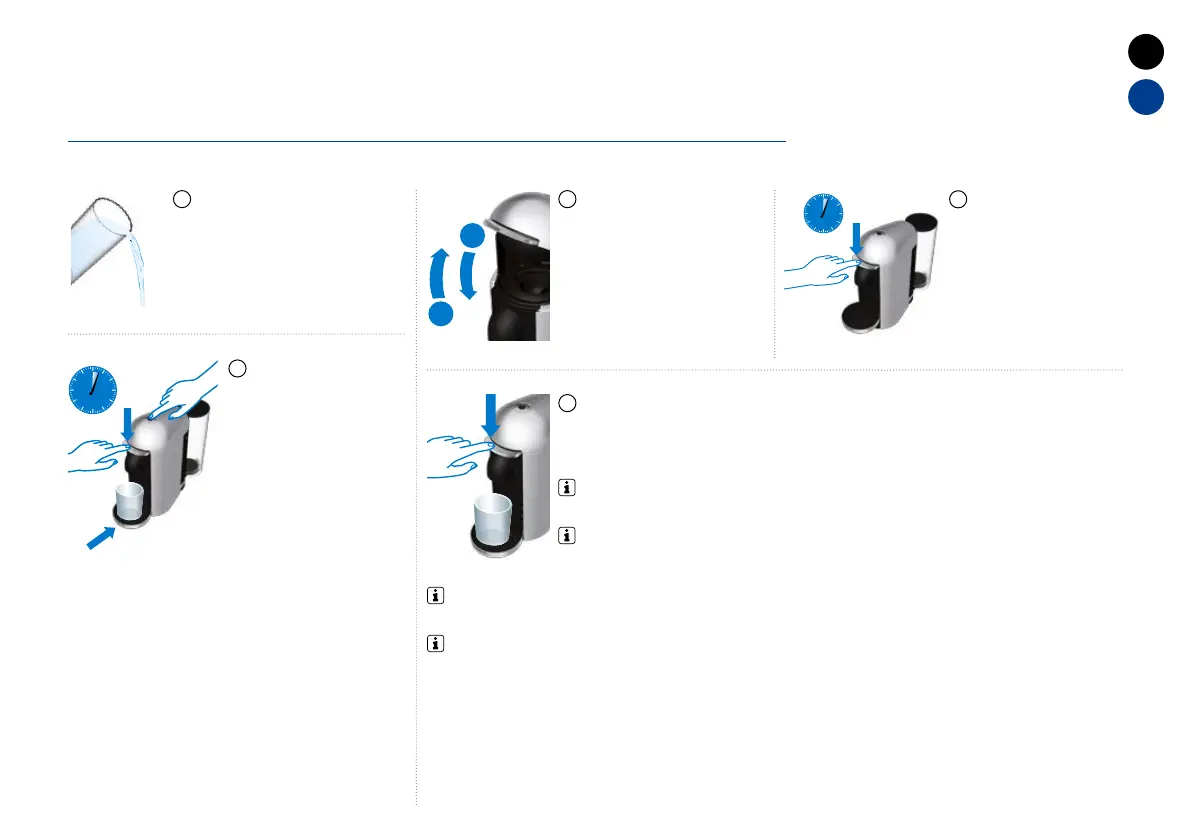
Empty the water tank and put it
in place.
Open the machine head
and let the used capsule be
ejected. Close the machine.
Empty the capsule container.
Choose function by pressing the lever down
- 2 times for “Emptying the system”
Place a container
under the coee outlet.
To enter "Emptying the
system" mode push
the buon and the
lever down at the same
time for 3 seconds.
ORANGE steady light
indicates entry into
the Special Functions
menu.
Turn the machine
"OFF" by pushing
the lever down for
3 seconds.
1 2
5
4
3
NOTE: the machine will blink twice every 2 seconds until the buon will be
pressed.
NOTE: Choose function within 2 minutes or else the machine will go back to Ready mode. ORANGE
light will blink 2 times every 2 seconds, indicating the “Emptying the system” function.






 To Next Page