9
Unlocking the Door By Card AND PIN
If Door Access Control is set to “Card” (Section 6), access will be granted by presenting a valid Card to the Reader.
The LED will glow RED upon the presentation of the valid Card in readiness for a PIN entry within 5 seconds.
If the Card and PIN combination are both valid the LED will flash Green for the unlock time and the Relay will
activate for the unlock period.
If no PIN is entered within 5 seconds S2 will time out and the LED will return to its normal red Flashing mode.
AND
S2 will sound 3 beeps if the entered PIN is invalid or incorrect
Resetting / Restoring an Alarm
If an Alarm occurs for any reason e.g. Door Forced Open or Open Too Long it can be reset by presenting A valid
card to the Reader or by entering the Master Code
OR
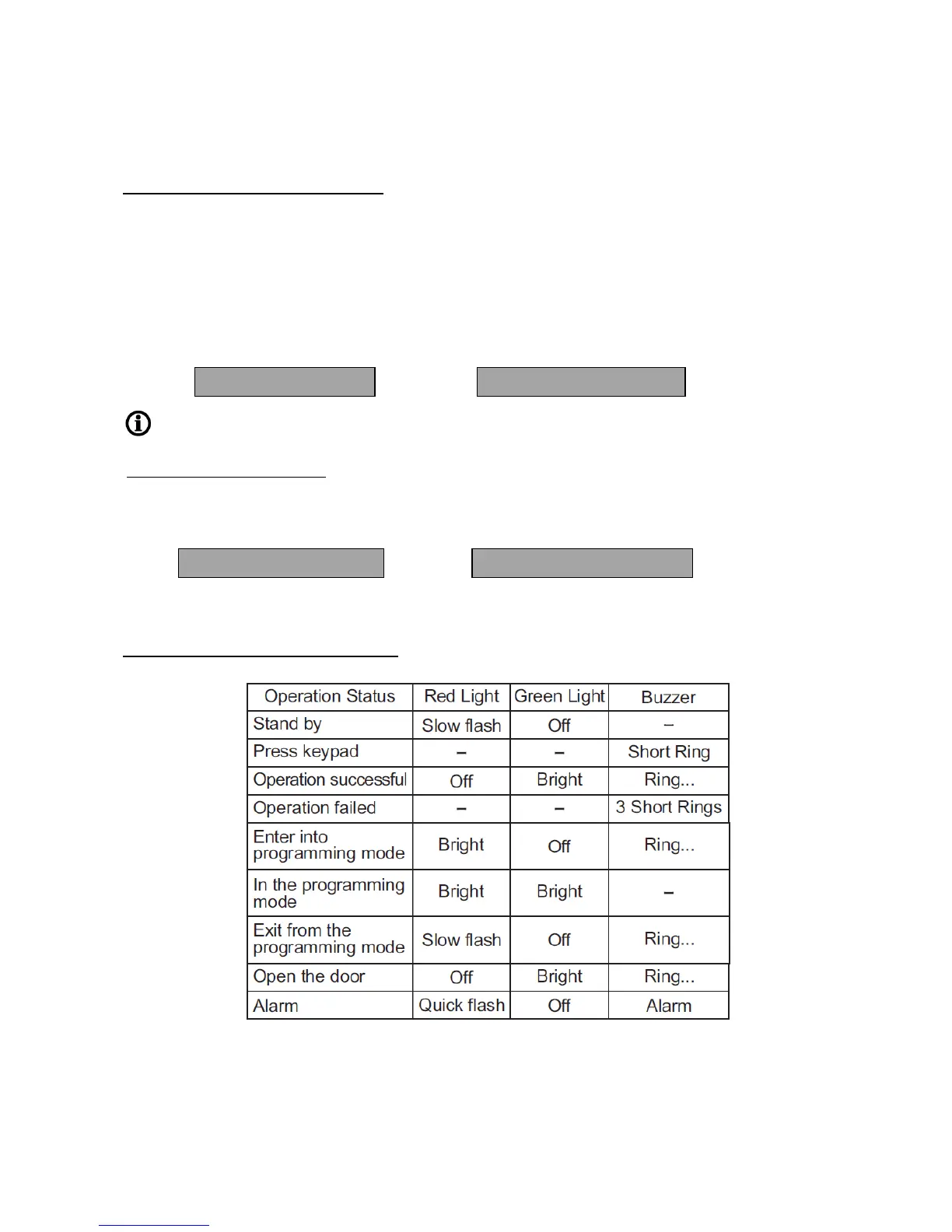
Indicators / Warnings (LED and Buzzer)


 To Next Page
 Loading...