4 mounting screws
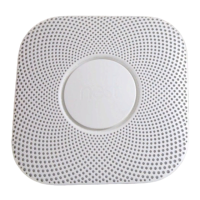
Nest Protect
Backplate
120V connector
3 wire nuts
5.3 in
(13.5 cm)
1.5 in
(3.9 cm)
54
MEET YOUR NEST PROTECT
REQUIREMENTS
You need Wi-Fi, an iOS or Android phone or
tablet, and a free Nest Account in order to
use some Nest Protect features: spoken room
names, wireless mobile notifications, and
software updates. During setup, Wi-Fi and
a free Nest Account are required for wireless
interconnect and room naming. After all the
Nest Protects in your home are connected,
they can communicate with each other
without Wi-Fi.
The horn enables
Nest Protect to alert
you with a loud
emergency sound.
The speaker allows
Nest Protect to speak
with a human voice.
The light ring changes
color to alert you.
Push the Nest button to
hush alarms or run a test.
Micro-USB connector
(not for normal use).
AC connector pins for
the 120V connector.
Backup battery
compartment: Three
AA Energizer® Ultimate
Lithium batteries (L91).
Nest Protect is designed to detect smoke and
carbon monoxide in a residential environment.
It has multiple sensors to help it understand
what’s happening in your home, including
a Split-Spectrum Sensor to detect a wide range
of slow-smoldering and fast-flaming fires.
This guide covers the installation of Nest Protect
(Wired) - Model number 06C.
Inside the box you’ll find:


 To Next Page