EasyManua.ls Logo

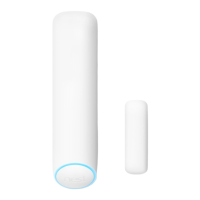
nest Detect - Features; Tamper detection

nest Detect
23 pages
Print Icon
To Next Page IconTo Next Page
To Previous Page IconTo Previous Page
Loading...
Features
Quiet Open
When
the
security
level is
set
to
Home
and Guarding, you can use Quiet Open
to
open a door
or
window
without
the
alarm going off.
Press
the
button
on
the
Nest
Detect
that
you
want
to
use. The
light
ring
will
turn
green, and you'll have
10
seconds
to
open
it.
Your
Detect
will
automatically
re-arm
when you close
the
door
or window.
You
can enable or disable Quiet Open
in
the
Nest
app's
Settings
menu.
Select
Security
the'l
Security
Levels.
Path
light
When you
walk
by
Nest
Detect
in
the
dark,
Path
light
turns
on
to
help
light
your way. Using Path
light
may decrease
Nest
Detect's
battery
life, so you can
change
the
brightness
or
turn
it
off
with
the
Nest
app.
Path
light
is
off
by
default.
You'll need
to
turn
it
on
with
the
Nest
app
in
Nest
Detect's
Settings
menu.
Dog Pass
If
you have a dog under
40
pounds
(18
kg),
you can turn on Reduced Motion Sensitivity
with
the
Nest
app
to
help
prevent
false
alarms
caused
by
your
dog. For more
information,
see page
9.
Tamper
de
tection
If
someone
tampers
with
Nest
Detect
and removes
it
from
the
backplate,
the
Nest
app
will
send you an
alert
to
let
you know.

Related product manuals