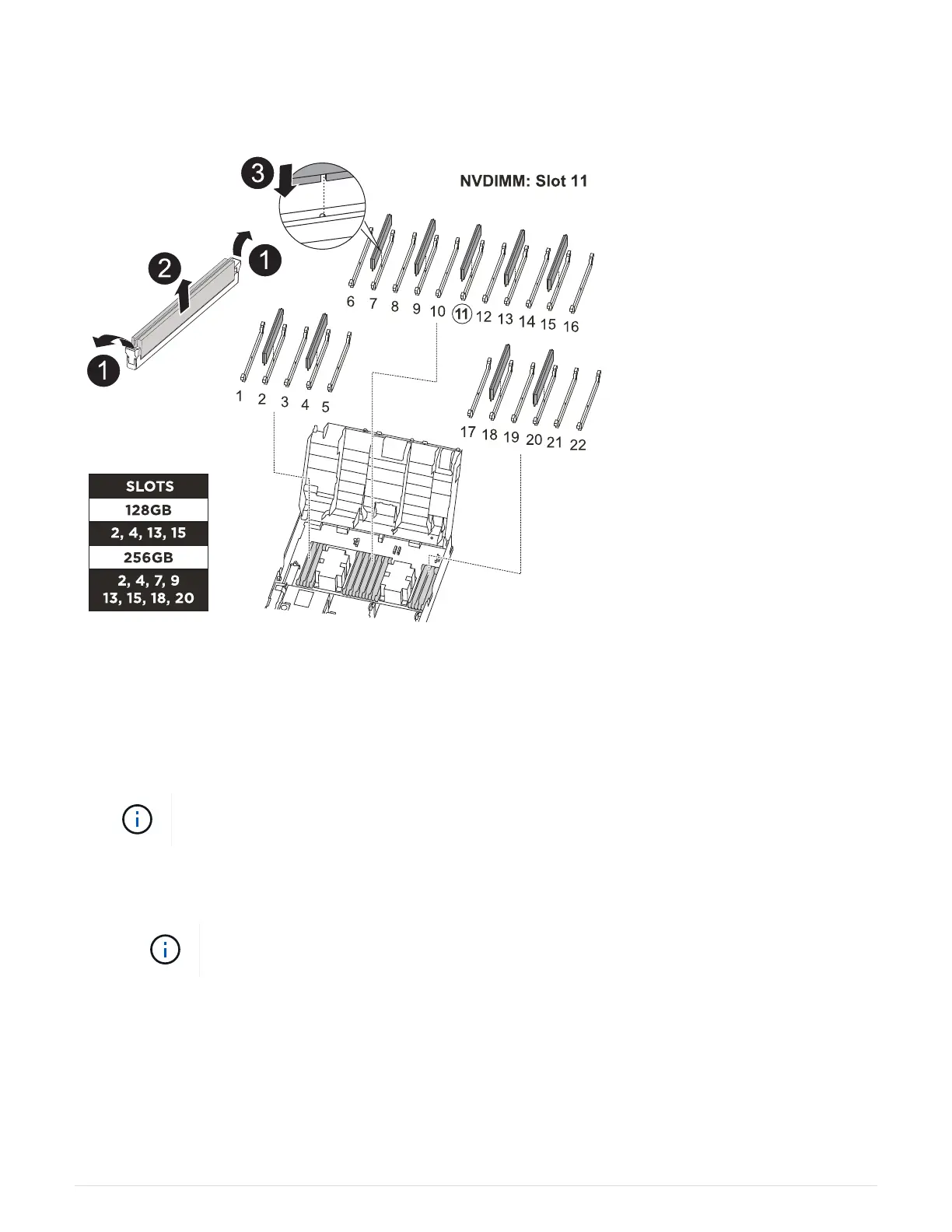
You can use the following animation, illustration, or the written steps to move the DIMMs from the impaired
controller module to the replacement controller module.
Animation - Move the DIMMs
1. Locate the DIMMs on your controller module.
2. Note the orientation of the DIMM in the socket so that you can insert the DIMM in the replacement
controller module in the proper orientation.
3. Verify that the NVDIMM battery is not plugged into the new controller module.
4. Move the DIMMs from the impaired controller module to the replacement controller module:
Make sure that you install the each DIMM into the same slot it occupied in the impaired
controller module.
a. Eject the DIMM from its slot by slowly pushing apart the DIMM ejector tabs on either side of the DIMM,
and then slide the DIMM out of the slot.
Carefully hold the DIMM by the edges to avoid pressure on the components on the
DIMM circuit board.
b. Locate the corresponding DIMM slot on the replacement controller module.
c. Make sure that the DIMM ejector tabs on the DIMM socket are in the open position, and then insert the
DIMM squarely into the socket.
The DIMMs fit tightly in the socket, but should go in easily. If not, realign the DIMM with the socket and
reinsert it.
50



 To Next Page