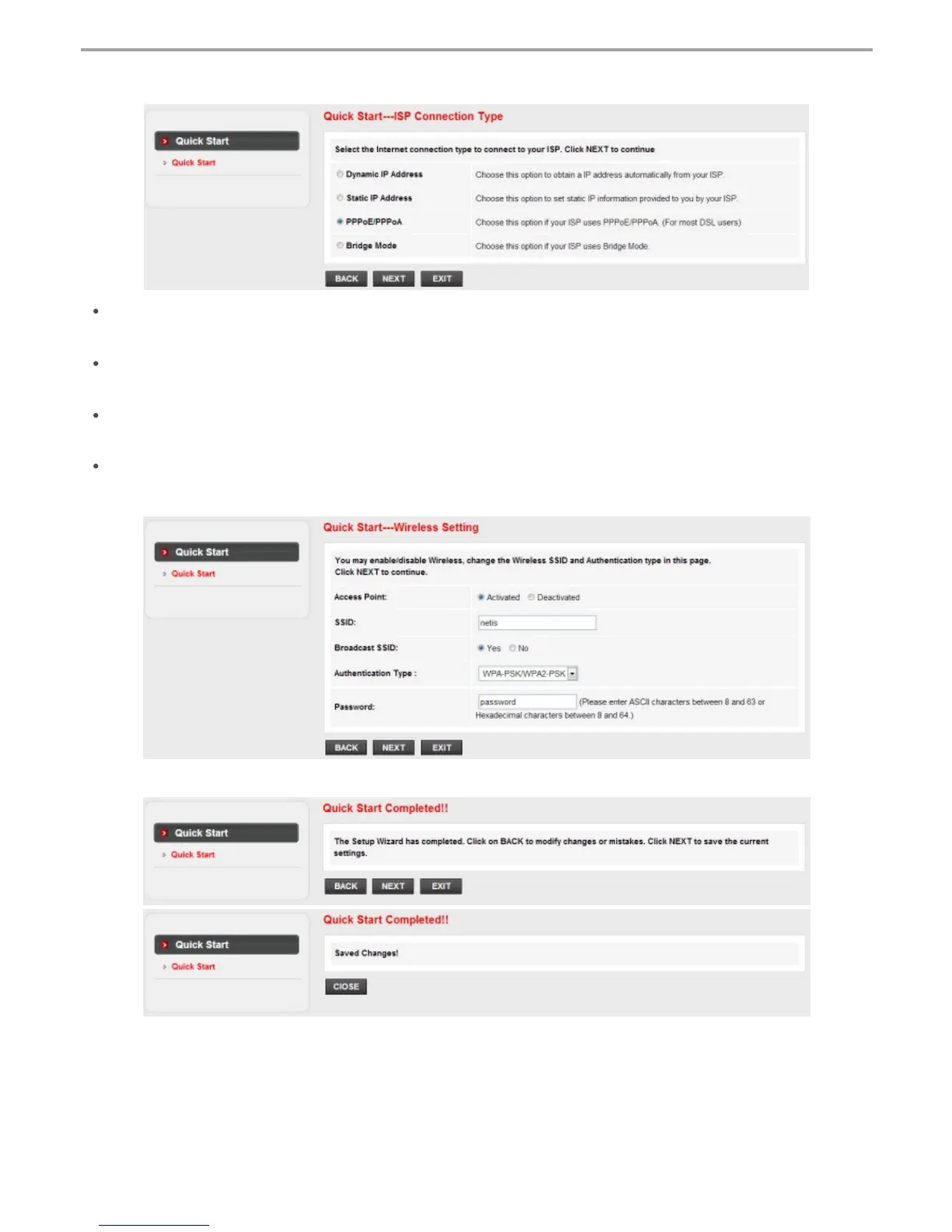
3) Configure your wireless network name (SSID) and password, and then left-click on “NEXT”.
4) Left-click on “NEXT” and then “CLOSE” to save the current settings. Quick Start will be finished.
2) Select the Internet Connection Type given by your ISP, then left-click on “NEXT”.
If “Dynamic IP Address” is selected, select the Connection Type defined by your
ISP and the router will automatically receive the IP parameters from your ISP.
If “Static IP Address” is selected, enter the IP Address/Subnet Mask/ISP
Gateway/DNS Servers/Connection Type given by your ISP.
If “PPPoE/PPPoA” is selected, input the Username/ Password and select the
Connection Type given by your ISP.
If “Bridge Mode” is selected, select the Connection Type defined by your ISP.
Tip 1:
Default IP address: 192.168.1.1 Default login username: guest
Default SSID: netis Default login password: guest
Default wireless password: password
4
netis Wireless N ADSL2+ Modem Router Quick Installation Guide
Tip 2:
After the basic Internet settings, you may open some popular websites to
check your Internet connection. If you cannot access the Internet, please
refer to the instructions in “Troubleshooting”.


 To Next Page
 Loading...